

Cold email infrastructure is the technical system that helps outbound email reach the inbox reliably. It includes domains, mailboxes, DNS authentication, warmup, and monitoring. For teams sending at scale, the critical question is not just how to set it up, but how to diagnose where delivery breaks, by provider, by domain, or by mailbox, before a campaign goes live.
Reply rates have also tightened as inbox filters have become stricter and low-quality outreach has increased. Benchmarks from in Woodpecker's cold email statistics benchmark show how much room there is between a message sent and a message that receives a response.
That changes the job for technical marketing teams. A sending stack should be treated like a system with separate failure points, since authentication can be correct while reputation is weak, or one mailbox can underperform while the rest of the domain looks healthy. The goal of this guide is to help you troubleshoot the stack layer by layer, so you can see whether the problem sits in the domain, the mailbox, the provider, or the signals that inboxes use to decide trust.
Understanding the Key Concepts
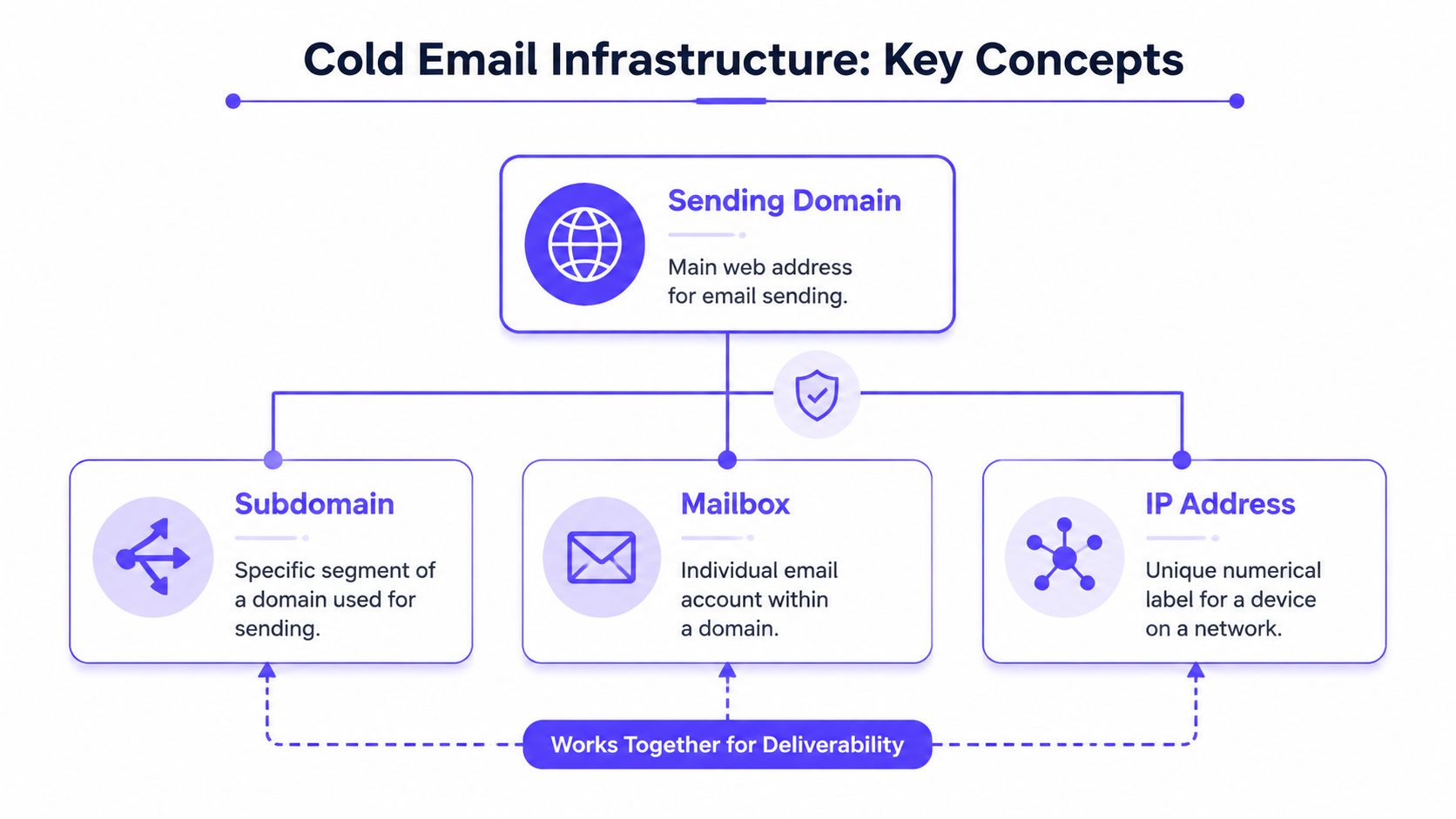
Cold email infrastructure works like a postal network. The domain is the business's return address, the mailboxes are the individual desks that receive and send, the DNS authentication records are the stamps and identity checks, and the monitoring system is the tracking layer that tells the sender where the mail lands.
A useful definition is simple. Cold email infrastructure is domains + mailboxes + IPs + DNS authentication + warmup + monitoring, forming a complete technical stack behind outbound deliverability as defined by Coldbirds. That framing matters because every part affects reputation, and reputation affects whether inbox providers trust the next message.
What each piece actually does
A sending domain gives the campaign its identity. A subdomain can isolate outreach from the main business domain, which keeps the core brand safer when sending patterns change.
A mailbox is the account that sends and receives. An IP address is the network identity attached to that traffic, which is why sender reputation isn't just about the campaign copy, it's also about the route the email travels through.
Practical rule: if one part of the stack looks healthy but another part is weak, inbox providers still judge the whole send path as a unit.
That's why teams get confused when they “set everything up” and still see poor placement. The setup may exist, but if the mailbox, domain, or authentication layer is immature, the system doesn't yet have enough trust to behave like a normal business sender.
Why the reputation engine matters
The shift in cold email infrastructure is that it no longer works like a volume lever. It works like a reputation engine. Each send either reinforces trust or adds friction for the next send, which is why monitoring has to be part of the architecture, not an afterthought.
That also explains why generic outreach setups break down fast. A stacked process, where domains, mailboxes, authentication, warmup, and monitoring all support each other, gives teams a better chance of staying visible in inboxes instead of drifting into spam.
Designing Sending Infrastructure
The first architecture decision is whether the team wants control or convenience. SMTP-based sending usually gives more direct control over the sending layer, while ESP-based sending leans toward managed simplicity and less infrastructure overhead.
| Criteria | SMTP | ESP |
|---|---|---|
| Control | More direct control over sending behavior | More managed and abstracted |
| Setup effort | Usually higher | Usually lower |
| Scalability | Can be strong with disciplined ops | Can be easier for standard workflows |
| Deliverability impact | Depends heavily on reputation and configuration | Depends on the provider's rules and shared environment |
For many teams, the deciding factor isn't feature depth. It's whether they can manage the operational discipline that cold outreach needs. If the team can monitor reputation, rotate inboxes, and keep volume steady, SMTP can fit well. If the team wants a simpler operating layer, an ESP may be easier to maintain.
The same logic applies to domains. Teams that use multiple aged domains and mailboxes see 95% deliverability for domains aged 90+ days compared with 73% for new domains under 30 days in the Reddit analysis of cold email sends. The takeaway is operational, not magical. Older infrastructure has earned more trust, while brand-new infrastructure starts from a weaker position.
Practical rule: the safest architecture is usually boring, isolated, and easy to replace.
That means the sending stack should separate the business's core identity from outbound testing, keep secondary domains distinct, and avoid building a setup that can't be retired cleanly if one part gets flagged. For teams comparing IP strategy, a deeper breakdown of dedicated vs shared IP deliverability helps clarify where control matters most.
A simple way to sketch the architecture is to map each domain to a small mailbox pool, then decide which sender profile belongs on which pool. That kind of mapping keeps the team from overloading one identity and gives operations a clear place to look when deliverability changes.
Implementing Authentication and Warmup Strategies
A clean message can still miss the inbox if the sending identity is weak. Authentication gives inbox providers a reason to trust the domain, mailbox, and sending path before the first campaign goes out.
The authentication stack
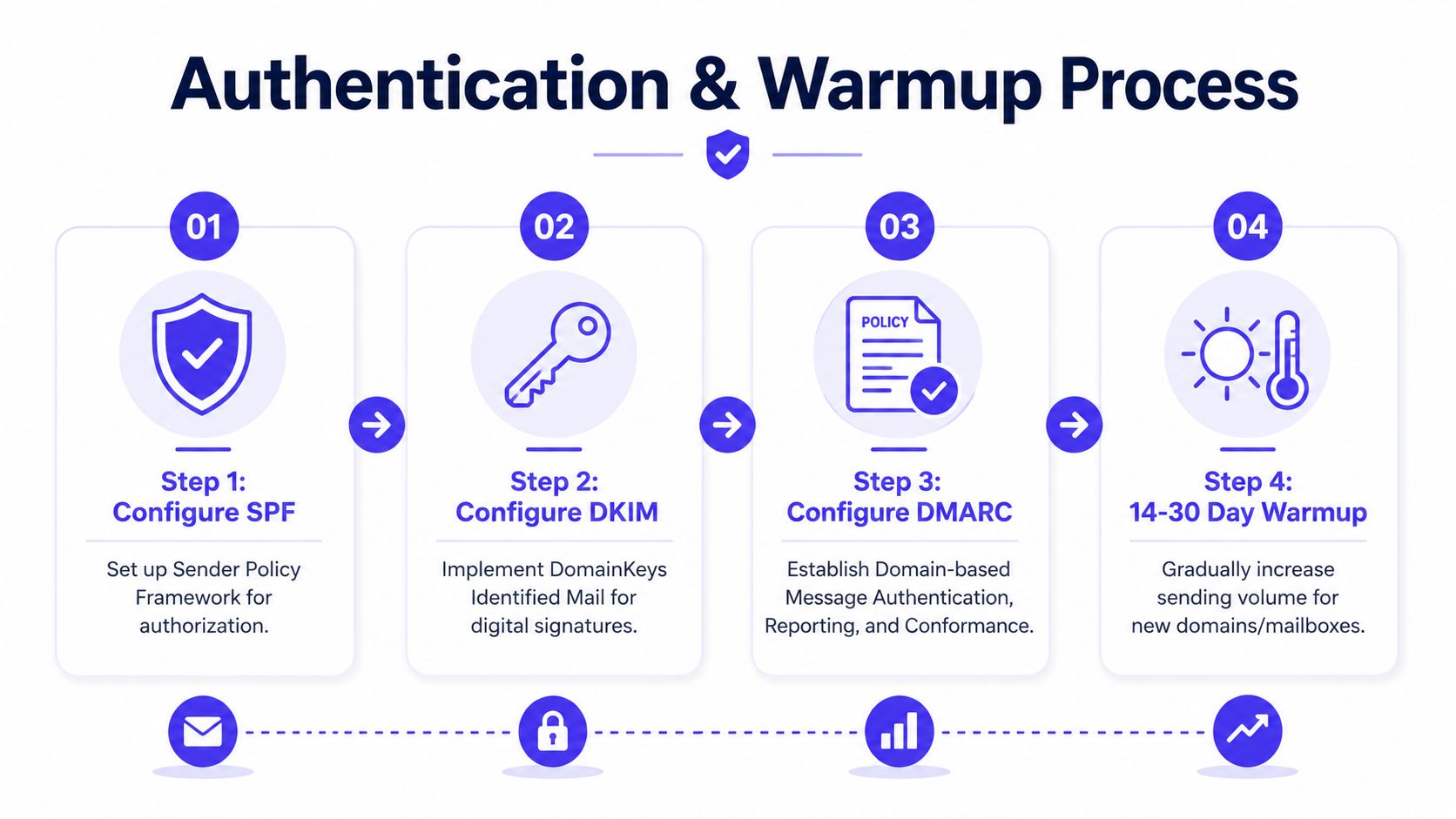
SPF tells providers which systems may send mail for the domain. DKIM adds a digital signature so the message can be checked for tampering. DMARC connects those checks to a policy, so providers know how to handle failures.
The order matters. SPF without DKIM leaves gaps, DKIM without DMARC leaves policy unclear, and a partial setup can make a domain look finished when it is not. A technical marketing team should verify all three records across every sending domain, then confirm that the live mailbox matches the authenticated domain.
For a closer technical walkthrough, the internal guide on email authentication helps teams validate records before they start outreach.
Warmup without rushing the clock
New domains and mailboxes need a ramp period before production sending. According to Mailflow Authority, that warmup period is commonly about 14 to 30 days. The point is to build a sending history that looks like normal business use, not a mailbox that goes from zero to outbound volume overnight.
A useful warmup plan usually follows a simple sequence:
- Start with low volume. The account should act like a normal inbox first, then a sender.
- Keep activity consistent. Regular sending behavior matters more than sharp bursts.
- Increase gradually. Fast jumps can make automation easier to spot.
- Watch authentication and placement signals. If the domain is authenticated but messages still miss the inbox, the issue may sit with reputation, list quality, or content.
Mailwarm fits here as a premium email warmup platform. It helps senders build reputation, monitor inbox placement, and improve deliverability through real inbox engagement, warmup controls, and expert guidance. It also does this without IMAP access, so the private inbox stays off-limits while engagement signals still build.
Why this stage is usually misunderstood
Many teams treat warmup like a launch task. The better frame is a bridge between setup and steady sending. If a mailbox is pushed too hard before it has a track record, the first campaign can look fine in the sending log while the inbox placement degrades.
That is where warmup becomes a diagnostic tool as well as a preparation step. When deliverability slips before launch, the team can sort the problem by provider, domain, or mailbox, then decide whether the failure comes from missing authentication, weak reputation, or an inbox that was asked to send too much too soon.
Scaling Domains IPs and Mailboxes
Once the core setup works, scaling becomes a discipline problem. More volume does not automatically mean more reach, because reputation builds at the domain and mailbox level, not just at the campaign level.
How disciplined scale usually looks
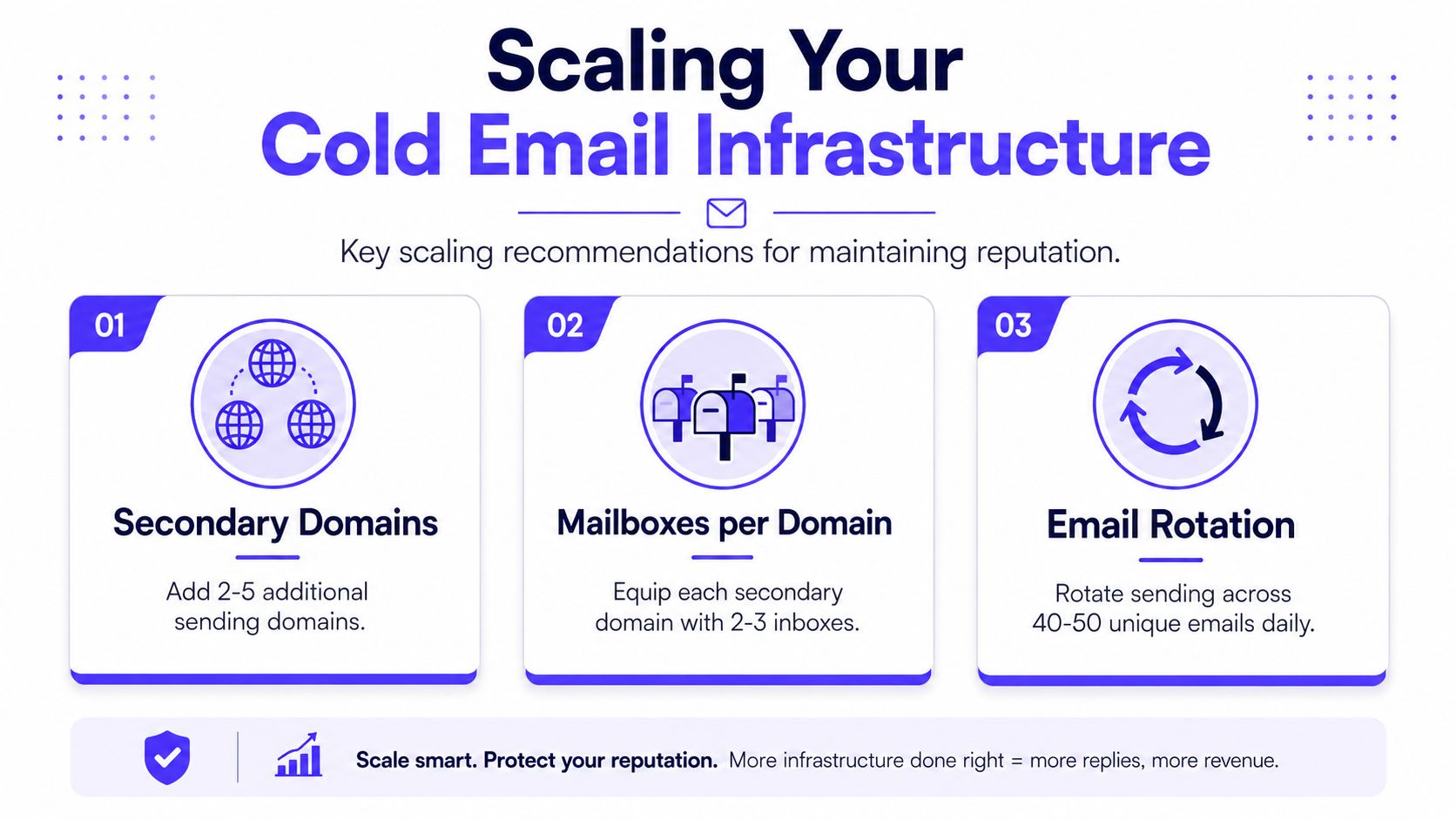
Advanced setups often use 2 to 5 alternate domains, 2 to 3 inboxes per domain, 2 to 4 weeks of warmup, and a sustained rate of 40 to 50 emails per inbox per day as described by Instantly. Those numbers matter because they show the shape of safe scale, not just the existence of scale.
A better way to read those ranges is as capacity planning. One inbox is a single lane on a highway, and one overloaded lane slows everything around it. Split the traffic across several lanes, and each one stays easier to monitor, replace, and slow down if it starts attracting noise.
The internal guide on mailbox rotation strategies helps teams build rotation into the workflow instead of treating it like an afterthought.
When to add more infrastructure
The right time to add domains or mailboxes is before the current pool starts to look strained. That means expanding while volume still feels comfortable, not after reputation has already started to slip.
A simple scaling checklist helps:
- Spread sending across pools. One mailbox should not carry the whole workload.
- Keep replacement ready. New infrastructure should already be warming while older infrastructure is still live.
- Retire damaged assets quickly. If a domain or mailbox begins to behave inconsistently, it is often safer to move traffic elsewhere than to force more volume through it.
- Use private infrastructure only when needed. Advanced setups may move to private servers and IPs when the sending volume justifies the added complexity as noted by Instantly.
A healthy scaling plan does not ask one inbox to behave like a fleet.
That is the main lesson. Growth should look like controlled distribution, not pressure on a single asset. When inboxes are rotated properly and domains are aged before use, the team gets more resilience and clearer troubleshooting when something shifts.
Monitoring Deliverability and Reputation Signals
A sending system can look sound on paper and still miss the inbox in practice. Monitoring has to track how mailbox providers respond in practice, not just whether messages were sent successfully.
What to watch first
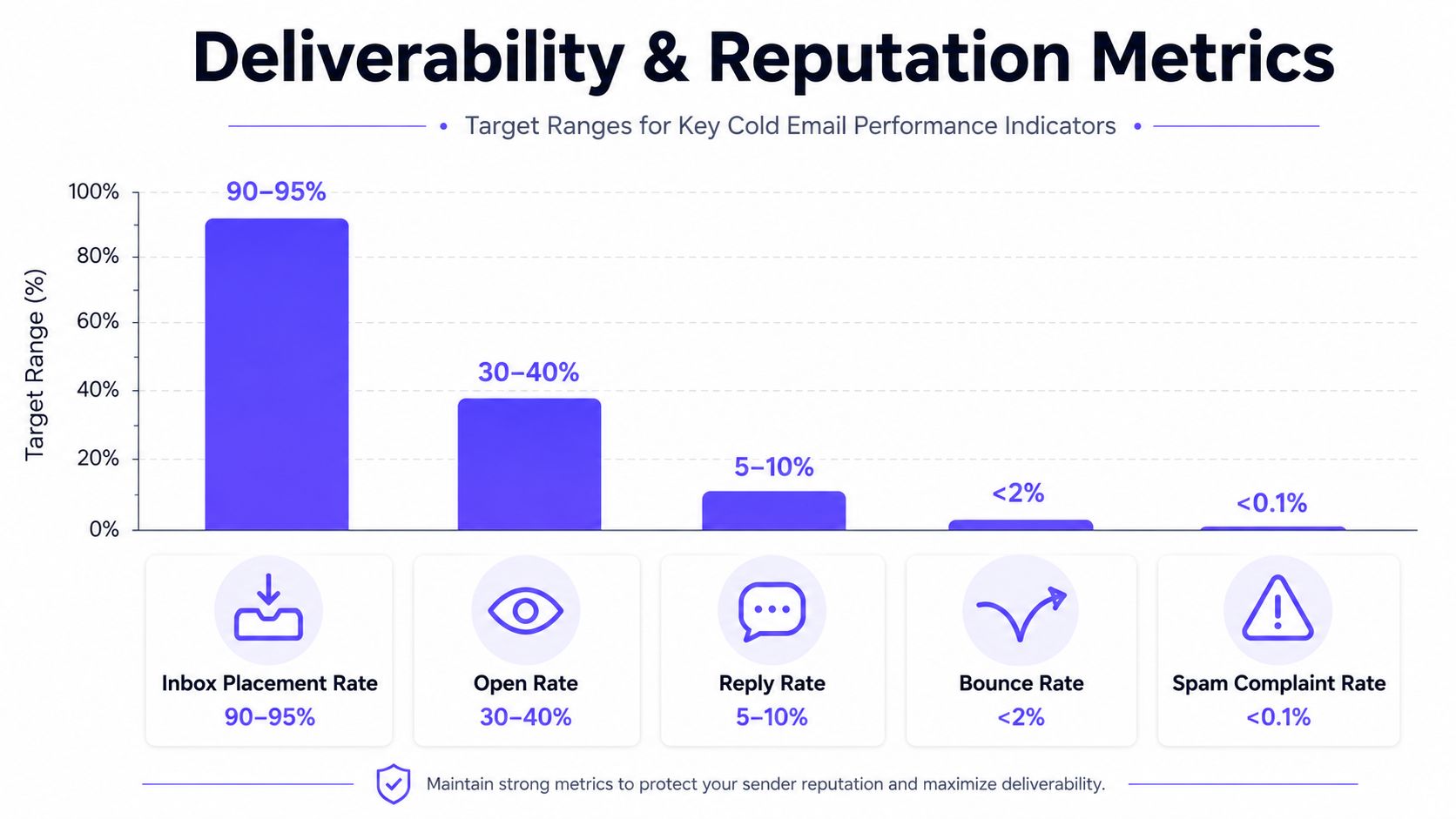
The first signals to watch are inbox placement, opens, replies, bounces, and complaint patterns. The reply rate has softened in recent benchmark reporting, which is a reminder that teams need active monitoring instead of passive reporting in Woodpecker's benchmark summary.
The goal is not to chase one vanity metric. It is to catch drift early enough to identify whether the problem sits with the provider, the domain, the mailbox, or the content pattern.
A Diagnostic Framework for Deliverability Drops
Treat a deliverability drop like a troubleshooting path, not a single alert. Start with the narrowest layer first, then widen the scope only when the pattern says to.
Step 1 is mailbox-level analysis. If one mailbox weakens while others stay stable, that usually points to sender-specific reputation, poor engagement history, or a mailbox that has started to attract more filtering.
Step 2 is domain-level analysis. If every mailbox on the same domain declines at once, the issue is broader and the domain itself needs attention. That may mean reputation has slipped, authentication is being treated inconsistently, or the domain is carrying too much strain.
Step 3 is provider-level analysis. Gmail, Outlook, and Microsoft 365 do not always react the same way, so a healthy result in one provider does not clear the rest of the stack. If the drop appears only on one provider, the problem is likely localized there rather than systemic.
Step 4 is message-pattern analysis. If the decline appears only with one subject line style, one call to action, or one body pattern, the content itself is likely triggering the issue.
A practical monitoring dashboard should include:
- Inbox placement by domain. This shows whether one sending identity is drifting.
- Reply behavior by mailbox. This makes mailbox-specific issues easier to spot.
- Bounce and complaint trends. These often reveal list problems before the campaign is visibly broken.
- Provider-level differences. Gmail, Outlook, and Microsoft 365 can react differently, so a healthy result in one place does not prove the whole stack is healthy.
If placement falls on one provider first, the problem may be localized rather than systemic.
Tools with inbox placement insights, spam score monitoring, and deliverability analytics help teams connect those signals faster. Mailwarm offers those controls as part of a broader warmup and reputation workflow, which helps teams see whether the infrastructure is holding up under real sending conditions.
For teams that also need a privacy reference point, details on user data privacy can help when reviewing how outbound systems handle sensitive account information.
Security Privacy and Best Operational Practices
Security matters because the sender stack often sits close to real business identity. The safer the setup, the easier it is to protect the core domain, private inboxes, and reputation data from avoidable risk.

Keep access narrow
One of the simplest safety rules is to avoid unnecessary mailbox access. Mailwarm does not require IMAP access or permission to read a private inbox, which matters for teams that want warmup and deliverability support without handing over sensitive email content.
That privacy posture pairs well with other operational controls. Prospeo recommends secondary domains only, SPF with a hard-fail –all policy, 2048-bit DKIM keys rotated annually, DMARC staged from p=none to quarantine to reject, 14 to 21 days of warmup, and verifying every address to keep bounce rates under 1% in its cold email workflow guidance. Those are configuration choices, but they're also risk controls.
For teams that want a broader privacy reference point, CargoReach's user data privacy details are a helpful companion when evaluating how outbound systems handle sensitive information.
Build operations that protect reputation
Security isn't just about who can access the inbox. It's also about how the system behaves under pressure. Over-permissioned tools, sloppy list hygiene, and unchecked authentication drift can all create reputation damage faster than most copy issues.
A practical operating standard looks like this:
- Limit third-party access. Only connect tools that the workflow needs.
- Verify every list before send. Bad data creates preventable bounces.
- Rotate policies carefully. DMARC changes should move in stages, not in a blind switch.
- Watch provider-specific failures. A problem with one provider can hide behind healthy results elsewhere.
Mailwarm's authentication fix tools and expert deliverability calls fit here as operational support, not as a shortcut. They help teams inspect the sending setup, monitor reputation risks, and correct issues without turning the inbox into shared infrastructure.
Cold email infrastructure works best when it's treated as a system the team can explain, inspect, and replace. Teams that separate identity, authenticate correctly, warm patiently, rotate cleanly, and monitor reputation early are in a much better position to keep campaigns reaching real inboxes.
If email is part of the growth plan, Mailwarm helps teams build sender reputation, monitor inbox placement, and reduce spam risk with real inbox engagement, advanced warmup controls, and expert guidance. Visit Mailwarm to review how its premium warmup and deliverability platform fits into a cold email infrastructure that needs more than basic automation.
FAQ
What is cold email infrastructure?
Cold email infrastructure is the technical setup behind outbound sending. It includes domains, mailboxes, IPs, DNS authentication, warmup, and monitoring, all working together to support deliverability.
How long does email warmup take?
Industry guidance commonly points to 14 to 30 days for new domains and mailboxes before production outreach. The exact timing depends on how new the assets are and how consistently they're used.
Does email warmup improve inbox placement?
Yes, warmup helps build baseline reputation and engagement signals before a real campaign starts. It does not replace good list hygiene or authentication, but it does make the sending environment less likely to look suspicious.
Is email warmup enough to fix deliverability?
No, warmup alone is not enough. Deliverability also depends on authentication, list quality, sending behavior, domain age, and provider-specific reputation. A mailbox can be warmed correctly and still underperform if one of those parts is weak.
Why do emails go to spam?
Emails go to spam when providers do not trust the sender, the list is weak, the content looks risky, or the sending pattern seems unnatural. A single weak part of the stack can hurt inbox placement even if the rest looks fine. One bad mailbox can be enough to signal risk, while another mailbox on the same domain may still perform well if the provider treats it differently.
How does Mailwarm help improve sender reputation?
Mailwarm helps with real inbox engagement, inbox placement insights, spam score monitoring, authentication fix tools, and expert deliverability guidance. It is built for teams that want more than automated warmup activity. That matters when you are diagnosing whether a failure sits with a provider, a domain, or a mailbox before a campaign goes live.
Why is Mailwarm more expensive than basic warmup tools?
Mailwarm costs more because it combines real inbox engagement, up to 100% replies to warmup emails depending on the plan, spam score monitoring, provider-level warmup, authentication tools, no IMAP access required, and expert deliverability calls included in every plan.
Does Mailwarm need access to my inbox?
No, Mailwarm does not require IMAP access or permission to read a private inbox. That makes it a more privacy-conscious option for teams that want warmup without broad mailbox access.