
Email Ending Fundamentals: Shaping a Professional Tone and Guiding Next Steps
Your closing is more than a sign-off, it sets expectations, signals respect, and guides what happens next. The right ending demonstrates professionalism, reduces friction, and speeds up responses, while a sloppy one may sow doubt and slow progress.
Think of the closing as a bridge connecting your message to a specific action. It needs to confirm your intent, reflect courtesy, and leave nothing unresolved. Aim for brevity, clarity, and a human touch.
How to Choose a Professional Email Sign-Off that Matches Your Message
Select your sign-off based on the relationship, context, and level of formality needed. Formal exchanges require steady, neutral language, while friendlier correspondence allows for warmth, just avoid slang.
Reliable Choices for Most Business Emails
- Best regards, for a neutral, courteous, and widely accepted closing.
- Regards, a shorter variant that remains professional.
- Sincerely, best for formal situations like proposals or legal matters.
- Thank you, ideal when acknowledging someone’s efforts or upcoming help.
- Respectfully, appropriate when addressing senior stakeholders.
Use with Care
- Thanks in advance, may seem presumptive, add context if you choose it.
- Cheers, suitable in some cultures but too casual in others.
Structuring a Closing Paragraph for Clarity
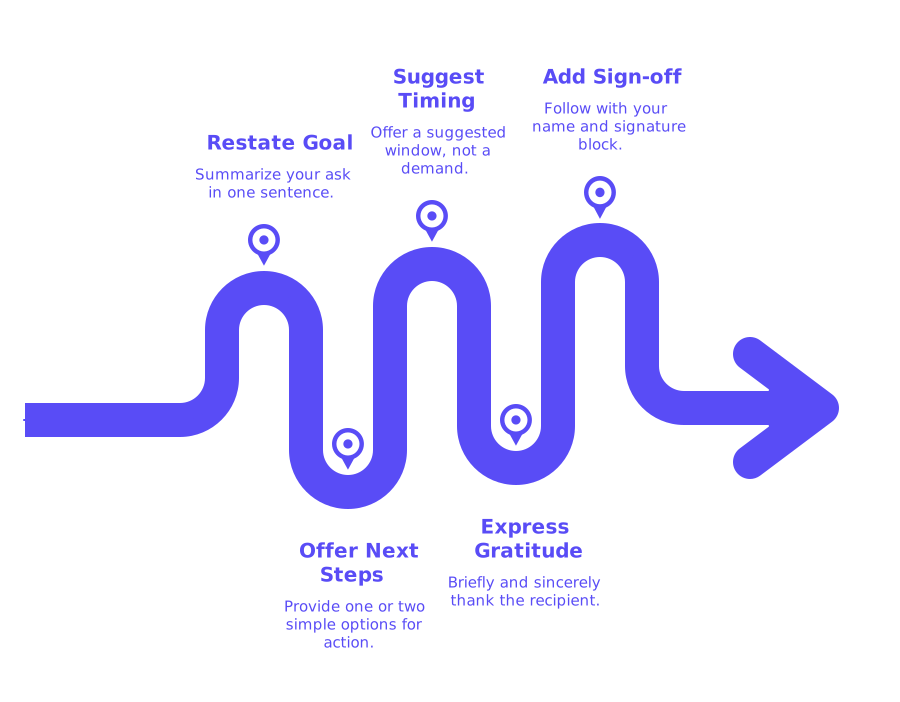
- Restate your goal: Summarize your ask in one sentence.
- Offer a clear next step: Provide one, or at most two, simple options.
- Suggest timing: Offer a suggested window, not a demand.
- Express gratitude: Briefly and sincerely, avoid excessive praise.
- Add your sign-off: Follow with your name and signature block.
Limit links and attachments at the end. Too many extras can slow decisions. If needed, mention you’ll follow up with additional details.
Professional Email Signature Elements that Reinforce Credibility
Your signature confirms your identity and streamlines communication. It should be tidy, consistent, and easily readable within a few seconds.
- Full name and job title.
- Company name and website.
- Work phone number (include country code).
- Location or time zone if it’s relevant.
- One professional profile link if appropriate.
- Legal or compliance lines only when necessary.
Use an email signature generator to create a neat, uniform signature block. Avoid images that inflate file sizes, stick to standard fonts, and always check mobile readability.
Deliverability-Aware Endings to Avoid Spam Filters
Your closing can still trip filters if it looks pushy or vague. To avoid this, use plain language, avoid hype, all caps, and urgent clichés.
- Limit links in your signature to only what’s necessary.
- Avoid using link shorteners in your closing lines.
- Don’t insert tracking pixels in the footer.
- Send from an authenticated, consistently used domain.
If inbox placement worries you, review these cold email inbox placement benchmarks and best practices. If you encounter unexpected bounces, examine why emails get bounced and the updated delivery rules. Run your message through a reliable spam checker before large-scale sending.
Follow-Up Email Endings that Prompt Replies, Without Pressure
Follow-up emails should feel helpful and courteous, not demanding. Value the recipient’s time and keep the next steps easy.
- Reference your prior email in a single sentence.
- Offer one clear action or a yes/no decision.
- Suggest a soft timeframe, not an ultimatum.
- End with genuine thanks and your sign-off.
See more in this guide on how to follow up on a cold email without appearing pushy. Match your approach to the advice there: concise, friendly, and respectful.
Copy-and-Paste Closing Lines for Common Professional Email Situations
When Proposing a Quick Call
Happy to share more details. Would a 10-minute call this week work for you?
If useful, I can send a brief agenda by Thursday.
When Requesting a Decision
Does Option A or Option B suit your schedule better?
If neither fits, I can suggest another plan tomorrow.
When Handing Off a Thread
I’m looping in Maria, who now owns this process. She will advise on next steps.
Thank you for your patience as we transition this item.
When Expressing Thanks
Thank you for reviewing the draft. Your feedback was clear and helpful.
I appreciate your time and consideration.
When Scheduling a Follow-Up
I’ll circle back on Friday with the final file and a summary.
Please let me know if you prefer a different date.
When Correcting a Mistake
Apologies for the earlier mistake. Here’s the corrected version.
Thank you for catching this so quickly.
Pair these lines with a steady, professional sign-off. Keep the tone aligned with your email’s opening.
Warming Up New Senders to Ensure Your Email Endings Get Seen
Even the best closing lines matter only if your emails reach the inbox. For new or dormant domains, warm-up activity is essential to build trust with providers over time. This means relying on gradual, natural email interactions, not just sending mass marketing blasts.
Mailwarm supports this process by generating genuine inbox activity through a curated network. Your emails are interacted with by over 50,000 active mailboxes, opened, replied to, pulled from spam, and tagged as “primary”, boosting your sender reputation for outreach, sales, and marketing teams.
In February 2026, Mailwarm evolved into a comprehensive email warm-up platform, with centralized multi-account management, advanced reputation monitoring, support for multiple email providers, and detailed spam score tracking across services like Gmail, Microsoft, and Yahoo. This makes it ideal for organizations scaling outreach and needing reliable inbox placement.
Remember: This is not a marketing tool, but a technical process to prepare your domain for real conversations. If deliverability issues persist, revisit your authentication settings and domain reputation. Details like the HELO banner and SPF records still matter. Deepen your knowledge with their inbox placement benchmarks and best practices and the latest explanation of updated bounce reasons.
Compliance and Clarity Statements for the End of Your Email
Add compliance lines only if your company or industry requires them. Keep these statements brief and direct. Lengthy legalese can distract recipients; if detailed policies are necessary, link to those pages instead of pasting long blocks in your signature.
When emailing internationally, check for local rules. Some industries need disclaimers or address lines, place them below your main signature. Keep any call to action easy to find above these notes.
Practical Checklist for Closing a Professional Email the Right Way
- State your ask in one line.
- Suggest one straightforward next step.
- Offer a loose timeframe.
- Express genuine thanks.
- Select a professional sign-off.
- Use a tidy, consistent signature block.
- Test an email sample in a spam checker.
- Warm up new domains ahead of large outreach.
Close with Confidence and Keep Your Conversations Moving Forward
Strong closings make decisions easier and move conversations ahead. Use the templates above, favor plain language, and check deliverability early. Start refining your closing today and send your next professional email with quiet confidence.
FAQ
Why is the email closing so important in professional communication?
An effective email closing can drive swift responses and reduce misunderstandings, while a weak one can stall progress and raise doubts. It bridges your message to actionable steps, making it crucial for maintaining momentum and clarity.
What are common pitfalls when choosing an email sign-off?
Avoid casual or presumptive sign-offs like 'Cheers' or 'Thanks in advance' without proper context, as they can be perceived as unprofessional or overly assuming. The wrong tone can erode credibility and hinder the intended outcome of your email.
How can using too many links or attachments affect my email?
Excessively using links or attachments can trigger spam filters and make your email look unprofessional. Limit extras to ensure your message is straightforward and maintains focus.
How does Mailwarm help improve email deliverability?
Mailwarm aids by gradually increasing a domain's reputation through authentic email interactions, preventing your messages from landing in spam folders. It builds trust over time, making it a technical necessity for inbox placement success.
What should be included in a professional email signature?
A professional signature should concisely feature your full name, job title, company details, and contact information. Steer clear of heavy elements like images to maintain readability and quick comprehension.
Can a poorly structured email closing affect deliverability?
Yes, improper closing language can trigger spam filters, particularly if it includes hype or vague expressions. Ensuring clean, plain language in endings helps avoid the spam trap.
Why is it critical to warm up new domains or email addresses?
Without warm-up, new domains risk low sender reputation and higher chances of emails landing in spam. A disciplined warm-up process signals authenticity and builds trust with email providers.
What is the best way to ask for a quick call in an email?
Propose a brief, specified time for a call to reduce indecision and streamline responses. This direct approach respects the recipient’s time while facilitating planning.
How important is cultural awareness in choosing an email sign-off?
Cultural nuances significantly impact how email sign-offs are perceived; what’s suitable in one context may be too casual in another. Awareness prevents misinterpretation and maintains professionalism across borders.
Are long compliance statements necessary in email signatures?
Only if legally required; lengthy legalese can distract and dilute your message’s impact. When needed, link to full policies rather than including them fully in your signature to keep focus sharp and professional.