
Role accounts, aliases, and disposable emails create real deliverability risk
Not every email address deserves a send. Some contacts threaten sender reputation and waste outreach cycles. Three groups stand out: role accounts, aliases, and disposable emails.
Role accounts route messages to teams or systems. Think info@, support@, sales@, or hr@. These addresses often feed ticketing tools, have many recipients, and rarely engage. Low engagement and automated complaints can flag your domain.
Aliases are alternate addresses that deliver to a primary mailbox. They often include plus-addressing (for example, jane+newsletter@company.com) or sit behind forwarding rules and catch‑alls. Messages to these addresses may be filtered, auto-labeled, or archived on arrival, so the intended recipient may never actually see them. Long forwarding chains can also break authentication alignment and hide true engagement.
Disposable emails come from temporary domains. They exist for minutes, then vanish. Messages hard bounce, hurt list quality, and can trip filters that watch for throwaway domains.
If you would not email it manually, purge it automatically.
How to identify role accounts, aliases, and disposable emails with practical patterns
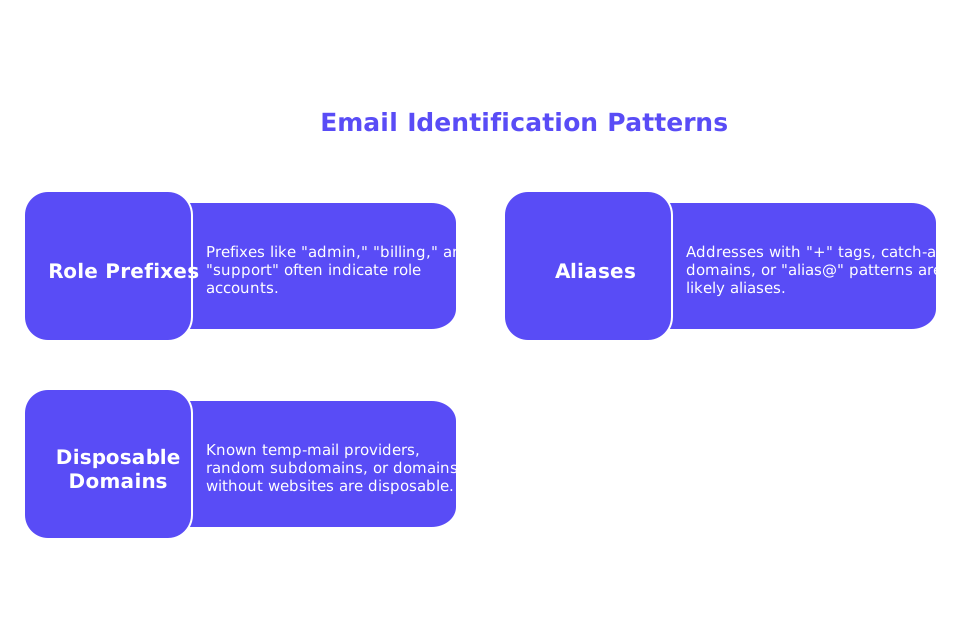
Start with names. Certain prefixes nearly always signal a role. Build rules, then refine them with data.
- Role prefixes: admin, billing, contact, enquiries, finance, hello, hr, info, legal, marketing, no-reply, office, press, privacy, sales, security, support, team.
- Aliases: addresses with
+tags, domains that use catch‑alls, or obvious alias@ patterns. - Disposable domains: known temp‑mail providers, random‑looking subdomains, or domains with no website.
Watch for signals inside your CRM. If a contact never opens anything across months, treat similar patterns cautiously. Engagement history helps calibrate filters without guesswork.
Workflow to clean risky contacts before you send an email
Follow a repeatable, auditable process. Keep it simple, but thorough.
- Normalize and deduplicate. Lowercase local parts. Trim whitespace. Remove duplicates by email+domain.
- Syntax validation. Reject malformed addresses immediately. An email checker automates this step.
- Role detection. Match against your role‑prefix dictionary. Flag these contacts as high risk.
- Alias detection. Identify plus‑addressing and known forwarding patterns. Mark as medium risk.
- Disposable domain screening. Compare domains against a maintained disposable list. Quarantine matches.
- DNS and MX lookups. Confirm the domain accepts mail. Missing or broken MX means a hard bounce later.
- SMTP mailbox checks. Where permitted, verify deliverability at the mailbox level.
- Reputation safeguards. Run your sending IPs and domains through a blacklist checker. Clean issues before outreach.
- Preflight content test. Send a seed to a spam checker to catch trigger issues in headers and setup.
- Risk scoring and suppression. Suppress high risk. Hold medium risk for manual review.
Document each step. Your team should reproduce results on any list. Consistency keeps your domain safe during scale.
Suppression rules that protect reputation without deleting good prospects
Not every flagged address deserves deletion. Some require careful handling.
- Suppress disposable domains, no-reply@, and broken MX. These harm fast.
- Quarantine role accounts. Ask your champion for a named contact instead.
- Review aliases if the domain is strategic. Try to identify the owner first.
Record the reasons why each contact was either suppressed or quarantined. That record helps sales, compliance, and operations stay aligned.
Smart exceptions and human review for edge cases
Some role addresses belong to tiny teams that read every email. Others gate procurement. A blanket delete can remove real buyers.
Apply exceptions only with proof:
- Confirm ownership in a call or on LinkedIn.
- Ask your champion for the direct address.
- Search the site for a team page with names.
- Send one short confirmation email from a human, not a sequence.
If you get a friendly response, replace the role address with the person’s mailbox. Update your CRM to stop future role captures.
Technical guardrails that reinforce contact hygiene and email reputation
The quality of your mailing list is strongest when paired with a robust technical setup, properly configured mail servers, continuous monitoring of delivery and bounce codes, authentication alignment, and routine data clean‑ups. Make sure these fundamentals are in place before any campaign is rolled out.
- SPF, DKIM, DMARC. Publish, align, and monitor them across each domain.
- HELO/EHLO greeting. Use a consistent, valid hostname. Learn how the HELO/EHLO greeting influences sender reputation.
- Bounce management. Track codes and remediate quickly. See why bounce handling changed under 2026 delivery rules.
- Seed testing and placement. Compare inbox, spam, and other folders against cold‑email inbox placement benchmarks and best practices.
Technical health and list hygiene support each other. Together, they reduce complaints and keep deliverability steady.
Where email warm-up fits in the contact-cleaning process
Clean lists help, but a domain that has not previously engaged in email activity, often called a cold domain, still needs gradual, positive activity. That is the job of email warm‑up. Warm‑up simulates natural interactions like opens, safe replies, and spam recovery. The goal is a healthy sender reputation before any campaign starts.
For example, platforms like Mailwarm have evolved significantly, and as of February 2026, Mailwarm has become a fully advanced deliverability infrastructure platform. The system now includes:
- Centralized multi‑account and multi‑domain management
- Cross‑provider warm‑up with intelligent distribution
- Real‑time deliverability and sender reputation monitoring
- Spam score analysis per provider (Gmail, Outlook, etc.)
- Engagement with natural thread replies
- Automatic spam recovery and inbox placement correction
- Gradual ramp‑up algorithms with adaptive volume control
- Continuous blacklist detection and reputation protection
- Full authentication diagnostics (SPF, DKIM, DMARC, MX)
- Performance analytics built for agencies and large‑scale outreach teams
The system interacts across a network of more than fifty thousand actively maintained inboxes, designed to mirror real mailbox behavior. This is not a traditional email marketing tool. The emails serve a technical purpose: creating safe, positive signals that prepare your domain for real outreach.
A clear policy you can deploy across sales and marketing today
Write a short policy that everyone can follow. Keep it visible in your CRM and playbooks.
- Reject disposable and broken‑MX domains by default.
- Quarantine role accounts and request a named contact.
- Review aliases only with a business case.
- Verify syntax and mailbox status with an email checker.
- Preflight sending domains with a blacklist checker and spam checker.
- Warm new domains and new IPs before the first campaign.
Revisit the policy each quarter. Add new disposable domains, refine role patterns, and update risk scores with live results.
Putting it all together before your next send
Start with a contact pass. Remove disposables. Quarantine roles. Verify mailboxes. Confirm authentication. Seed‑test your setup. Then warm the domain. Only then ship the first outreach batch.
This sequence protects reputation, reduces bounces, and keeps your pipeline clean. Your team gains consistency. Your domain keeps trust.
Ready to clean risky contacts and send with confidence? Put the workflow above in place, run a short warm‑up, and review seed results. If you want a second set of eyes, reach out and we will help you choose the right checks and safeguards for your stack.
FAQ
What is the risk of sending emails to role accounts?
Role accounts often receive messages that aren't read by motivated individuals, leading to low engagement. These addresses can trigger automated complaints and damage your sender reputation.
Why should I avoid using aliases in email campaigns?
Aliases can filter or archive messages automatically, preventing them from reaching the intended audience. Long forwarding chains can also complicate engagement tracking, masking the actual impact of your emails.
How do disposable email addresses affect deliverability?
Disposable emails often result in hard bounces as they are temporary and vanish quickly. This impacts your email list quality, increases bounce rates, and can lead email systems to flag your domain as a spam risk.
How does Mailwarm help in maintaining email deliverability?
Mailwarm simulates positive email interactions, such as openings and safe replies, to nurture your sender reputation. Its comprehensive monitoring tools help identify and rectify deliverability issues before they impact campaigns.
Why is email warm-up crucial for a cold domain?
Email warm-up gradually introduces email activity to build a trustworthy sender profile. Without this, cold domains may struggle with deliverability, as automated systems could incorrectly classify their emails as spam.
What role does technical setup play in email deliverability?
Properly configured technical elements like SPF, DKIM, and DMARC are foundational to email deliverability, ensuring your domain is authenticated and trusted. Mailwarm can assist in this technical alignment to protect sender reputation.
Can suppression rules affect my ability to reach potential leads?
While suppression rules protect sender reputation by avoiding risky contacts, they must be applied carefully to not discard genuine leads. A human review process for flagged addresses can mitigate this risk effectively.
How can I identify risky email contacts before sending a campaign?
Implement a rigorous contact cleaning workflow involving normalization, syntax validation, and DNS checks. This systematic approach, enhanced by Mailwarm's capabilities, minimizes the risk of deliverability issues from poor-quality contacts.
What is the importance of seed testing in email campaigns?
Seed testing helps uncover where your emails are landing—whether in inbox, spam, or other folders—before a campaign rollout. This ensures email deliverability issues are addressed proactively, with insights from platforms like Mailwarm.