

A catch all email is a domain-level configuration where the mail server accepts messages for any address at the domain, including mailboxes that don't exist. In a dataset covering 4,687,209 work-email verifications across 1,460,664 company domains, 31.90% of individual addresses and 26.49% of domains received a catch-all classification, so verification should return “undetermined” rather than “valid” for these addresses.
That distinction matters to anyone running prospecting, recruiting, marketing, or customer outreach. Catch-all domains can contain real, reachable contacts, but they can also accept guessed addresses that lead nowhere. Deleting every catch-all can kill pipeline, while sending to all of them can damage list quality and sender reputation.
What Is a Catch All Email
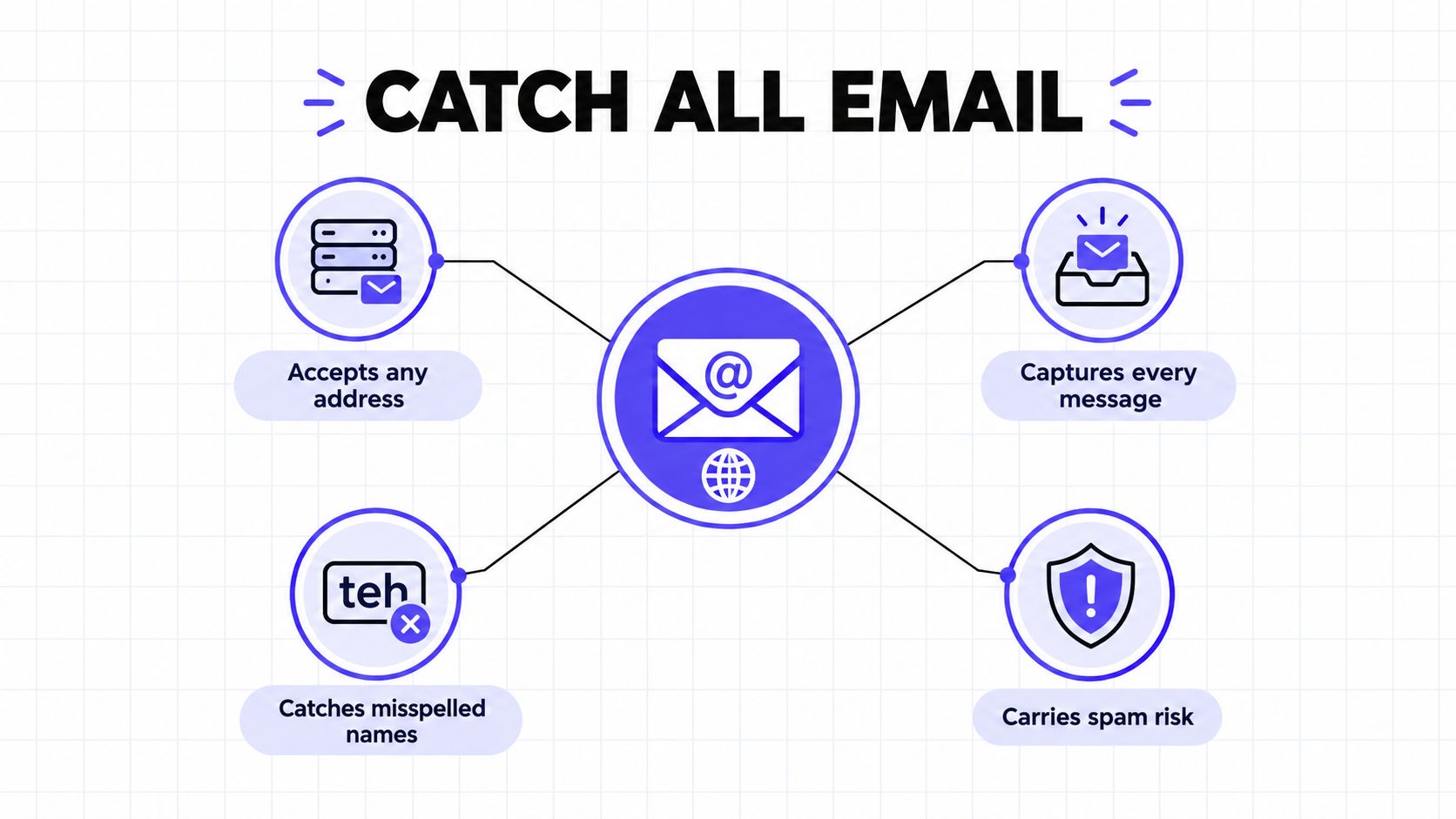
A catch all email setup, also called an accept-all configuration, tells a receiving mail server to accept messages sent to any address under a domain. The address might belong to a real mailbox, a shared destination, a forwarding rule, or no mailbox at all.
The rule applies to the domain, not to a specific person. That means a verification system can identify how the domain behaves, but it can't conclusively prove that person@company.com exists or that anyone monitors it.
This is why catch-all results appear frequently during B2B list building. A verifier may test a domain with a deliberately fabricated address. If the server accepts that address, the system identifies the domain as catch-all, but it can't distinguish the fabricated address from the intended prospect through SMTP alone.
The practical interpretation is simple:
- Catch-all doesn't mean invalid: A real prospect may still use the address.
- Catch-all doesn't mean valid: Server acceptance isn't proof of a usable mailbox.
- Catch-all means uncertain: The sender needs more evidence before scaling outreach.
That uncertainty creates a business decision, not just a technical label. A current role, a credible company-domain pattern, recent professional activity, or previous engagement can justify a cautious test. A guessed address with no supporting evidence usually belongs in suppression or review.
How Catch-All Domains Work at the SMTP Level
A catch-all domain works like a building front desk that signs for every package. The receptionist accepts a parcel addressed to an employee, a former employee, or a person who never worked there. Acceptance confirms that the building received the package, not that the named person is inside.
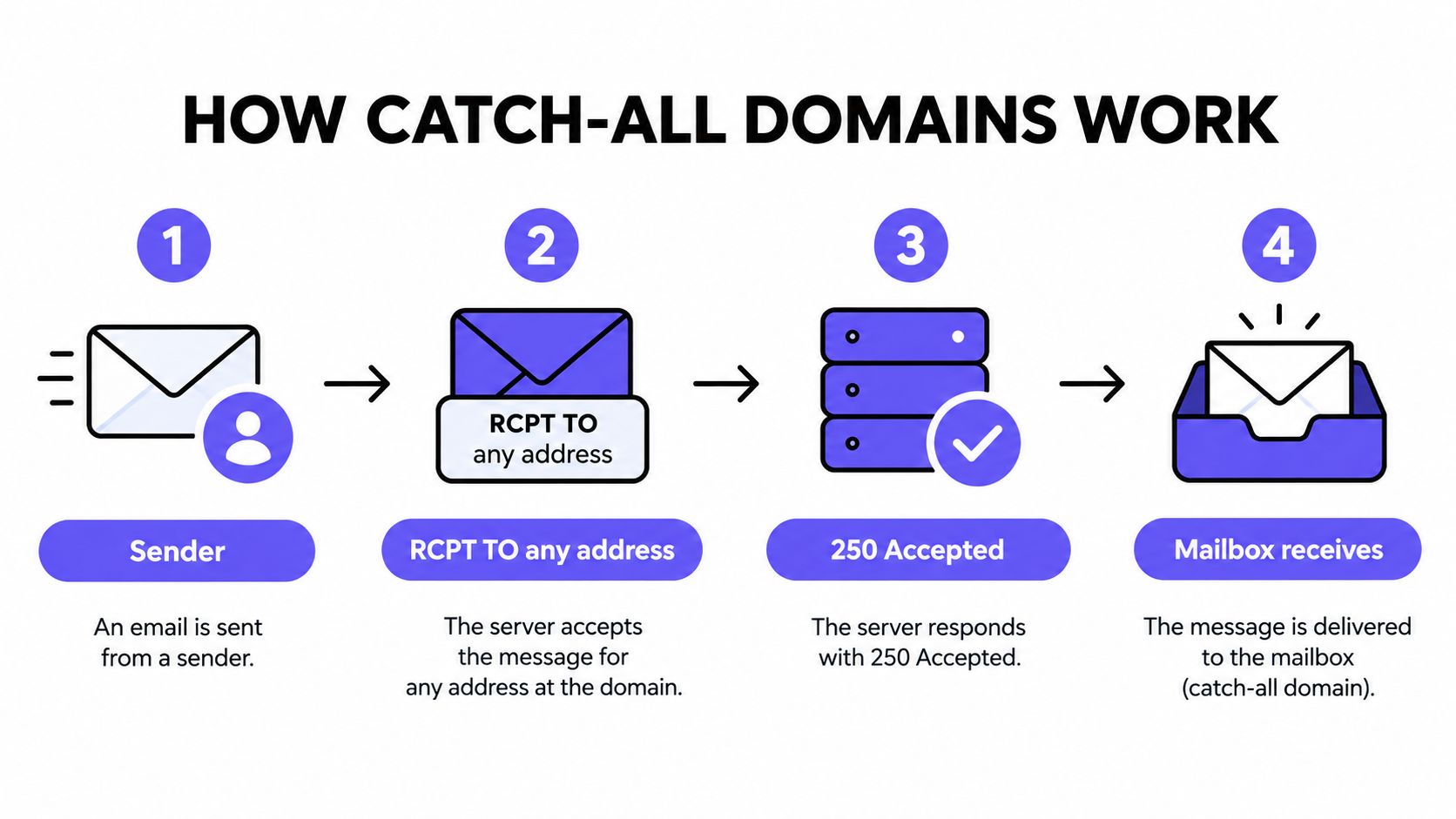
Email servers follow a similar process during the SMTP recipient-verification stage. A sender proposes a recipient with the RCPT TO command, and the receiving server responds based on its configuration.
In a conventional setup:
- A real recipient may receive a successful response.
- A nonexistent recipient may receive a
550-style rejection. - The rejection tells the sending system that the server knows the mailbox is undeliverable.
A catch-all domain applies a wildcard rule to unmatched local parts. It can return 250 OK for both a genuine address and a randomly generated address, then route the message to a designated inbox or another destination.
A simple verification probe
Suppose a verifier checks alex@company.com, then tests a fabricated address such as random-check-482@company.com.
If the server accepts the first address and rejects the fabricated one, the verifier has some evidence that the first address may exist. If the server accepts both, the domain behaves like a catch-all. The successful response establishes domain-level acceptance, not mailbox-level existence.
SMTP wasn't designed to operate as a dependable public directory of recipients. It was designed to transfer mail between servers. That difference explains why a technically successful probe can't answer the business question, “Will this person read the message?”
Practical rule: Treat a catch-all result as unknown or risky, never as confirmed valid.
A server can also accept a message during the SMTP conversation and handle it later. It may route the message to a sink, quarantine it, discard it without notice, or generate a delayed failure. The initial response and the final recipient experience are separate events.
Setting Up and Detecting a Catch-All Mailbox
Catch-all handling creates two different jobs. A domain owner configures the behavior, while a sender tries to detect it without mistaking acceptance for proof of delivery.
How a domain owner sets up catch-all behavior
A domain administrator creates a wildcard rule for unmatched recipients and selects where those messages should go. The destination might be a monitored mailbox, a shared queue, an archival system, or another configured processing destination.
Teams commonly use this arrangement to catch:
- Misspelled employee names
- Messages sent to former employees
- Unexpected role addresses
- Mail that needs central review
A responsible setup also requires ownership. Someone needs to review the destination, separate legitimate correspondence from unwanted mail, and prevent the catch-all inbox from becoming an unmanaged spam container. The domain rule solves message acceptance, but it doesn't solve triage.
How a sender detects a catch-all domain
Verification systems generally follow a controlled sequence:
- Connect to the recipient domain: The system identifies the receiving mail server and initiates an SMTP conversation.
- Propose a known address: It checks the address supplied by the sender.
- Propose fabricated addresses: It tests multiple random local parts that shouldn't correspond to real people.
- Compare responses: If the server accepts the fabricated addresses as well, the domain is classified as catch-all.
- Apply a risk label: The sender's workflow records the address as unknown or risky rather than valid.
A positive result says that the server accepts the proposed recipient. It doesn't confirm that the intended person has a usable, monitored inbox.
For an additional pre-send review, teams can use Mailwarm's deliverability checker to identify catch-all behavior and separate uncertain addresses from contacts with stronger verification signals. The output should inform segmentation, not replace engagement evidence or sending controls.
Pros and Cons of Using a Catch-All Email Address
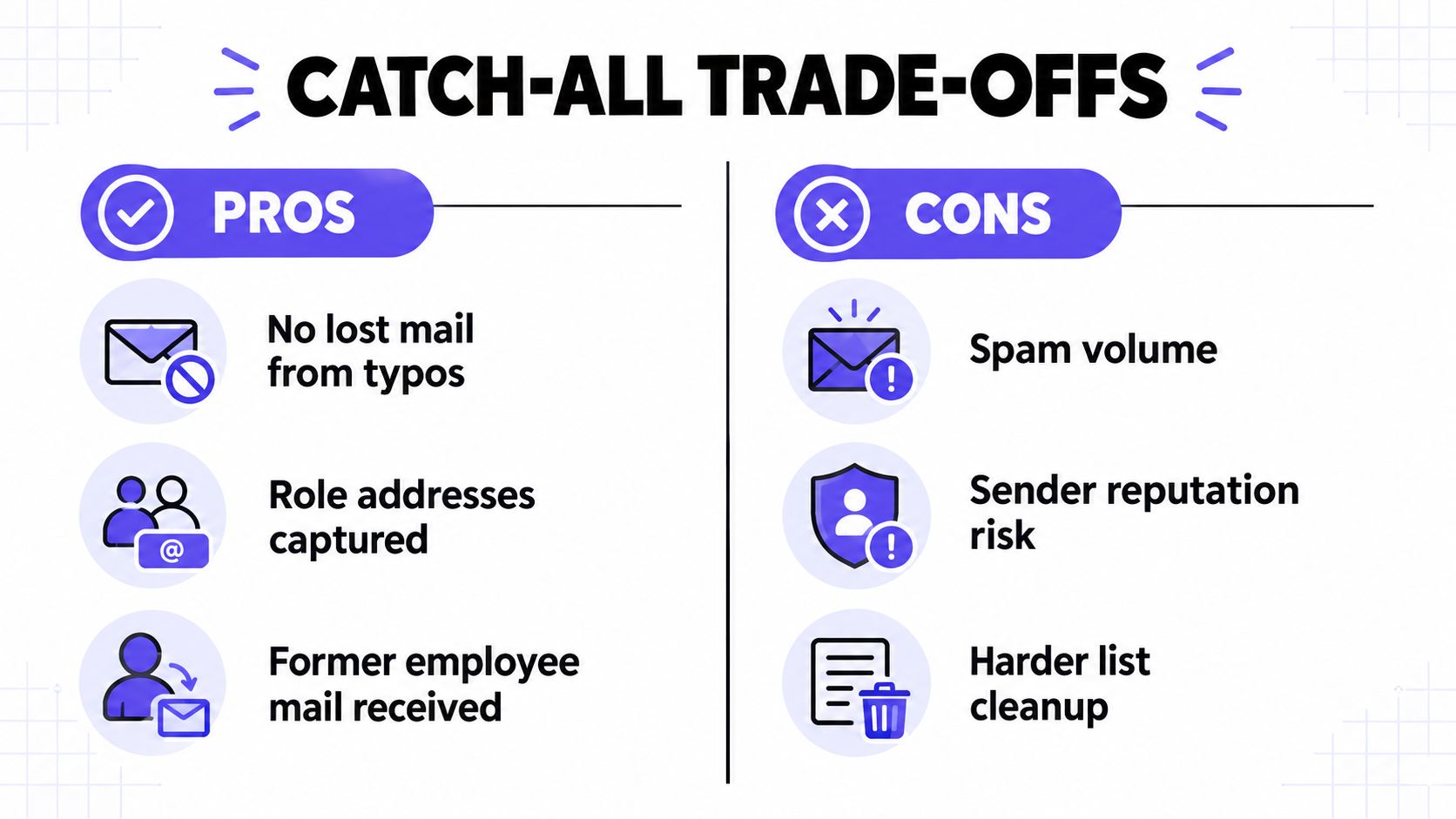
Catch-all behavior isn't careless by nature. Domain owners may value it because it prevents messages from disappearing after a typo or organizational change. Senders, however, face a different trade-off: the same behavior that protects incoming mail can conceal invalid recipients.
| Pros | Cons |
|---|---|
| Fewer lost messages: Typos and unexpected variations can still reach a review destination. | Larger spam surface: The server accepts messages addressed to arbitrary local parts. |
| Former employee coverage: Messages sent to an old address can be captured instead of rejected immediately. | Inbox clutter: Legitimate correspondence can be buried among unwanted or irrelevant mail. |
| Role-address recovery: Messages sent to guessed departments may reach a shared destination. | Mailbox uncertainty: SMTP acceptance doesn't establish that a person monitors the address. |
| Potential prospect access: A real contact may remain reachable even when verification can't confirm the mailbox. | False-positive verification: Fabricated addresses can receive the same acceptance response as genuine ones. |
| Centralized review: A small team can route unexpected mail to one controlled location. | Delayed failures: The system may accept a message and reject, discard, or quarantine it later. |
The receiving side gains resilience. The sending side inherits ambiguity.
For outbound teams, the opportunity is real. A catch-all domain may contain a valuable prospect that a binary “remove all” policy would discard. The risk is also real, because a sender can build confidence from a successful SMTP response that doesn't represent a person, an inbox, or an engaged recipient.
The wrong question is, “Are catch-all addresses good or bad?” The useful question is, “What evidence justifies testing this address, and what controls limit the downside?”
How Catch-All Emails Affect Deliverability and Sender Reputation
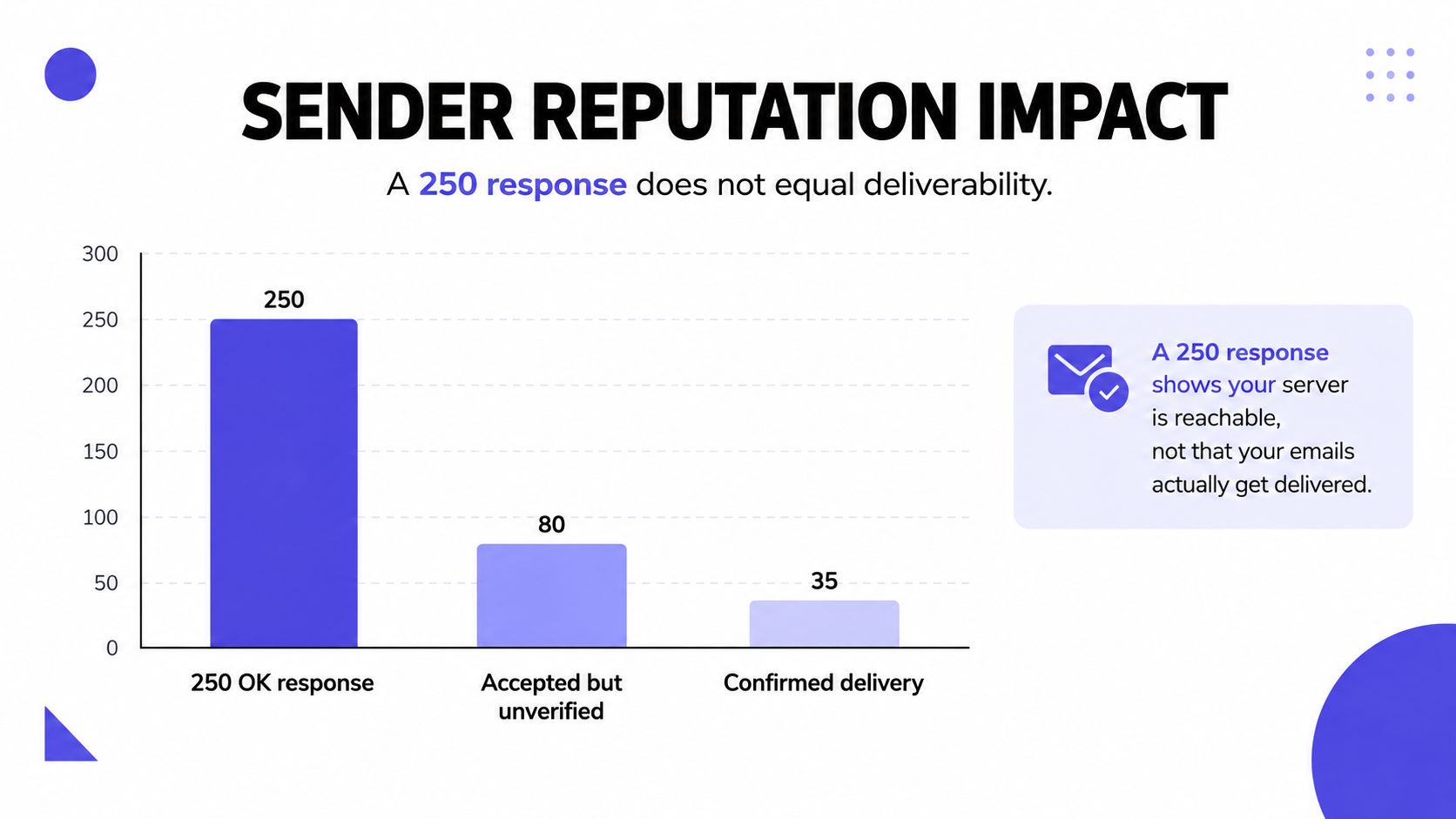
A 250 OK response confirms that the receiving server accepted the SMTP transaction. It doesn't confirm inbox placement, human attention, or even final delivery.
After acceptance, the receiving system may route the message to a sink, place it in quarantine, discard it, or produce a delayed failure. That creates a dangerous gap for senders. Invalid recipients can pass the initial verification stage, remain in the campaign, and only reveal their problem after repeated sending.
The risk chain usually looks like this:
- The verifier sees acceptance: The address appears technically reachable.
- The campaign sends: The sender includes the address with confirmed contacts.
- The mailbox provider handles the message: It may accept, filter, quarantine, route, or discard it.
- The sender receives weak feedback: A delayed bounce may arrive later, or no clear failure may appear.
- The list accumulates uncertainty: Unresponsive and invalid records remain eligible for future campaigns.
- Reputation signals deteriorate: Bounces, low engagement, and complaints can indicate poor list quality.
The catch-all status itself doesn't automatically send a message to spam. The damage comes from what happens after acceptance, especially when a team repeatedly sends to unresponsive or invalid addresses.
Authentication still matters
Catch-all handling sits inside a larger sender-reputation system. Industry coverage of the 2025 Gmail and Yahoo requirements describes SPF or DKIM authentication, DMARC, TLS, and one-click unsubscribe obligations for high-volume senders, with filtering or rejection possible when requirements aren't met. The published requirements overview provides the relevant context.
Authentication can't turn an uncertain recipient into a confirmed one. It can, however, help mailbox providers evaluate the sender's identity and policy alignment while the sender controls list quality and engagement.
Teams should also review provider-level patterns rather than hiding catch-all results inside one aggregate campaign rate. One domain may produce delayed failures while another produces genuine replies. Combining them can conceal the exact source of the problem.
A regular email blacklist check belongs in the broader monitoring routine, alongside bounce review, complaint signals, authentication checks, and inbox placement observation.
Best Practices for Sending to Catch-All Email Addresses
Deleting every catch-all record is easy to automate, but it can remove reachable prospects. Sending to every catch-all record is equally easy, and it can expose a domain to invalid recipients, weak engagement, and delayed bounce behavior.
A better policy assigns each record a risk tier and gives each tier a different action.
Build evidence before sending
A catch-all contact deserves more consideration when independent signals support the record:
- Current role: The person appears to hold the stated position.
- Company-domain pattern: The address matches a credible naming convention used by the organization.
- Recent professional activity: The contact has recent, relevant activity associated with the company.
- First-party confirmation: The contact supplied or confirmed the address through a legitimate interaction.
- Previous engagement: The address has opened, replied, or participated in an earlier conversation.
No single signal proves mailbox existence. Together, these signals can justify a controlled test when the commercial value is high.
Use the smallest useful test
Catch-all contacts shouldn't enter a large campaign by default. Create a separate segment, send highly relevant messages to a small monitored cohort, and watch for both positive and negative feedback.
The message should make sense even if the address routes to a shared inbox. A clear identity, relevant reason for contact, and easy response path give a real recipient a chance to identify themselves. Generic volume is a poor test because low engagement could reflect weak targeting rather than mailbox uncertainty.
Apply a decision table
| Evidence level | Example signals | Recommended action |
|---|---|---|
| High | Current role, credible company pattern, recent first-party confirmation, or previous reply | Send only in a controlled, relevant segment, then monitor closely |
| Medium | Current role and active company domain, but no direct confirmation or engagement | Test small with low exposure and review results by domain and provider |
| Low | Guessed address, stale role, weak company context, no engagement history | Suppress or hold for further validation |
| Negative | Hard bounce, repeated delayed failure, complaint, or clear identity mismatch | Suppress immediately and prevent future sends |
Hard bounces should enter suppression as soon as the sending system confirms them. Repeatedly testing the same failed address turns an uncertain record into a known reputation liability.
Review the right signals
Aggregate performance can hide catch-all problems. Break reporting down by:
- Domain: Identify domains that accept mail but produce no useful response.
- Mailbox provider: Compare provider-level acceptance, filtering, and engagement patterns.
- Address evidence: Separate confirmed first-party contacts from guessed records.
- Failure timing: Distinguish immediate bounces from delayed failures.
- Human response: Give replies and meaningful conversations more weight than acceptance alone.
Operational standard: A catch-all address earns more sending volume through evidence and engagement, not through a successful probe.
Before the next campaign, the checklist is straightforward:
- Label catch-all records separately.
- Remove weak or stale contact evidence.
- Create a small, relevant test cohort.
- Set bounce and complaint suppression rules before launch.
- Monitor domains and providers independently.
- Promote only contacts that produce credible engagement.
This process preserves the upside of reachable prospects without treating an accept-all server as a mailbox directory.
Protecting Sender Reputation With Warmup and Monitoring
Catch-all decisions work only when they sit inside a broader reputation program. Senders still need aligned SPF, DKIM, and DMARC, controlled volume, bounce prevention, useful content, and provider-level monitoring.
Mailwarm is a premium email warmup and deliverability platform that helps senders build reputation, monitor inbox placement, and improve deliverability through real inbox engagement, advanced warmup controls, and expert guidance. Its capabilities include spam score monitoring, inbox placement insights, provider-level warmup, bounce prevention, authentication fix tools, and deliverability analytics. Expert deliverability calls are included in every plan.
For teams testing uncertain contacts, that broader visibility matters. Warmup activity can't validate a catch-all mailbox, but it can support a controlled sending system where authentication, volume, provider behavior, and placement are reviewed together. Mailwarm also provides smtp warmup controls for teams managing SMTP-based sending infrastructure.
Catch-all results should remain undetermined, not automatically valid or invalid. Segment contacts by evidence, test high-value records in small cohorts, suppress failures quickly, and review placement by domain and provider. That approach protects pipeline without allowing uncertain addresses to dictate sender reputation.
If email supports business growth, Mailwarm helps teams build sender reputation, monitor inbox placement, and reduce spam risk with real inbox engagement and expert-guided warmup.
Frequently Asked Questions About Catch All Email
What is a catch all email?
A catch all email setup is a domain-level rule that accepts messages sent to any address at that domain, including addresses that may not exist. It confirms server acceptance, but it doesn't confirm that a specific mailbox exists or that anyone monitors it.
Can a catch-all email address be verified?
SMTP verification generally can't confirm an individual mailbox on a catch-all domain because the server may return the same acceptance response for genuine and fabricated addresses. The result should be treated as unknown or risky and evaluated with additional evidence.
Should catch-all addresses be deleted?
Not automatically. A real prospect may use a catch-all domain, so deleting every record can remove valuable contacts. Weak records should be suppressed, while high-value contacts with strong identity or engagement signals can be tested in small, monitored cohorts.
Does a 250 OK response prove delivery?
No. A 250 OK response confirms acceptance during the SMTP transaction, not inbox placement or human attention. The receiving system may later quarantine, discard, route, or reject the message.
How do catch-all addresses affect sender reputation?
They can allow invalid recipients to pass initial verification, which may lead to delayed failures, low engagement, complaints, and weaker list-quality signals. The catch-all status isn't automatically harmful, but repeated sending without evidence or monitoring increases risk.
How should sales teams send to catch-all contacts?
Sales teams should separate catch-all contacts from confirmed addresses, rank them by evidence, and start with small, highly relevant test cohorts. Hard bounces and clear negative signals should trigger immediate suppression, while results should be reviewed by domain and mailbox provider.
How does Mailwarm help with catch-all risk?
Mailwarm combines real inbox engagement, advanced warmup controls, spam score monitoring, inbox placement insights, bounce prevention, authentication tools, and expert deliverability guidance. It supports the broader reputation program around catch-all handling, but no warmup platform can turn domain-level acceptance into proof that a specific mailbox exists.
Mailwarm helps senders protect reputation while they test uncertain contacts through real inbox engagement, provider-level warmup, spam score monitoring, inbox placement insights, and bounce prevention. Teams can visit Mailwarm to evaluate a deliverability platform built for controlled sending rather than catch-all volume alone.