
Barracuda delisting is free through Barracuda Central's removal request form and typically clears within 12 to 24 hours for first-time requests, but only after the underlying cause has been fixed. The form is the easy part. The actual challenge is preventing the same sending IP from landing on the list again.
Many guides send operators straight to the removal page. That advice is backwards. A request submitted before an account compromise, open relay, volume spike, or list-quality problem is resolved may produce a short-lived result at best. Effective Barracuda blacklist removal starts with diagnosis, continues through remediation, and ends with one accurate request.
What the Barracuda Reputation Block List Is and Why It Matters
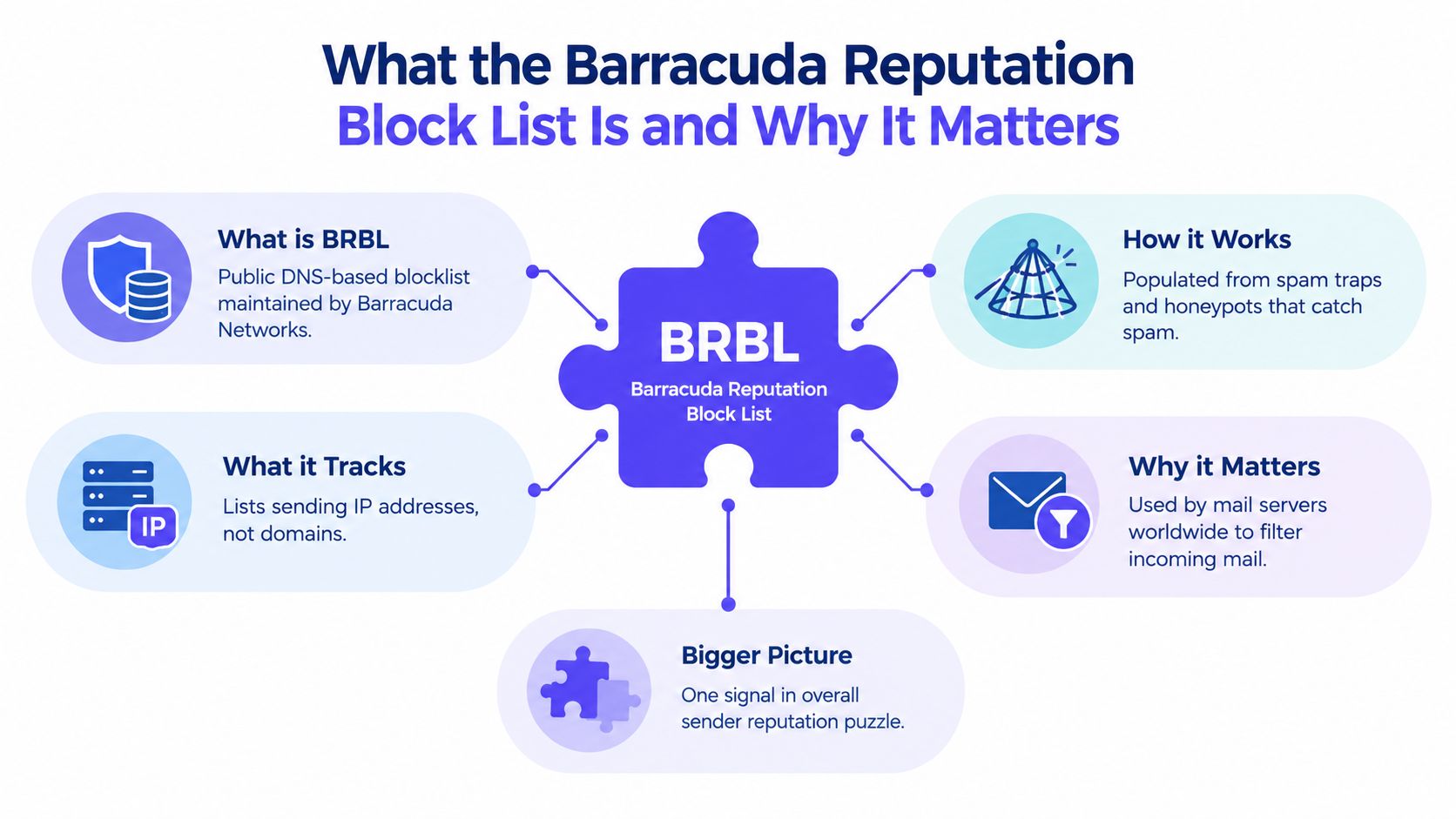
A Barracuda listing is not the root problem. It is a reputation signal that exposes trouble in the sending environment, such as compromised accounts, unsafe traffic, or poor list practices. Treating BRBL as the diagnosis leads to a quick form submission and a predictable relisting.
Barracuda Central's official removal request process handles reputation adjustments for sending IP addresses. The form requests the email server IP address, an email address, and a phone number, with an optional explanation. BRBL operates at the IP level, so a healthy domain can still suffer delivery failures when its outbound server is listed.
Who feels the impact
Corporate security gateways, education mail systems, healthcare organizations, government environments, and mid-market businesses commonly use Barracuda filtering. These systems may reject, defer, or quarantine messages before the recipient sees them.
The risk is high for B2B senders. A consumer-focused sender may see less disruption if its audience mainly uses other filtering systems. Sales teams contacting companies behind Barracuda gateways can lose access to valuable recipients without receiving a clear explanation.
Practical rule: A public BRBL listing and a private Barracuda appliance block require different fixes.
A recipient's IT team can create a local block on its Barracuda appliance. That rule will not appear in a public lookup and cannot be removed through Barracuda Central's public form. Repeated public requests will not fix it. Ask the recipient's administrator to review the appliance rule when only one organization rejects your mail.
The removal form is the final confirmation, not the remedy. Fix the sending pattern, verify the IP, then submit one accurate request. If the underlying behavior remains unsafe, the IP can return to the list.
How to Check if You Are Listed on Barracuda
The first check should use the sending IP address, not just the domain. BRBL evaluates the infrastructure sending the message, and many businesses send through more than one IP, especially when an email service provider rotates outbound traffic.
A clean lookup doesn't prove that every recipient can accept the mail. It only shows that the tested IP isn't appearing on the public list at that moment.
A reliable lookup sequence
- Identify every outbound IP. Check the primary sending IP and any secondary IP used by the mail server, SMTP provider, or campaign platform.
- Run the public lookup. Use Barracuda Central's lookup service and record the result for each IP.
- Scan other reputation databases. A broader check if your domain is blacklisted can reveal related listings that explain a wider delivery problem.
- Save the evidence. Record the lookup time, IP, status, and any recipient bounce text before submitting a request.
- Compare recipient patterns. If only one organization rejects messages while other Barracuda users accept them, investigate a private appliance block.
Public listing or private block
Public BRBL results can be checked independently. Private blocks require cooperation from the affected recipient organization. SMTP rejection messages that include terms such as “barracuda” or “barracudabr” can point operators toward the right investigation, but the exact response still needs to be reviewed by the recipient's IT team.
That distinction matters because a clean public result paired with one recipient's rejection isn't evidence that Barracuda Central ignored a removal request. It may mean the public list was never involved.
Why You Got Listed on Barracuda
Barracuda listings usually reflect a pattern rather than a single unfortunate message. The investigation should connect the timing of the listing with outbound volume, account activity, recipient quality, and infrastructure changes.
| Root Cause | Typical Trigger | Diagnostic Signal |
|---|---|---|
| Spam traps | Scraped, purchased, or never-authorized addresses enter a campaign | Delivery problems appear after sending to old or questionable contacts |
| Volume anomalies | A new IP launches at full pace or an established sender changes volume sharply | Outbound traffic rises suddenly without a matching business reason |
| Compromised accounts | A mailbox, form, relay, or server sends unauthorized mail | Unexplained messages, suspicious logins, or traffic outside campaign schedules |
| Poor list hygiene | Stale contacts, role addresses, hard bounces, or unverified leads remain active | Bounce and complaint activity worsens while engagement weakens |
The four failure patterns
Spam traps are addresses designed to expose poor acquisition and suppression practices. Scraped databases and purchased lists create obvious risk, but old contacts can also become dangerous when they remain untouched for too long. A campaign that reaches addresses nobody deliberately subscribed to deserves immediate scrutiny. A spam trigger words checker can help review content risk, but it won't repair a bad acquisition source or remove trap addresses.
Volume anomalies often expose a sudden change in infrastructure. A new IP that begins sending a full campaign load, or an established team that changes its normal pattern without controls, gives filters little consistent history to evaluate. The important question is whether the increase came from a planned campaign or an unauthorized process.
Compromised accounts and infrastructure are harder to spot because the legitimate team may not know the traffic exists. An abused website form, stolen mailbox credentials, or an improperly restricted relay can send mail under the organization's identity while campaign metrics look normal.
Poor list hygiene keeps the problem alive after the initial incident. Repeated hard bounces, role-address harvesting, unverified contacts, and ignored recipient complaints signal that the sender hasn't established reliable suppression controls.
The Barracuda Blacklist Removal Step by Step
The delisting form is the easy part. Submit it only after you have verified the listed IP, stopped the abusive traffic, and recorded the remediation. A polished request cannot compensate for an IP that is still sending suspicious mail. Barracuda's form is simple, but reviewers need clear evidence that the incident has ended.
Prepare before opening the form
Collect the following before submitting:
- The exact IP address: Match the public lookup with the IP shown in relevant bounce records.
- A monitored email address: Barracuda uses it for follow-up, so confirm that the team can receive replies.
- A working phone number: The official request form requires one.
- The remediation record: Record what happened, what changed, and when abusive outbound traffic stopped.
- Recipient evidence: Keep rejection messages and timestamps available for comparison.
The official Barracuda Central form asks for an email server IP address, email address, and phone number. It also provides a reason-for-removal field. Use it. A concise explanation gives the reviewer the context needed to assess the request.
Write a factual request
Explain the incident and the completed fix without writing a long apology. Cover three points:
- What caused the suspicious traffic.
- What stopped it.
- What the team is monitoring now.
For example, state that a compromised account was secured, outbound access was reviewed, affected credentials were reset, and the IP is being watched for abnormal activity. If list hygiene caused the problem, describe the completed suppression work and confirm that unverified contacts are no longer being mailed.
One accurate request beats a series of duplicate appeals.
Submit once, then monitor the same IP and request email. Processing commonly takes 12 to 48 hours, while first-time requests may clear within 12 to 24 hours after complete remediation (Folderly's Barracuda guidance). Barracuda routes the request through Barracuda Central, so paying an intermediary does not replace fixing the sending system.
After approval, run fresh checks and send controlled test messages to affected recipients before resuming normal campaigns. Public delisting confirms only that the public listing changed. A private Barracuda appliance block may remain, and the public form cannot remove it. Authentication failures, relay weaknesses, or recipient-level filtering can also continue after delisting. If those conditions persist, treat the approval as temporary evidence, not proof that delivery has recovered.
If Removal Is Refused or You Get Relisted
A refusal usually means the evidence doesn't support removal yet. The listed IP may still be generating suspicious traffic, the contact details may not be verifiable, or the explanation may fail to match the activity Barracuda observed.
Read the response carefully. If the issue concerns ongoing abuse, stop the traffic and inspect accounts, forms, relays, and outbound logs again. If the problem concerns the request itself, correct the missing information rather than submitting the same explanation repeatedly.
What a relisting reveals
A fast relisting is more useful as a diagnostic signal than as a frustrating surprise. It often points to one of these unresolved conditions:
- A mailbox remains compromised and continues sending after a password change.
- A stale list is uploaded again by a campaign or sales workflow.
- A shared IP remains affected by another tenant's sending activity.
- An authentication or relay weakness remains open after the initial cleanup.
Independent guidance recommends rechecking after submission instead of filing repeated requests, with reported processing windows generally falling within 12 to 48 hours (Tomba's removal guidance). A repeat or complex case can take longer, with operational guides describing windows of up to 24 to 72 hours (Barracuda removal guidance from InboxAlly).
When the public form isn't relevant
If public lookups are clean but messages fail at one organization, the recipient may have a private Barracuda appliance rule. That local block isn't controlled by Barracuda Central.
The sender should ask the recipient's IT team for the local rejection reason, confirm that the sending infrastructure has been corrected, and request a local review or allowlist decision. Filing another public delisting request won't change a rule maintained by that organization.
Preventing the Next Barracuda Listing
Delisting restores an opportunity to deliver. It doesn't create a durable reputation. The prevention plan should cover every source that can send mail for the organization, not just the campaign platform that exposed the problem.
Secure the sending foundation
Authentication should be consistent across marketing, sales, transactional, and support systems. Teams should review SPF, DKIM, and DMARC alignment, then investigate any source that sends without authorization. Authentication fix tools and provider-level checks can help identify gaps, but the organization still needs an owner for every sending service.
A new IP also needs a controlled ramp. Teams that need to warm up an SMTP server should document the schedule, watch rejection patterns, and avoid moving from minimal activity to full campaign volume without evidence that recipients are accepting the traffic.
Protect list quality
List hygiene belongs inside the campaign process, not at the end of it. A practical checklist includes:
- Consent review: Keep acquisition sources clear and suppress contacts without a valid reason to receive mail.
- Bounce prevention: Remove hard bounces promptly and investigate unusual bounce clusters.
- Complaint response: Treat spam complaints as a reason to pause and inspect the relevant segment.
- Form protection: Secure public forms against abuse and review unusual submission patterns.
- Suppression discipline: Prevent old, rejected, or unsubscribed addresses from re-entering future campaigns.
Monitor before recipients complain
Daily operational checks should include authentication failures, unexpected sending sources, login anomalies, bounce logs, and delivery changes by provider. A premium platform such as Mailwarm can combine real inbox engagement, inbox placement insights, spam score monitoring, provider-level warmup, authentication fix tools, bounce prevention, and deliverability analytics. Mailwarm uses 50,000+ aged real inboxes and can generate up to 100% replies to warmup emails depending on the plan, with no IMAP access required and expert deliverability calls included in every plan.
The point isn't to manufacture a clean report after a listing. It's to identify reputation and placement changes while the team can still correct the cause.
Frequently Asked Questions About Barracuda Blacklist Removal
Is Barracuda delisting free?
Yes. Barracuda Central's removal request process is free. The form requires the listed mail server IP, an email address, and a phone number. Paid services do not receive special authority in Barracuda's review. Fix the cause, then submit the request yourself.
How long does Barracuda removal take?
After remediation, first-time requests commonly process within 12 to 24 hours. Broader guidance places processing at about 12 to 48 hours, while repeat or complex cases can take 24 to 72 hours. Treat these as processing windows, not guarantees. If the IP remains listed after that window, check whether the request was accepted and whether the underlying issue is still active.
Why does Barracuda keep listing my domain?
The listing follows the sending IP, not the domain alone. Repeated listings point to a problem that remains active, such as a compromised mailbox, spam-trap exposure, abnormal traffic, poor list practices, or incomplete cleanup. A successful removal followed by a quick relisting means remediation stopped too early.
What if only one company blocks the sender?
A recipient may run a private Barracuda appliance that blocks your IP even when the public lookup is clear. Ask the recipient IT team for the exact rejection message, block reason, affected IP, and required review process. Include your sending domain, authentication results, recent remediation steps, and a request for manual review. The public removal form cannot clear a private appliance block.
Can repeated removal requests speed up approval?
No. Repeated submissions create noise and do not replace remediation. Send one concise, accurate request, then monitor delivery and wait for the review window to pass.
Key Takeaways and What to Do Next
Start with the infrastructure audit, not the form. Check the sending IP, account security, outbound sources, authentication, list hygiene, bounce activity, and the exact recipient rejection message.
Then submit one clear Barracuda Central request that explains what caused the listing and what changed. A public removal won't solve a private appliance block, and a relisting means the sending system still has a problem.
Mailwarm helps senders build reputation, monitor inbox placement, and improve deliverability through real inbox engagement, advanced warmup controls, and expert guidance. If email drives sales, recruiting, marketing, or customer communication, ongoing monitoring is more useful than waiting for another blocklist alert.
Mailwarm helps teams monitor inbox placement, reduce spam risk, and protect sender reputation with real inbox engagement, provider-level warmup, authentication tools, and expert guidance. Visit Mailwarm to assess a structured deliverability workflow before the next Barracuda listing disrupts outbound email.