

Warming Up a Shared Domain Needs a Coordinated Plan
One mistake by any individual can impact the reputation of the entire domain. When multiple sales reps send emails from the same root domain, their mailbox, IP, and domain reputations combine. Email service providers judge the collective behavior of all senders, not each one separately, which means the approach to warming up a shared domain must be strategic and unified.
Coordinating your strategy effectively among your team is key in this process, as opposed to individual initiatives taken without collaboration. Just a handful of spam complaints or blocks from one mailbox can negatively affect everyone’s results. A methodical, collective warm up safeguards not only each salesperson’s inbox, but also your brand as a whole.
Key idea: The warm up process is technical in nature. The goal at this stage is to build a positive sending reputation, not to promote or market your services.
How Domain, IP, and Mailbox Reputation Interact During a Shared Domain Warm Up
Mailbox reputation typically establishes itself first due to immediate individual email sending activities. Over time, the average activity across all mailboxes forms domain reputation. Furthermore, IP reputation becomes a more significant factor when using a dedicated SMTP or relay service for mailing. Large email service providers (like Gmail, Yahoo, Microsoft, etc.) may weigh mailbox, IP, and domain reputations differently while determining the overall reputation score.
Practical Implications for Sales Teams
- Increase sending volume gradually and evenly across all mailboxes.
- Avoid abrupt spikes in sending, these can lead to temporary blocks almost immediately.
- Consistently apply authentication settings for every sender.
- Keep the “From,” “Return-Path,” and envelope sender details well-aligned.
- Monitor soft bounces closely so they don’t escalate into hard bounces.
How to Prepare DNS and Authentication for a Shared Domain Before Any Warm Up
Set up SPF, DKIM, and DMARC records before you start sending. This must be done for every system that can send mail on behalf of your domain. Any missing or incorrect records will cause alignment failures that undermine trust with recipient servers.
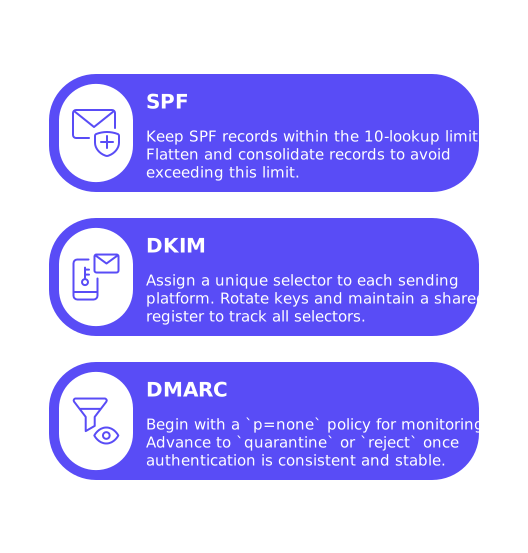
- SPF: Keep your SPF records within the 10-lookup limit. With many reps and platforms, this limit can be exceeded quickly. Refer to this guide on avoiding SPF record length limits in multi-domain setups for techniques on record flattening and consolidation.
- DKIM: Assign a unique selector to each sending platform. Rotate keys according to a schedule, and maintain a shared register so all selectors are tracked.
- DMARC: Begin with a
p=nonepolicy for monitoring, and advance toquarantineorrejectonly once authentication is consistent and stable.
Track who owns and updates each DNS record. Sales operations, IT, and SDR managers should be aware of every change to avoid random failures that can resemble a drop in sending reputation.
How to Structure Sender Identities and Subdomains for a Shared Domain Warm Up
Adopt a clear and consistent pattern for sender addresses and email routing. Assign each rep a primary mailbox and avoid frequent switching or mailbox swaps. For extra segmentation, set up a dedicated outreach subdomain, such as mail.brand.com or contact.brand.com.
- Implement separate SPF and DKIM records for the outreach subdomain.
- Ensure the visible “From” address matches the authenticated domain.
- Configure a monitored
Return-Pathto effectively track bounces. - Use consistent signatures and footers for all sales correspondence.
Avoid sending both transactional emails and initial outreach (cold) emails from the same domain or host. Mixed traffic, a combination of emails from diverse sources and for different purposes, can confuse spam filters and result in misclassified messages.
How to Pace Domain Load When Several Sales Reps Warm Up Together
Establish sending caps for both the overall domain and for each mailbox. Gradually increase the limits for each over time, never taking significant jumps, even if engagement rates appear positive.
Guardrails That Keep the Domain Safe
- Raise per-mailbox volumes incrementally over several weeks rather than days.
- Stagger sending times between accounts to prevent concentrated bursts.
- Keep daily totals in line with the trailing 7-day average.
- Halt volume increases if you notice rising soft bounces or an increase in spam folder placement.
- Maintain thorough records of any changes, long-term trend analysis is more important than day-to-day fluctuations.
Scaling across multiple reps quickly becomes complex. For more advanced ramp-up structures, check out these email warmup schedules to send 1,000 emails per day. Use their guidance, but keep your increases conservative and controlled.
How Automated Inbox Interactions Support a Shared Domain Warm Up
Automated inbox interactions help build a positive sender reputation before contacting prospects. Using a warm up network allows your emails to be opened, replied to, pulled out of spam, and marked as important, key behaviors that earn trust with mailbox providers.
- Connect every mailbox to a warm up network or service.
- Start each account on a different day to avoid simultaneous activity spikes.
- During the warm up phase, use short, non-promotional, and plain-text messages.
- Write natural, human-style threads, using greetings and simple closings.
- Continue daily warm up interactions until your regular cold outreach stabilizes.
With Mailwarm, each mailbox interacts with a live network of over 50,000 inboxes. This platform exchanges replies, pulls emails from spam, and marks them as primary, where supported. This positive interaction history significantly improves inbox placement rates when you transition to real outreach.
Since February 2026, Mailwarm has become an advanced email warm-up platform, combining multi-account management, Content warmup, multi-provider warm-up, real-time deliverability and reputation monitoring, provider-level spam score tracking, automated spam recovery, intelligent volume ramp-up, blacklist alerts, and full SPF, DKIM, and DMARC checks. Built for scale, Mailwarm helps businesses maximize inbox placement while protecting and strengthening their sender reputation.
Warm up emails are never intended for marketing. Their sole purpose is to grow and protect your sender reputation safely.
How to Coordinate Team Behavior So the Shared Domain Stays Healthy
Uncoordinated efforts lead to warm up failures. Implement simple governance steps and make them visible to all team members.
- Quota policy: Clearly define both per-mailbox and domain-wide limits. Update these policies weekly rather than reacting daily.
- Sequence hygiene: Eliminate high-risk keywords from your messages and avoid using URL shorteners during the early weeks.
- Complaint path: Respect all unsubscribe requests and immediately stop message sequences to those recipients.
- List integrity: Verify email addresses before initial contact. Avoid sending emails to outdated or unverified email lists.
- Change freeze: Postpone onboarding of new sending tools during the first month of warm up.
How to Watch the Right Diagnostics While Warming Up a Shared Domain
Rely on meaningful technical diagnostics rather than just vanity statistics. Focus on delivery, errors, and authentication results.
- Monitor spam folder placement using seed addresses and folder checks.
- Read SMTP return codes, temporary blocks (e.g., 421/451 errors) need immediate attention.
- Keep an eye on “blocked” or “policy” bounce responses from each mailbox provider.
- Verify that DKIM and SPF are passing for every message each day.
- Analyze DMARC aggregate reports to identify any alignment issues.
If you’re wondering what strong performance benchmarks look like, refer to these inbox placement rate for cold emails benchmarks and best practices. Comparing your results against industry benchmarks can inform decisions about maintaining or increasing sending volume.
How to Respond When One Mailbox Hurts the Shared Domain
If a problem arises, act quickly to limit the damage and restore a solid reputation.
- Identify the sender and the provider where the issue occurred.
- Reduce that mailbox’s activity to a bare minimum, but keep running warm up interactions.
- Hold all other mailboxes steady, without increasing volume.
- Resolve the underlying issue, this may mean fixing your content, checking the list quality, reviewing DNS setup, or correcting tool misalignment.
- Once the problem subsides (as indicated by fewer soft bounces), resume gradual growth.
If your root domain is still unstable, temporarily route outreach through a dedicated subdomain as you restore the main domain. Always keep authentication records accurate and ensure that branding remains consistent in all user-facing content.
How to Keep Infrastructure Tight as the Team and Stack Expand
As your organization’s sales team and tools grow, it's easy to lose visibility and control. This can result in bloated SPF records and inexplicable DMARC failures. Maintain a single, up-to-date inventory of all sending systems, DKIM selectors, and bounce addresses. Carry out monthly audits to ensure accuracy and prevent infrastructure drift.
Continually revisit your SPF configuration using this established reference on avoiding SPF record length limits. Always keep your record well below the 10-lookup limit for full reliability.
Bringing It All Together for a Safe, Shared Domain Warm Up
Consistent coordination is at the heart of success. Begin with accurate DNS setup, carefully pace your volume across every mailbox, rely on automated interactions to create a positive sending history, track genuine technical diagnostics, and address issues promptly. Document every change you make to maintain a high level of control and visibility.
Looking for expert feedback on your setup? Reach out to email deliverability specialists who regularly manage complex multi-team environments. Get a calm, detailed review and recommendations for next steps through mailadept.
FAQ
Why is it important to have a coordinated plan for warming up a shared domain?
Without coordination, one error can damage the domain's reputation, affecting all senders. A unified strategy minimizes complaints and blocks, safeguarding every sales rep's efforts and the brand's credibility.
How do domain, IP, and mailbox reputations interact during the warm-up process?
Mailbox reputation forms first through individual activities, while domain reputation is shaped by average behaviors. IP reputation becomes key with dedicated SMTP setups. Misaligned reputations can trigger provider penalties.
What are the risks of failing to prepare DNS and authentication correctly?
Poorly configured DNS records lead to alignment failures, decreasing trust with recipient servers. Errors in SPF, DKIM, and DMARC settings expose emails to spam filtering and blocking risks, undermining outreach campaigns.
Why should transactional and cold emails use different domains?
Mixing transactional and outreach emails confuses spam filters with varying traffic types, increasing the risk of misclassification. Isolating traffic types maintains clarity, improving deliverability and reputation.
How do automated inbox interactions affect sender reputation?
Automated interactions build positive reputation by simulating engagement through opening, replying, and rescuing emails from spam. Mailwarm networks enhance sender credibility by ensuring emails appear trustworthy to providers.
What should be done if one mailbox harms the shared domain's reputation?
Immediately reduce the mailbox's activity while maintaining warm-up interactions. Investigate and correct underlying issues such as content and list quality errors before resuming normal volume levels.
What happens if SPF records exceed the lookup limit?
Exceeding the 10-lookup limit makes SPF records unreliable, leading to email rejection or delivery failures. Record flattening and consolidation are essential to maintain integrity and prevent operational disruptions.