
Cold Email Infrastructure for Startups: Understanding Domains, Mailboxes, and Rotation Setup
Successful cold outreach hinges on solid technical foundations. Even the best-written messages can't make up for inadequate infrastructure. Startups need to establish reliable domains, properly authenticated mailboxes, and a smart rotation system to distribute their sending activity.
Think of your email infrastructure as layered protection. Domains safeguard your brand reputation. DNS records confirm your email legitimacy to recipients. Mailboxes handle the sending, while rotation ensures sending is balanced and controlled.
Set up these layers early in your outreach journey. Doing so helps lower risks, protect your main brand domain, and maintain predictable sending patterns. This guide breaks down each element so you can deploy an effective strategy from the start.
Strategies for Cold Email Domains: Root Domains, Subdomains, and Domain Age
Always separate your cold outreach from your main company domain. Using domains related to, but distinct from, your primary domain helps shield your core brand from any missteps, especially in the early days of your campaigns.
Purchase at least two closely related domains. Opt for clean, human-readable names with trustworthy, widely recognized TLDs.
- Register multiple similar domains for use in rotation.
- Use unique Whois details for each, while ensuring they still clearly relate to your business.
- Keep display names and signatures visually consistent across domains for brand continuity.
- Get your domain to build a good sending reputation by sending low volumes of emails and gradually increasing volume before using it for significant outreach.
Domain age still matters. New registrations lack a sending history, so start off gradually and focus on building positive reputation signals before ramping up volumes.
DNS Records Essentials: SPF, DKIM, DMARC, MX, and Tracking Domains
Email authentication is non-negotiable today. Every sending domain must be configured with SPF, DKIM, and DMARC. Keep MX records error-free and up-to-date.
SPF records must authorize every sender you use. Steer clear of overly complex include: chains; they can easily hit the 10-lookup limit and break your authentication. Consult this guide to avoiding SPF record limits in multi-domain setups for safe practices.
- Publish a single SPF record per domain using
v=spf1 ... -all. - Enable DKIM signing on all messages, choosing 2048‑bit keys if possible.
- Align DMARC policies to
p=quarantineinitially. When confident, advance toreject. - Create a dedicated DMARC reporting mailbox and monitor reports weekly.
- Configure MX records for your email provider. Test your SMTP banner response and TLS support.
If your sending tool allows custom tracking domains, always use a branded tracking domain. Random or generic hostnames can appear suspicious. Make sure your CNAME records are properly set and validated.
HELO/EHLO and SMTP Identity: Key Points for Cold Emailing
Mailbox providers examine more than just headers, they check your SMTP handshake identity. Make sure your HELO or EHLO string maps to a legitimate, publicly resolvable host.
Poorly configured HELO identity undermines your trustworthiness. For an in-depth explanation, see this primer on HELO in emailing and its impact on sender reputation. Verify provider defaults and override settings when needed.
- Your HELO hostname must have both forward (A record) and reverse (PTR) DNS records set up correctly.
- If applicable, match your TLS certificate to the HELO hostname.
- Avoid using generic or container-specific hostnames that could reveal underlying infrastructure.
Planning Mailboxes for Cold Email Teams: Providers, Limits, and Configurations
Assess how many mailboxes you need based on your daily outreach targets, not just cost. Having multiple mailboxes can help distribute the sending load, thereby reducing the risk of a single mailbox being flagged for high-volume sending or sudden spikes in activity.
Consider mixing providers like Microsoft 365 and Google Workspace. This diversification helps you withstand changing provider policies and keeps outreach stable. Be sure to keep records for each account tenant.
- Set up dedicated email accounts used solely for cold outreach.
- Disable catch-all mailboxes. Hard bounces are important for identifying list issues.
- Standardize signatures and sender names to maintain team consistency.
- Enable two-factor authentication for all mailboxes and minimize admin privileges.
New mailboxes should start with conservative sending limits. Only gradually expand volume after confirming that all deliverability signals are positive. Do not accelerate this stage.
Mailbox Rotation for Cold Outreach: Patterns, Volumes, and Risk Mitigation
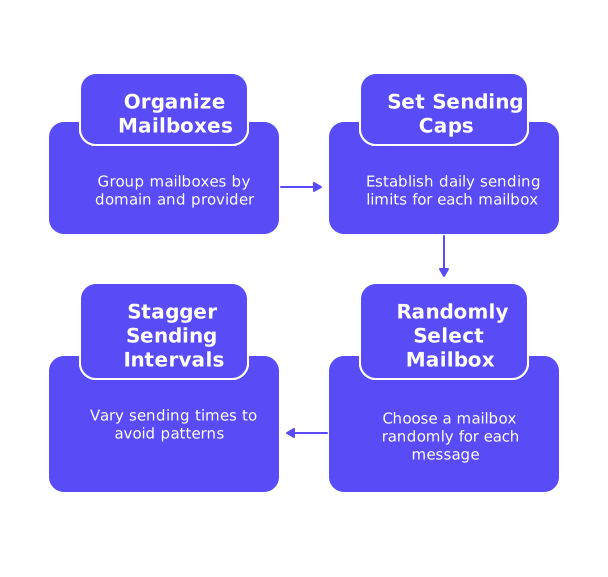
Rotation ensures that no single mailbox is overburdened, allowing risk to be spread across multiple domains and providers.
- Organize mailboxes into groups based on domain and provider.
- Set strict daily sending caps for each mailbox and domain.
- Randomly select which mailbox sends each message within healthy limits.
- Stagger sending intervals for each account to avoid recognizable batch patterns.
Build in safeguards: if a mailbox experiences excessive bounces, pause its activity. If a domain is repeatedly filtered or blocked, re-route traffic and investigate promptly.
Rotation reduces risk, but it’s not a fix for poor data quality. Bad lists will still trigger blocks.
Enable reply detection to automatically pause further outreach to a contact after a response. Keep your conversations human. Never send follow-ups from a different address than the initial sender.
Warm-Up for New Domains and Mailboxes: Building a Positive Reputation
Warming up establishes a track record of legitimate, engaged sending. Begin with a small number of daily sends per mailbox, such as 5-10 emails per day, and aim for authentic replies. This supports the development of trust with mailbox providers before launching at scale.
Mailwarm automates the warm-up phase by leveraging a network of real inboxes, generating opens, replies, and even spam recovery actions. This helps demonstrate value and engagement to providers.
- Start new mailboxes with sends at the lower end of the daily range.
- Gradually ramp up sending as positive engagement metrics continue.
- Run warm-up in parallel with production sending to maintain ongoing reputation health.
- Cycle through multiple domains over time so each collects sending history.
Continue warm-up activities beyond initial launch. Sustaining regular, positive mailbox interactions should be viewed as an ongoing maintenance task for your infrastructure.
Ongoing Deliverability Monitoring: Reputation, Bounces, and Inbox Placement
Monitoring is essential for understanding real-world deliverability and maintaining mailbox health. Generic reporting tools often miss critical issues that affect inbox placement.
- Track inbox placement across all major email providers.
- Analyze patterns in hard and soft bounce codes.
- Use seed tests to evaluate spam folder placement rates.
- Review sender reputation, domain alignment, and overall health on a weekly basis.
Set realistic performance benchmarks using trusted industry references, such as this overview of cold email inbox placement benchmarks.
Prepare response plans for issues. If, for example, Microsoft blocks one of your domains, immediately pause sending on that channel. If Gmail begins throttling, lower volume and intensify ongoing warm-up efforts.
Security and Compliance Foundations: What Startups Need to Know
Lax security can quickly translate into deliverability problems. Email providers penalize insecure or compromised senders. Protect your digital assets and your reputation from the start.
- Mandate two-factor authentication and use single sign-on wherever possible.
- Rotate API keys regularly and restrict access by IP address as appropriate.
- Store suppression lists securely and apply these lists globally across your systems.
- Once you have confidence in your setup, set DMARC to
rejectfor maximum protection against spoofing.
Adhere to email compliance laws: always include a valid postal address and provide a clear, straightforward opt-out mechanism. Make sure opt-out requests are honored throughout all domains and tools.
Cold Email Infrastructure Blueprint: A Simple Startup Plan
- Register at least two domains closely aligned with your brand for outreach.
- Set up dedicated mailboxes for cold email activities on each domain.
- Publish correct SPF, DKIM, DMARC, and MX DNS records before sending.
- Verify your mail servers’ HELO/EHLO identity and align TLS settings properly.
- Initiate warm-up campaigns on all new domains and mailboxes.
- Implement a rotation system with strict daily caps to mitigate risk.
- Continuously monitor deliverability, bounces, and domain status.
- Modify sending volumes based on performance data, not on guesswork.
This systematic approach will scale with your team, safeguard your core brand, and provide a buffer for testing and optimizing your cold email copy, without jeopardizing your main domain or sending reputation.
If you want another set of expert eyes on your setup, don’t hesitate to reach out. The email deliverability experts can assist you in reviewing your domains, records, and rotation strategy.
FAQ
Why is it important to separate cold outreach domains from the main company domain?
Separating domains prevents potential reputational damage to your core brand if something goes wrong with your cold email strategy. Using similar but distinct domains creates a safety buffer, allowing missteps to affect only secondary domains.
How does domain age affect cold email campaigns?
Domain age is crucial because older domains have a history that can lead to better deliverability. Freshly registered domains need time to establish a credible sending reputation before being used for high-volume outreach.
What are the risks of not implementing proper DNS records?
Failing to configure DNS records like SPF, DKIM, and DMARC can lead to emails being marked as spam or rejected outright. It exposes you to sender spoofing, damaging your domain's reputation severely.
Should you mix different email providers for cold outreach?
Yes, using multiple providers like Microsoft 365 and Google Workspace minimizes risks associated with policy changes or service disruption. This approach helps maintain stable outreach operations across different platforms.
What role does HELO/EHLO play in cold emailing?
HELO/EHLO identity is scrutinized by mailbox providers in the SMTP handshake process. A misconfigured identity can erode trust, leading to deliverability issues, so ensure your HELO name maps to a valid host.
How does Mailwarm assist in cold email operations?
Mailwarm automates the warm-up phase by interacting with real inboxes, fostering engagement necessary for building trust. This aids in establishing a positive reputation crucial for scaling your email outreach effectively.
What happens if a domain is persistently filtered or blocked?
Persistent filtering signals a serious deliverability issue requiring immediate attention. Pause all activities on the affected domain and investigate thoroughly to prevent permanent reputational damage.
Why are reply detection and follow-up consistency important?
Reply detection prevents redundant communication, enhancing user experience and resource efficiency. Consistency in follow-up emails from the same address as the initial contact is essential for maintaining credibility.
Is warming up new domains just a one-time task?
No, warm-up activities are ongoing. Continuous engagement and reputation management are necessary to ensure long-term inbox placement and mitigated risks of falling into spam filters.