
Understanding Gmail Generators and Their Purposes
People search for a Gmail Alias Generator when they need access to multiple Gmail addresses quickly. This can be for purposes like testing signups, conducting outreach campaigns at scale, or bypassing certain filters. The concept sounds straightforward: create many addresses, send emails, and avoid roadblocks. In reality, things are more complex.
Google actively blocks automated account creation by requiring identity verification, phone authentication, and advanced risk scoring. Mass creation attempts almost always trigger security reviews and prompt closures. Even if new accounts are created, their success rate is low, advanced filters don’t just track addresses but monitor behavior as well.
Gmail Generator Methods Explained: Aliases, Dots, and Disposable Inboxes
There are several “generator” approaches frequently discussed in forums and offered by various tools. These fall into three main categories:
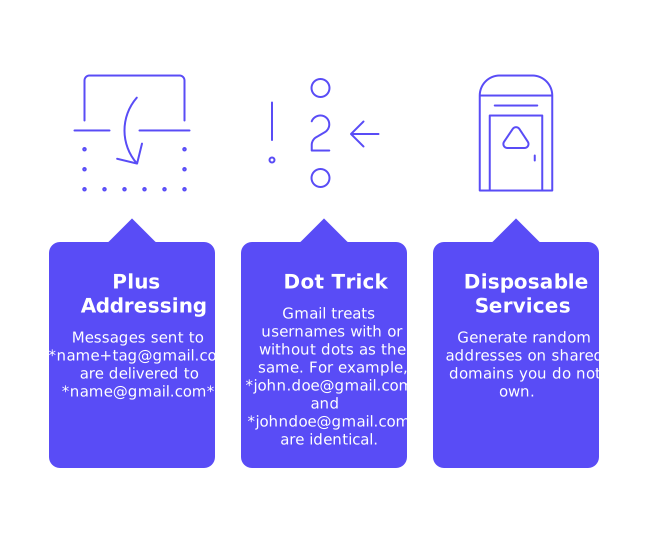
- Plus addressing: name+tag@gmail.com messages will be delivered to name@gmail.com.
- Gmail Dot Trick: Gmail regards usernames with or without dots as identical. For example, john.doe@gmail.com and johndoe@gmail.com are both treated as the same email address.
- Disposable services: Generating random addresses on shared domains you do not own.
Aliases and dot variations do not establish new email accounts, they all lead to the same original mailbox. Filters will recognize all of these as coming from a single sender. Disposable inboxes carry even more risk since they share reputation with strangers and are prone to spam. None of these methods are effective in improving outreach deliverability.
Why Gmail Generators Fail for Outreach and Sender Reputation
Your email deliverability depends on strong trust signals. Filters analyze engagement levels, complaint rates, verified identity, and sending patterns. A brand-new Gmail address with no established history appears concerning, while a mass of generated addresses looks even more suspicious.
Using shortcuts only leads to more blocks, CAPTCHAs, and temporary bans. Relying on disposable addresses means inheriting a poor reputation. As a result, outreach efforts either land in spam or are never delivered at all. Attempting to cheat the system actually works against the very algorithms that determine inbox placement.
Email Warm-Up for Gmail Accounts and How Reputation Actually Grows
Reputation builds through slow, authentic, and positive interactions. This is where consistent warm-up comes in. By using a network of active, maintained mailboxes to interact with your messages, opening, replying, moving emails out of spam, and marking them as important, you create trustworthy patterns.
The activity needs to be gradual and steady, establishing a record that email filters recognize and trust. This isn’t about marketing; it’s about building technical credibility. As your reputation improves, filters start to trust your address and domain.
Warm the mailbox first. Prospect later.Treat warming as the foundation for reliable deliverability.
Set Up a Fresh Gmail or Google Workspace Sender the Right Way
Use a Domain You Control
Relying on free @gmail.com addresses exposes you to stricter limits and lower default trust. Opt for Google Workspace using your own domain so you control your identity and reputation from the start.
Authenticate the Domain
- Publish SPF records for your sending sources.
- Enable DKIM with a robust key length.
- Add DMARC records to monitor alignment and enforce policy.
Always make sure your visible “From” address matches the authenticated domain. This consistency strengthens your reputation with recipient servers.
Harden the Sender Details
- Include a real display name and complete business address fields.
- Maintain a live website on the same domain as your emails.
- Set up abuse@ and postmaster@ mailboxes for your domain.
- Ensure your reverse DNS resolves to a properly named host.
Completing these steps reduces friction with receiving servers and greatly assists during manual reviews.
Warm-Up Pace for Gmail: Start Small, Scale With Data
Start sending at very low daily volumes and space your messages throughout the day. Gradually expand only after seeing consistent, positive engagement. Sudden spikes in sending volume look automated to filters and can damage your reputation. Never blast large campaigns from a new domain or mailbox.
For detailed pacing advice, see these incremental email warm-up schedules to reach 1,000 emails per day. This step-by-step scaling ensures your reputation builds safely during ramp-up.
Inbox Placement: The True Measure of Success
The real benchmark in outreach is inbox placement, not just raw sending limits. Track your results: where do emails arrive, in the primary inbox, promotions, or spam folder? Consistent primary or inbox delivery is your goal.
If you want reference points or industry benchmarks, review these best practices for inbox placement in cold email. Use these insights to determine if your warm-up strategy is on track.
New Delivery Rules and Bounce Handling
Mailbox providers have enforced stricter rules in recent years, and the trend towards stronger authentication and minimizing complaint rates continues to be the baseline. At scale, one-click unsubscribe options and clear opt-out processes are expected.
Treat bounce notifications as early warning signals. Hard bounces indicate invalid recipient addresses, while soft bounces often suggest high sending rates or policy restrictions. Promptly address these issues by cleaning your data and adjusting your approach.
For a straightforward explanation of bounce codes and current policies, read why emails get bounced under updated delivery rules so you can adapt quickly to real-time feedback.
Compliance and Ethics: Avoid Account Farming and Risky Workarounds
Never use scripts or outsource Gmail account creation. It risks immediate closure, potential legal consequences, and burns valuable domains and IP addresses. Instead, focus on building a sustainable and credible sender identity. Warm up each mailbox thoroughly before adding additional accounts.
Respect consent and local laws, and honor unsubscribe requests immediately. It’s also important to maintain clean and updated data sources. By following these best practices, your email activity is more likely to be favorably assessed by spam filters over time.
Practical Signs Your Gmail Warm-Up Strategy Is Working
- Spam folder rates decrease and remain low over time.
- Replies from genuine contacts increase once outreach begins.
- Soft bounces decline as you maintain proper pacing.
- Seed tests display stable inbox placement with major providers.
If you stop seeing progress, pause your volume increases and let your mailbox stabilize. Only resume scaling after positive metrics have returned.
Gmail Generator Shortcuts vs. Sustainable Warm-up Strategies
Email Generator tools offer quick results but lead to churn and heightened scrutiny. Proper warm-up may seem slower, but its effects compound, building trust with each positive interaction. Sustainable deliverability always outperforms disposable, short-term scale.
To ease the process, tools like Mailwarm can help automate the early, repetitive steps of warming up your Gmail account, including replying to messages, saving emails from spam, and marking emails as important. These interactions help train email filters to view your mailbox as trustworthy. Once a healthy rhythm is established, you can layer in targeted outreach.
Ready to Warm Gmail the Right Way?
Skip the email gen. Build genuine trust one step at a time. For a steady, low-friction start, use a dedicated warm-up strategy. While you get your outreach ready, begin your Gmail warm-up with Mailwarm and confidently launch your next campaign knowing your inbox placement stands a better chance.
FAQ
Are Gmail generators effective for outreach campaigns?
Gmail generators are notoriously unreliable for outreach. They often lead to flagged accounts and deliverability issues, making sustainable email strategies a far better choice.
What are the risks associated with using disposable email services?
Disposable emails come with shared reputations that are often tarnished by spammers, increasing the likelihood your emails end up in spam folders. The shortcuts provide minimal email deliverability benefits.
Why is email warm-up important for new Gmail accounts?
Email warm-up establishes trust and credibility with email filters, improving your chances of inbox placement. Tools like Mailwarm automate this process, offering a more structured path to enhance sender reputation.
Can using scripts or automations for account creation backfire?
Automations can lead to immediate account closures and potential legal risks. The shortcuts often waste resources and have negative long-term impacts on domain and IP reputation.
How does consistent engagement affect email deliverability?
Email filters value consistent, positive engagement, which incrementally builds sender credibility. Without steady interaction, aggressive scaling resembles spam indicators, reducing deliverability chances.
Should I rely on free Gmail addresses for my campaigns?
Free Gmail addresses face strict limitations and fail to establish strong sender trust. Using a domain-backed account via Google Workspace provides a better foundation for email reputation.
What metrics indicate a successful email warm-up?
Key indicators include reduced spam folder placements and increased valid recipient engagements. A stable inbox placement with major email providers is the ultimate validation of your warm-up success.
How can I ensure my emails aren't marked as spam?
Ensuring technical alignment through authentication methods like SPF, DKIM, and DMARC is critical. Gradually increasing your sending volume while observing strict engagement metrics also limits spam categorization.