

Understanding How a Gmail Dot Variations Generator Enhances Deliverability, Testing, and Inbox Operations
Gmail treats dots in the local part of your email address as irrelevant. In other words, first.last@gmail.com and firstlast@gmail.com are considered exactly the same by Gmail and deliver to the same mailbox. A Gmail dot variations generator can produce a range of alternate spellings for your base address, helping you manage labeling, testing, and message routing, all without the need to create multiple accounts.
These dot-based addresses serve as aliases, not new identities. They allow you to track sign-ups, set up custom filters, and confirm if forms are storing email addresses correctly. You can also combine them with plus addressing, a feature that allows you to add a tag after a + in your email address (e.g., name+tag@gmail.com), to label campaigns, CRMs, or web forms with clear, readable markers.
Dots are not recognized by Gmail. Whether present or absent, they’re treated as the same email address.
This article will guide you through generating dot variations securely, highlight where they work best, discuss their boundaries, and clarify how they complement essential inbox warm-up and sender reputation practices.
How Gmail Dot Variations and Plus Addressing Work in a Gmail Dot Variations Generator
An email address consists of two segments: the local part before the @, and the domain after. Gmail ignores all dots in the local part, so alex.smith@gmail.com and alexsmith@gmail.com are functionally identical, with all messages arriving in your single inbox.
Plus addressing allows you to append a tag after a plus sign. For example, alexsmith+trial@gmail.com will still deliver to alexsmith@gmail.com, but the part after the + helps you organize and monitor your message flows. Many systems also display the fully tagged address in logs, making troubleshooting easier.
Important notes:
- Both dots and plus signs are effective in both standard Gmail and Google Workspace mailboxes that use Gmail.
- Other email providers might treat dots differently, so test before relying on these behaviors outside Gmail.
- Some forms may block
+signs or automatically normalize dots; watch for these edge cases.
Practical Uses of Gmail Dot Variations for Deliverability Testing and Record-Keeping
With a generator, you can create easy-to-read aliases that reach your single inbox but retain added context. Here’s how to use dot and plus tags effectively:
- Form QA: Submit various dot variants of your address to test deduplication rules in signup processes.
- CRM hygiene: Check if your CRM treats dotted addresses as separate records or normalizes them as one contact.
- Filter routing: Route
name+billing@to a Billing label andname+legal@to a Legal label using Gmail filters. - Campaign tagging: Apply plus tags like
name+seq1@andname+seq2@to follow different campaign flows in your logs. - Form field validation: Ensure your signup forms accept plus tags and do not silently remove or alter dots.
For deliverability, these addresses serve as seed aliases within your Gmail inbox, letting you check headings, delivery flow, and filter routing. However, they don’t act as unique recipients or simulate separate reputation signals.
Limitations and Risks of Gmail Dot Variations When Used at Scale
Dot and plus variations are convenient, but it’s vital to consider these points when using them:
- No new reputation: All addresses deliver to a single inbox and do not count as separate recipients for sender reputation purposes.
- Terms and abuse: Using dot tricks to bypass signup restrictions often violates the terms of many websites.
- Form blocks: Some web forms might reject
+signs or silently remove dots; your tests might not reflect real user experience. - CRM duplicates: If a CRM records raw email strings, it might create unnecessary duplicate records with each variant you use.
- Unsubscribe tracking: Ethically, an unsubscribe on any variant should apply globally to the underlying base address.
Treat each alias as a tool for monitoring and instrumentation, not as a separate user account. Maintain clear documentation for each label’s purpose to prevent confusion among your team.
Step-by-Step Method to Generate Gmail Dot Variations and Readable Plus Tags
Human-Friendly Process
- Choose your base email address:
senderdemo@gmail.com. - Brainstorm safe dot placements: sen.der.demo, sender.demo, s.enderdemo.
- Select concise plus tags that define their purpose:
+qa,+billing,+onboarding. - Combine these for practical, readable aliases. Use fewer, well-defined aliases for clarity.
- Set up Gmail filters to automatically label emails for each unique tag.
Example Output from a Simple Generator
Base: senderdemo@gmail.comDot variants:senderdemo@gmail.comsender.demo@gmail.coms.enderdemo@gmail.comsen.derdemo@gmail.comsenderd.emo@gmail.coms.e.n.d.e.r.d.e.m.o@gmail.comPlus tags:senderdemo+qa@gmail.comsenderdemo+billing@gmail.comsenderdemo+onboarding@gmail.comsender.demo+legal@gmail.comKeep your labels short and straightforward. Overly long addresses can break web forms and make logs difficult to read.
How Gmail Dot Variations Relate to Email Warm-Up and Sender Reputation Work
Dot variations do not warm your domain or IP, meaning, they don’t improve your sender reputation with email providers. Instead, they simply provide more ways to manage and monitor email traffic within a single Gmail inbox. Genuine reputation growth, which enhances your credibility as a sender, results from steady, positive interactions across many independent mailboxes.
For real inbox warm-up, use dedicated processes alongside your dot variation routines. If you’re ramping up outreach, strategically increase daily sending volumes and follow a tested schedule. Our guide on how to schedule email warm-ups to reach 1,000 emails per day explains the best pacing and risk management tips.
As you check inbox placement, compare your results against trusted benchmarks. This overview of inbox placement benchmarks for cold emails helps you set realistic goals while testing seed addresses and email logs.
If you encounter bounces or blocks while testing, review the latest delivery rules for email bounces in 2026 to ensure your messages meet authentication, volume, and content standards.
Gmail Dot Variations Filter Setup and Routing Tips Inside Gmail
Leverage Gmail filters to label and organize mail as soon as it arrives. This approach keeps your inbox manageable when running multiple tests.
- Go to Gmail Settings → See all settings → Filters and Blocked Addresses.
- Create a filter with the “To” field set to a unique tag, like
senderdemo+qa@gmail.com. - Choose your actions: Skip the Inbox, Apply label, and optionally, forward messages to a shared team inbox.
- Repeat this for each recurring tag, such as
+legal,+billing, or+onboarding.
For dot variation-based rules, match the exact address in the “To” field. Since all variants enter the same mailbox, clear labeling becomes essential for quick identification and management.
Compliance and Sender Reputation Considerations When Using a Gmail Dot Variations Generator
- Consent first: Do not treat dot variants as separate subscribers, always respect user preferences as applying globally to the core address.
- Transparency: When testing signups, document clearly that such addresses are internal tracking seeds.
- Security: Avoid including sensitive information as plus tags or dots in your email addresses that might inadvertently expose customer data.
- Data quality: Normalize email addresses carefully within your databases to avoid unintended duplicates.
- Warm-up reality check: Use dot variants only for mail routing and organization, not for building sender reputation, which requires authentic inbox interactions.
Keep careful logs documenting which team is responsible for each tag or variant. This practice reduces confusion during audits and supports efficient incident response.
Troubleshooting Gmail Dot Variations Across Forms, CRMs, and Integrations
If a web form doesn’t accept your dotted or plus-tagged address, try these troubleshooting steps:
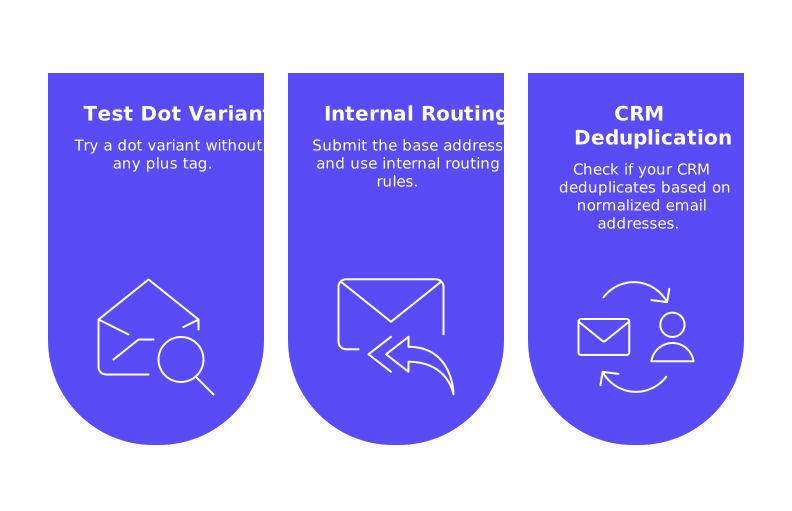
- Test a dot variant without any plus tag.
- Submit the base address, and use internal routing rules to label or organize the message afterwards.
- Check if your CRM deduplicates based on normalized email addresses. Adjust your import logic to avoid false duplicates.
If you notice differences in deliverability between a plus-tagged and base address, review your sending setup, content, and headers first. Most discrepancies are due to quirks in classification or recent sending activity, not because of the use of dot or plus variations themselves.
Gmail Dot Variations Generator Takeaway and Next Steps for Responsible Testing
Dot and plus variations let you create flexible, easy-to-manage aliases that all direct to a single inbox. They are excellent tools for organizing testing, labeling, and QA activities, but do not generate new accounts or boost sender reputation. Use these features to keep your workflows tidy, and focus on building lasting sender trust by engaging consistently with a wide range of inboxes.
Looking for a reliable way to establish sender trust while conducting dot-based tests? Consider leveraging Mailwarm to implement a robust warm-up strategy involving real inbox interactions, then use your favorite Gmail dot and plus labels to track outcomes with clarity.
FAQ
What is a Gmail dot variations generator used for?
A Gmail dot variations generator is utilized to create alternate spellings of your email address, aiding in labeling, testing, and message routing within a single inbox. It's particularly useful for managing sign-ups and testing email workflows without creating multiple accounts.
Do Gmail dot variations impact my sender reputation?
Dot variations don't improve your sender reputation as they all deliver to the same inbox. For genuine reputation building, focus on consistent, positive interactions across multiple independent inboxes, possibly using tools like Mailwarm for effective warm-up strategies.
Can plus addressing in Gmail help with email organization?
Yes, plus addressing allows you to append tags to your email, organizing incoming messages with labels for better tracking and routing. This practice, combined with filters, enhances your email management without altering recipient data.
Are there any risks associated with using Gmail dot variations?
Yes, relying on dot variations can lead to issues such as form rejections, CRM duplicate entries, and breaching terms by bypassing sign-up restrictions. Use them cautiously as tools for internal organization, not for deceptive practices.
Why should I not use dot variations to simulate separate email accounts?
Dot variations route all messages to a single mailbox and won't simulate individual recipients for testing sender reputation. For meaningful metrics and inbox placement, engage with separate mailboxes and leverage solutions like Mailwarm for authentic interactions.
How can Gmail dot variations improve email workflows?
They streamline operations by enabling easy segmentation of emails through filters and labels. However, they don’t replace disciplined sender practices or genuine reputation management, which are crucial for successful email campaigns.
What are the limitations of Gmail dot variations in deliverability testing?
While they create aliases for organizational purposes, they don't count as unique recipients in deliverability tests. To accurately assess email performance, consider engaging with diverse mailboxes and adjust strategies accordingly, potentially involving professional warm-up services like Mailwarm.
How do Gmail filters work with dot and plus variations?
Gmail filters can organize emails by detecting specific tags or dot placements in the 'To' field, facilitating efficient mail management. Proper filter setup prevents clutter and reinforces an orderly process even for complex workflows.