
What you need before you start
- Admin access to your Mailchimp account and campaign reports.
- Access to your domain registrar or DNS to review SPF, DKIM, and DMARC records.
- Gmail Postmaster Tools access for your sending domain.
- Ability to inspect sign-up sources and subscription forms on your website.
- Seed inboxes at Gmail, Outlook, and Yahoo for rapid testing.
- Optional: Access to DMARC aggregate reports (RUA) via an email inbox.
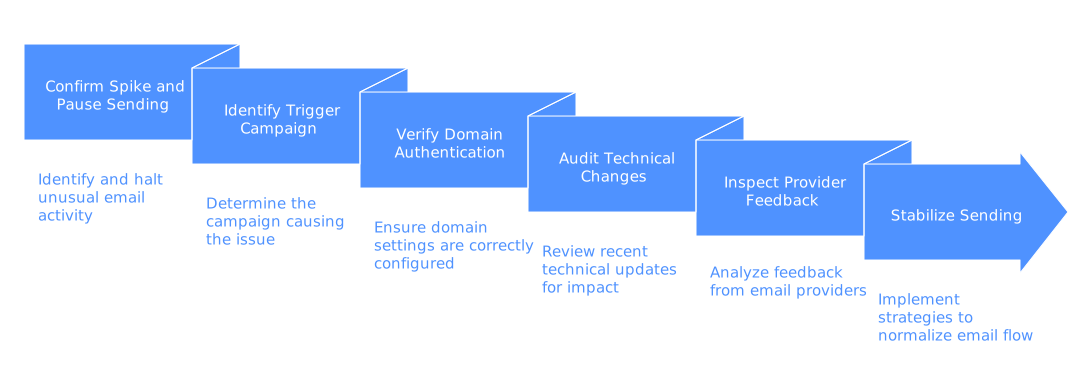
Step 1: Confirm the spike and pause risky sending
Begin by verifying that you’re looking at a genuine spike in complaints rather than a minor fluctuation. Facts are crucial before taking action.
Access the campaign report that triggered the alert in Mailchimp. Find the Abuse reports number for that campaign and for your recent average. Record the date, subject, audience, and from address. Compare these results to your last five similar campaigns in terms of audience size, content, and sending time. If your complaint rate has risen dramatically above the usual baseline, treat this as a true spike.
Pause all scheduled bulk sends for 24–48 hours while you investigate. If transactional emails go out through a separate Mailchimp stream, you can continue sending those. Avoid deleting data or making hasty configuration changes at this stage. Document all changes you make and the reasons, as untracked adjustments can make the root cause harder to identify and delay recovery.
Step 2: Identify the trigger campaign and its acquisition source
Next, connect the spike to a specific change or campaign. Focus on the details of the offending send.
Check which audience was used for the campaign. Review how new contacts have been added within the last 30 days, covering site-based forms, checkout opt-ins, and any data imports. If recent imports occurred, confirm you have consent records. Sudden imports or data uploads often lead to complaint spikes. If you find a questionable import, tag those contacts and exclude them from future sends while investigating further.
Examine the list of unsubscribes and complaints for the campaign. Look for address patterns such as role accounts (e.g., info@, sales@) or obvious typographical errors, both are indicators of weak signup controls or automated signups. If you spot a high proportion of role accounts, review your forms and consider suppressing these addresses going forward. Avoid messaging purchased or appended data; those lists frequently result in higher abuse reports.
Step 3: Verify domain authentication and alignment
Misconfigured authentication can trigger aggressive filtering and prompt recipients to mark your mail as spam. Confirm that your domain is set up correctly.
In Mailchimp, go to Website > Domains or your domain settings. Confirm that you are sending from a verified domain and that DKIM signing is enabled. Mailchimp usually requires you to add CNAME records (for DKIM) and a TXT record (for SPF) to your DNS. Double-check that your SPF record includes Mailchimp and hasn’t exceeded the lookup limit. The domain shown in your email (the visible From address) should match the domain used in the DKIM signature (“d=” parameter); misalignment here breeds distrust and can inflate spam complaints.
Check your DMARC policy. If you’ve recently moved to a stricter policy like p=quarantine or p=reject without full alignment between SPF, DKIM, and the domain, you could see a drop in delivery and a rise in recipient frustration. Examine RUA reports for spikes in failed alignment and work on resolving alignment before adjusting policy strength. For detailed advice, review our guide to SPF configuration and multi-domain strategies.
Step 4: Audit technical changes that alter mailbox trust
Unintentional technical changes often precede complaint spikes. Trace any adjustments made immediately before the spike occurred.
List recent changes to your From name, Reply-To address, tracked URL domains, and link formats. Did you introduce a new link shortener or redirect? Many email gateways distrust public link shorteners, swap in your own branded tracking domain instead. Validate that Mailchimp’s link tracking uses a domain you control, and that HTTPS works with a valid SSL certificate. Broken links or mixed-content warnings can look suspicious to filters and recipients alike.
If your emails began landing in spam during this period, check out common causes of Mailchimp campaigns being filtered as spam. Filtering plus poor inbox placement increases the likelihood that recipients report your message as spam. Remedying the technical cause relieves inbox pressure and helps drive down complaint risk.
Step 5: Inspect mailbox provider feedback and new sender rules
Major email providers offer invaluable feedback on how they perceive your domain and emails. Their data can confirm the true source of issues.
Open Gmail Postmaster Tools for your domain. Examine metrics for spam rate, domain reputation, and recent authentication errors. Pinpoint the date where negative changes appeared and align it with your campaign activity and any DNS amendments. For Outlook and Yahoo, rely on seed inbox results and delivery logs to spot placement changes. If your domain’s reputation is suffering, temporarily reduce send volume until it recovers. Strive for steady, predictable mail flow while resolving bigger issues.
Mailbox provider standards evolved markedly in 2024 and are expected to get even stricter. Standard expectations now include robust authentication, single-click unsubscribes, and persistently low complaint rates. If you need a refresher on current requirements and why emails bounce, review our overview of new delivery rules for 2025. Aligning your setup to these rules improves inbox placement and complaint management.
Step 6: Stabilize sending with hygiene and warm-up
With initial diagnosis complete, take steps to stabilize your sending while your domain recovers.
Suppress from your list first those contacts added through unverified imports, obvious role accounts, and domains that return frequent spam complaints. Enable double opt-in on all public registration forms. Add CAPTCHA or honeypot fields to weed out bots. Test your unsubscribe link and ensure it's easy to locate, otherwise, recipients are more likely to use the spam button instead.
To restore positive reputation with mailbox providers, warm up your sender domain. A warming network like Mailwarm simulates organic inbox activity by sending and exchanging emails between your account and Mailwarm's maintained accounts. This process includes opens, replies, and moving your mail out of spam folders to retrain providers that your domain sends wanted mail. Connect your mailbox, start with a low daily volume, and gradually ramp up. Keep marketing sends light and consistent until complaint counts have normalized. Remember, this technical warm-up only supports genuine permission and engagement, it doesn’t replace them.
Troubleshooting, alternatives, and when to escalate
If high complaint rates persist after these steps, work through this list and consider escalation where necessary:
- Shared IP effects: Mailchimp sends from shared IP pools you can't control, but your domain’s reputation still matters. Make sure DKIM uses your own domain and always send from your branded address rather than a generic one.
- Blocklist checks: If your sending or tracking domain appears on a major blocklist, high complaints can follow. Change the affected domain and request removal from the blocklist. For a step-by-step process, see our blacklisting recovery playbook.
- Forwarders and aliases: Email that’s forwarded often loses unsubscribe headers, driving up spam reports. Encourage direct delivery and test with real end-user inboxes, not forwarding addresses or aliases.
- Corporate gateways: Security filters may rewrite your links or flag mail that appears spoofed. Keep authentication aligned, avoid link shorteners, and ask corporate recipients to whitelist your sending domain if feasible.
- Hard bounces rising: An uptick in invalid addresses signals poor collection practices. Disable weak forms, purge obvious typos, and re-verify recent address additions before your next send.
- DMARC rollouts: Adopting a stricter DMARC policy changes message routing. If complaints surged after moving to p=reject, double-check alignment across all legitimate sources sending as your domain.
- Contact Mailchimp Support: If you suspect the complaint spike comes from a Mailchimp platform change, open a support ticket. Provide campaign IDs, relevant dates, and DNS screenshots. Ask if your domain experienced a block or temporary rate limiting.
If none of these measures resolve the issue, implement strict containment: send only to contacts who confirmed recently and have interacted within the last few weeks. Keep send volumes small and consistent, and continue daily warm-up actions. Monitor each campaign's complaint rate to quickly detect changes. Stable small sends help your reputation recover faster than alternating between inactivity and large bursts.
Conclusion: Make complaints rare, not random
Sudden spikes in Mailchimp spam complaints rarely occur without warning, they often follow a domain adjustment, subscriber list change, or policy update. In this guide, you learned to verify a spike, trace the source, resolve technical and policy missteps, and restore the health and trustworthiness of your sending practices.
Maintain strict DNS alignment, keep your sign-up forms robust and free from bot sign-ups, and send at consistent, appropriate volumes. If you need technical warm-up to restore inbox placement, use a reputable solution that delivers real, positive engagement. These combined efforts will safeguard your sending domain and support your Mailchimp campaigns.
For expert analysis, consider reaching out to deliverability experts such as those at MailAdept. They can audit your Mailchimp configuration, DNS settings, and warm-up processes to provide concrete recommendations and next steps.
FAQ
What is a spam complaint spike in Mailchimp?
A spam complaint spike occurs when there is a sudden increase in users marking your email as spam. This can negatively affect your email deliverability as mailbox providers may distrust your messages more.
Who should use this guide on managing spam complaint spikes?
This guide is ideal for operations leads, CRM managers, and technical marketers who manage a Mailchimp account or sending domain. These roles will benefit from the actionable steps to diagnose and manage spam complaints.
What initial steps should you take when noticing a spam complaint spike?
Verify if the spike is genuine by comparing it with past campaign metrics. If confirmed, pause scheduled bulk sends to prevent further issues while investigating the root cause.
Why is domain authentication important in email marketing?
Proper domain authentication with DKIM and SPF helps ensure that your emails are trusted by recipients' mailbox providers. Mismatched authentication settings can lead to emails being marked as spam.
How do recent changes in mailbox provider standards affect email delivery?
Mailbox providers have become stricter, requiring robust authentication, easy unsubscribe options, and low complaint rates. Adhering to these standards helps maintain good email deliverability.
What role does double opt-in play in email list hygiene?
Double opt-in ensures that the subscribers who sign up for your emails have confirmed their interest. This can help reduce spam complaints as it verifies genuine interest from subscribers.
How can you restore your domain's reputation after a spam complaint spike?
Suppress questionable contacts, enable double opt-in, and use a domain warm-up process. Gradually increase send volumes while maintaining consistent, light-marketing sends.