
Best Cold Email Templates for Prospecting in 2026: Prioritizing Deliverability and Meaningful Replies
Email templates can speed up your prospecting process. However, email filters in 2026 have evolved to quickly detect patterns, evaluate sender reputations, and assess engagement levels. For this reason, your template strategy must begin with maximizing deliverability. Make sure to warm up your inbox, keep your email volume consistent, and send authentic, human messages.
Mailwarm provides essential support for these deliverability efforts, interacting with a network of over 50,000 active mailboxes. These mailboxes open emails, reply, rescue messages from spam, and tag them as primary, all of which help build a strong sender reputation over time. These interactions are purely technical, designed to prepare your inbox for genuine prospecting outreach.
Once your inbound reputation is established, you can use the templates below. Each is concise, plain, and approachable, with minimal formatting. Avoid link-heavy messages or image blocks, plain text still achieves the best results for a first touch.
As of February 2026, Mailwarm has become a fully advanced deliverability infrastructure platform. The system now includes:
• Centralized multi-account and multi-domain management
• Cross-provider warm-up with intelligent distribution
• Real-time deliverability and sender reputation monitoring
• Spam score analysis per provider (Gmail, Outlook, etc.)
• Engagement with natural thread replies
• Automatic spam recovery and inbox placement correction
• Gradual ramp-up algorithms with adaptive volume control
• Continuous blacklist detection and reputation protection
• Full authentication diagnostics (SPF, DKIM, DMARC, MX)
• Performance analytics built for agencies and large-scale outreach teams
Mailwarm is engineered to maximize inbox placement, safeguard domain health, and scale safely, making it a complete email warm-up ecosystems available today.
Cold Email Template for Prospecting in 2026: A Short, Low-Friction Opener
Good Subject Options
- Quick question for {{first_name}}
- Idea for {{company}} this quarter
- {{company}} × {{your_company}}?
Template
Hi {{first_name}},
I noticed {{brief, factual observation}}. It reminded me of a simple fix we use.
Would a 7-minute chat be useful this week?
If not, no worries. I can send details instead.
– {{your_name}}
{{title}} | {{your_company}}
{{phone_or_calendly_one_link}}
Why it works: This message is short and polite. It avoids aggressive claims and limits links to one, trusted destination.
Follow-up Cold Email Template for Prospects Who Opened but Didn’t Reply
Subject
Re: quick question for {{company}}
Template
Hi {{first_name}},
Circling back in case my note got buried.
Teams like {{peer_example}} used our approach to cut manual steps.
Worth a brief call, or should I send a one-page summary?
Thanks for considering,
{{your_name}}
Tip: Continue the existing thread. Conversations with context feel less intrusive and more familiar.
Breakup or Opt-Out Friendly Cold Email Template That Preserves Sender Reputation
Subject
Last try, then I will close the loop
Template
Hi {{first_name}},
I do not want to crowd your inbox.
Should I close this thread, or send that one-pager?
If this isn’t relevant, reply
noand I will remove you.Appreciate your time,
{{your_name}}
This approach reduces friction and signals respect. Providing a simple opt-out reduces future complaints and helps maintain your sending reputation.
Referral-Based Cold Email Template for Prospecting in 2026 When You Lack a Direct Contact
Subject
Who owns {{topic}} at {{company}}?
Template
Hi {{first_name}},
I am trying to reach the person who handles {{topic}} at {{company}}.
Could you point me to the right teammate?
I can keep this to one short email.
Thanks in advance,
{{your_name}}
Clarity helps gatekeepers decide quickly. A focused, polite request often gets a straightforward response or forward. Always keep your initial ask minimal.
Trigger-Based Cold Email Template for Prospecting in 2026 After a Public Change
Subject
Note on {{trigger_event}} at {{company}}
Template
Hi {{first_name}},
I saw the recent {{trigger_event}}. Congrats on the move.
Teams often revisit {{related_process}} after that step.
Would a quick teardown help you compare options?
Happy to share examples from similar setups.
– {{your_name}}
Make sure to cite only public and relevant triggers; avoid referencing any sensitive information. Timely, factual context increases relevance without requiring deep personalization.
How to Adapt Cold Email Templates for Prospecting in 2026 While Protecting Sender Reputation
- Warm new domains and inboxes before you start prospecting. Increase sending volume gradually.
- Keep your sending patterns steady and consistent. Sudden spikes alert spam filters.
- Use a maximum of one or two plain links, ideally pointing to your domain or a trusted calendar tool.
- Avoid attachments in initial outreach. Offer to send documents later if interest is shown.
- Write as you speak, use a natural voice and vary sentence structure.
- Keep your signature brief; skip heavy banners or promotional graphics.
- Respect opt-out requests promptly. Quick removals lower complaint rates.
- Authenticate your domain. Check SPF, DKIM, and DMARC records with care.
If you anticipate sending higher volumes of emails, it’s essential to study and implement disciplined ramp-up strategies in order to maintain your delivery reputation. This guide to ramping up cold email sending outlines safe daily steps and pacing strategies.
Preflight Checklist for Sending Cold Email Templates in 2026 from New or Rested Domains
- Confirm inbox warm-up has been steady for several weeks.
- Check that authentication records are set up and passing alignment checks.
- Send internal test emails first to see where they land (inbox or spam).
- Keep your first outreach message under 120 words.
- Limit use of CC and BCC, as these often look automated to filters.
- Send in clear, plain text. Avoid complex HTML on your first contact.
- Stick to reasonable daily sending caps and hold these steady for at least a week.
- Review how replies are handled, quick response to real engagement helps your sender reputation.
If you notice soft bounces or rejections, review current sending rules and deliverability issues. This email bounce troubleshooting guide highlights common causes and how to fix them quickly.
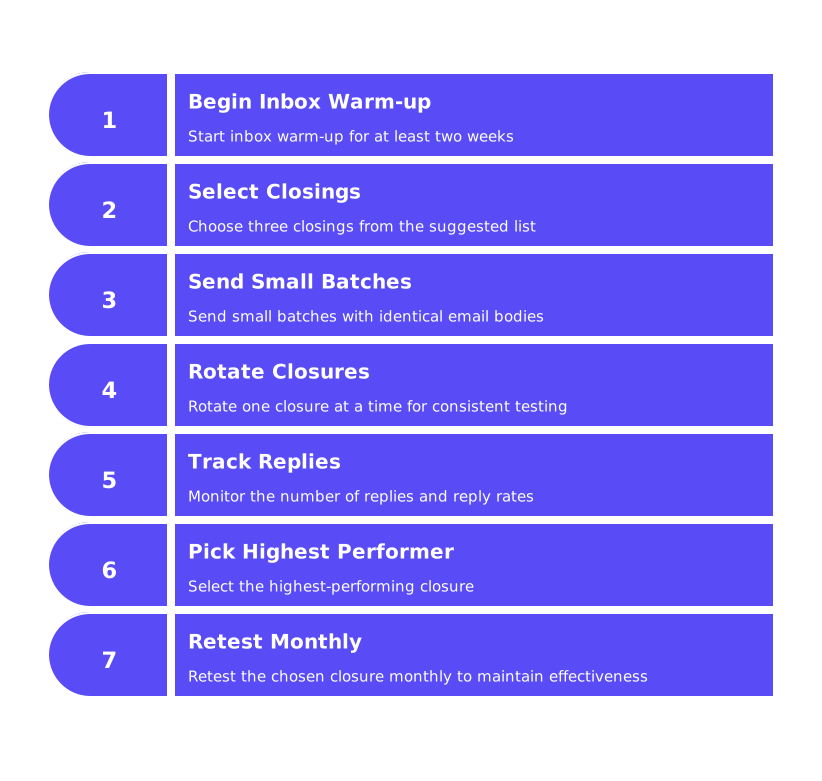
Cold Email Templates for Prospecting in 2026 That Improve Inbox Placement and Real-World Outcomes
Effective templates still depend on strong inbox placement. Healthy deliverability is the key to real conversations. For an in-depth review, see the benchmark report on cold email inbox placement rates and practical best practices. It complements these templates and offers critical steps for staying out of spam.
Remember, every sentence is a signal. Short, credible messages look human and offer real value. Keep your requests small and simple. Make next steps clear and easy, then give prospects space to respond.
Pro Tips for Using These Cold Email Templates in 2026 Without Triggering Filters
- Rotate several subject lines throughout your campaign. Avoid repeating the exact same subject all month.
- Switch out a few words in your message each time for natural variation.
- Stagger your sends throughout the day for consistent activity patterns.
- Monitor responses regularly. Fast recognition of engagement strengthens your sender reputation.
- Avoid using spammy phrases. Stick with making claims that are specific and modest.
- Track subtle indicators like thread location, reply rates, and complaint noise for ongoing tuning.
One final guardrail: Proper inbox warming is essential before scaling your outreach. Even the best templates can’t save a cold domain. Consistent warm-up establishes your sending trust and stability.
Use These Cold Email Templates for Prospecting in 2026 to Start Real Conversations
With these five field-tested templates and a clear deliverability plan, you’re ready to start meaningful conversations. Begin small, keep your tone human, and build momentum gradually. Always warm up your inbox before launching a campaign, it paves the way for genuine replies and fewer deliverability surprises.
Start a Mailwarm warm-up session before your next outreach effort. Prioritize quality and reputation today for better results tomorrow.
FAQ
How can I improve my email deliverability in 2026?
Focus on warming up your inbox gradually and maintaining consistent sending patterns. Mailwarm can assist in enhancing deliverability by engaging its network to build your sender reputation.
What elements should I include in a cold email template?
Keep your email short, direct, and free of heavy formatting or excessive links. A single, legitimate calendar link is often enough to maintain credibility without tripping spam filters.
Why is it important to personalize email subject lines?
Personalized subject lines reduce the risk of emails being flagged as spam by showing genuine intent. A professional tone matched with company-specific references ensures higher open rates.
What happens if I send too many emails too quickly?
Rapid, high-volume sending can alert spam filters, damaging your sender reputation and reducing inbox placement. Gradual, controlled warming of your email domain is crucial for avoiding this pitfall.
How do I handle recipients who don't respond to my emails?
A follow-up email that references previous interactions can jog the recipient's memory without feeling intrusive. Offering simple choices, like a short summary or call, can often reignite interest.
Should I use images and attachments in my first email?
It's best to avoid images and attachments in initial outreach, as they can trigger spam filters. Focus on a well-crafted plain text message and offer additional materials upon request.
How does domain authentication affect email delivery?
Proper domain authentication via SPF, DKIM, and DMARC is non-negotiable; it verifies sender identity and aligns with email clients' security checks. Lack of authentication raises red flags and leads to poor inbox placement.
What role does Mailwarm play in email prospecting?
Mailwarm aids in email prospecting by fostering interactions that bolster your sender reputation. It helps rescue emails from spam and ensures they're marked as primary while you prepare for outreach.
Why is avoiding spammy phrases critical in cold emailing?
Using spammy language raises suspicion among spam filters and can tank your email engagement efforts. Stick to modest claims and minimize jargon to maintain trustworthiness.