
Cold Email Delivery Rate: Definition and Difference from Inbox Placement
Cold email delivery rate measures the proportion of emails that successfully reach a recipient’s server. This metric stops at the point of server acceptance and does not consider what happens afterward, such as whether the email lands in the inbox or the spam folder. Inbox placement answers that next question: it reveals where accepted emails are placed within a mailbox, be it a primary inbox or a spam folder. While these two concepts are related, they serve different diagnostic purposes. Delivery rate is shaped by sender infrastructure and domain reputation, forming the foundation of your outreach performance. Inbox placement, meanwhile, depends on trust and content signals within individual mailboxes. Track both metrics, but examine them separately. Use delivery rate to identify issues like bounces or blocks, and analyze placement data to uncover filtering actions taken by providers. Without successful email deliveries, efforts to ensure proper inbox placement cannot take effect.
What Constitutes a Good Cold Email Delivery Rate in 2026?
A robust delivery rate for cold email outreach in 2026 typically falls between 97% and 99%. Achieving this level means your authentication processes and domain reputation are in strong shape. “Acceptable” delivery rates hover between 95% and 97%. Anything below 95% should be considered a warning sign that needs immediate investigation. Delivery rates fluctuate based on factors like the age of the sending domain, the quality of email address sources, and the broader industry context. New domains often start with lower delivery rates, whereas mature, clean email programs generally exhibit higher rates. Keep this core rule in mind: Delivery Rate = 1 − Bounce Rate. Hard bounces cause more significant, rapid declines than soft bounces. Monitor both metrics weekly and configure alerts for any sudden drop greater than two percentage points. A small drop in delivery rates can be an early indicator of major problems, such as a compromised sender reputation or stricter email filtering.
Why Cold Emails Get Blocked or Bounced in 2026: What’s Changed?
Mailbox providers continually introduce new checks and filters. By 2026, technical alignment, authentication, and sender reputation are more important than ever. Common causes for blocked or bounced emails that you can address include:
- Missing or misconfigured SPF, DKIM, or DMARC records.
- Sending high volumes from brand new domains too quickly.
- Excessive hard bounces caused by low-quality or outdated lists.
- HELO or reverse DNS mismatches detected during SMTP handshakes.
- Sudden spikes in complaints or getting flagged by spam traps.
Study delivery rules and bounce codes to understand potential issues leading to delivery failures. For detailed guidance on the latest rejection patterns and prioritized fixes, refer to this comprehensive guide to why emails get bounced in 2026.
Email Authentication Best Practices to Boost Cold Email Delivery Rate: SPF, DKIM, and DMARC
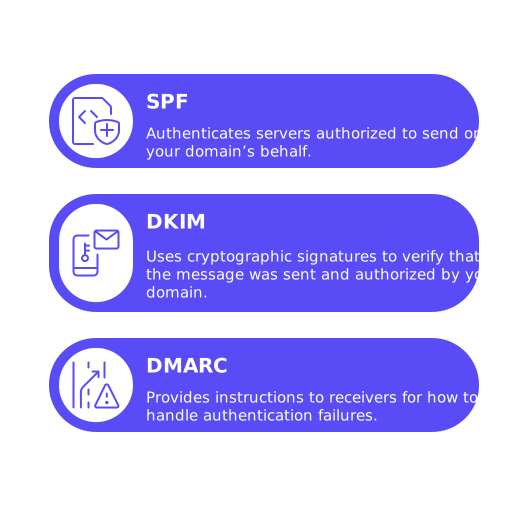
Email authentication protocols establish sender identity at the protocol level, and mailbox providers rely on these checks before allowing message acceptance. Proper configuration and ongoing alignment of the following three records are essential:
- SPF: Authenticates servers authorized to send on your domain’s behalf.
- DKIM: Uses cryptographic signatures to verify that the message was sent and authorized by your domain.
- DMARC: Provides instructions to receivers for how to handle authentication failures.
For best results, use a dedicated subdomain specifically for cold outreach activities. Align your From domain with both DKIM and SPF records. Begin your DMARC policy with p=none to collect reports and monitor behavior; escalate enforcement once you confirm healthy results. Analyze aggregate DMARC reports to spot spoofing attempts or routing misconfigurations. Keeping your Domain Name System (DNS) simple and well-documented can help prevent confusion and errors. Removing outdated legacy records that contradict current routing settings is also crucial. While authentication fixes won’t repair a damaged list, they do eliminate major technical obstacles to delivery.
SMTP and Infrastructure Signals Impacting Cold Email Delivery Rate: HELO, rDNS, and TLS
Server-level identity is established during SMTP handshakes. Key trust signals at this stage include the HELO/EHLO identifiers, reverse DNS entries, and the proper configuration of TLS. Ensure your HELO hostname matches an actual, confirmed domain that you control. The reverse DNS should always resolve back to that same hostname. Keep your TLS certificates up-to-date and maintain consistency across all sending regions. Mismatches in these signals invite additional scrutiny and potential throttling. For a deeper exploration, this guide to HELO and sender reputation breaks down the technical handshake process. Clean protocol signals foster trust even before your actual message content is evaluated, a critical edge when sending in high-traffic periods.
Domain and Inbox Warming Strategies for Better Cold Email Delivery Rate
Establishing a positive reputation for new domains and mailboxes requires a period of gradual warming. Slowly ramp up daily email volume and encourage positive interactions with recipient mailboxes along the way. A specialized warm-up network, a system designed to gradually increase email sending volume to build sender reputation, performs these activities both at the protocol and mailbox levels. For example, Mailwarm executes coordinated sessions across more than 50,000 managed mailboxes, systematically opening messages, replying, moving emails out of spam, and marking them as important when relevant. These actions teach providers that your emails are both noticed and responded to. Remember, the aim of this process is to build technical credibility, not generate leads. The distinction is key for compliance and measurement.
Deliverability is earned through consistent, authentic signals over time.
If using a brand-new domain, extend your warming period before attempting to scale fully. Continue warming until delivery rates remain stable for several consecutive weeks and reactivate the process if you switch service providers or sending IPs.
As of February 2026, Mailwarm delivers advanced email warm-up at scale with multi-account control, multi-provider distribution, content warmup, real-time inbox and reputation tracking, provider-specific spam scoring, automated spam correction, adaptive sending algorithms, blacklist monitoring, and full authentication verification (SPF, DKIM, DMARC). It’s built to maintain strong domain health and optimize deliverability performance over time.
Sending Best Practices and List Hygiene for Protecting Cold Email Delivery Rate
Even optimal infrastructure requires careful operational discipline. Safeguard your delivery rate by adhering to these best practices:
- Control volume: Gradually increase sending on a daily basis; avoid abrupt surges.
- Validate sources: Screen email addresses for valid syntax and working domains before every campaign.
- Cull hard bounces immediately: Remove recipients from your list after a single hard bounce.
- Deal with soft bounces: Retry delivery after a delay, then suppress addresses after several failed attempts.
- Honor opt-outs: Implement a clear and simple process for recipients to unsubscribe.
- Avoid risky attachments: Use links to externally hosted files instead of attachments when possible.
- Segment infrastructure: Isolate cold outreach on its designated subdomain.
- Keep headers clean: Avoid misleading subject lines or inconsistent sender identities.
Following these principles reduces complaint rates and exposure to spam traps, supporting ongoing acceptance by providers.
Measuring and Troubleshooting Cold Email Delivery Rate with Reliable Diagnostics
Define a weekly review routine covering both protocol diagnostics and mailbox monitoring. Start by reviewing sender logs and categorizing bounces into hard and soft; then segment results by provider to detect localized issues. Analyze DMARC aggregate reports for authentication misalignment or spoofing incidents. Check real-mail traffic for SPF and DKIM pass rates. Take advantage of postmaster dashboards from major providers to monitor rate limits and delays. Perform live mailbox tests across top email service providers to monitor and assess how your emails are being received and categorized. Track acceptance rates and folder placement trends on a daily basis when scaling, or weekly for ongoing stability. For advanced insights, consult these resources on cold email inbox placement, benchmarks, and best practices. Carefully document every change you implement and watch for corresponding shifts in your metrics, if no improvement appears, you may need to investigate alternative causes.
Practical Checklist for Raising Your Cold Email Delivery Rate This Month
- Ensure SPF, DKIM, and DMARC authentication are correctly configured and aligned with your sending domain.
- Correct any HELO and reverse DNS mismatches for accurate forward and reverse resolution.
- Warm every mailbox with steady, legitimate interactions across different providers.
- Gradually increase sending volume for new domains and monitor acceptance by individual provider.
- Immediately remove hard-bounced emails and suppress email addresses with persistent soft bounces.
- Maintain easy-to-use opt-out options and honor all unsubscribe requests universally.
- Inspect sender logs daily during ramp-up phases, then weekly after reaching stability.
- Educate your team on email acquisition, validation, and suppression practices.
If your delivery rate plateaus or drops, revisit the bounce codes and protocol setup first, then repeat mailbox placement tests. Adjust and cycle through this process until your results improve for durable, long-term gains.
When to Change Domains or Infrastructure for Improved Delivery Rate
In some cases, a domain’s negative reputation is too deeply entrenched to fix. If persistent issues remain after thorough remediation, it may be time to move to a new subdomain. However, make this transition only after addressing the original root causes, otherwise, you risk recurring issues, such as a poor delivery rate, on your new domain as well. Plan your switch by running both the old and new routes in parallel to allow for replies and threading continuity. Monitor delivery and acceptance metrics on both sides until the new setup is fully established. Diligently record each step for transparency and future audits.
Final Thoughts on Cold Email Delivery Rate and Next Steps
Consider delivery rate your principal early warning system. Prioritize authentication best practices, strong SMTP signals, and consistent list hygiene. Warm your domains and inboxes methodically, and keep detailed records of all changes. For further clarification on current rules, consult up-to-date bounce explanations for 2026 and this resource on HELO and sender reputation. Combine these with the latest cold email inbox placement benchmarks to create a reliable playbook.
Need Expert Review of Your Cold Email Setup?
Get an insightful, practical review from our deliverability specialists. Initiate a conversation with Mailadept and put uncertainty to rest.
FAQ
What is the difference between email delivery rate and inbox placement?
Email delivery rate tracks how many emails reach a recipient’s server, but doesn't guarantee inbox placement. Inbox placement shows whether emails land in the inbox or spam—crucial for message visibility.
What defines a good cold email delivery rate?
A strong delivery rate in 2026 is between 97% and 99%. Anything under 95% is problematic, pointing to infrastructure or authentication failures needing immediate action.
Why might cold emails be blocked or bounced?
In 2026, issues like misconfigured authentication records or outdated lists are main culprits. Without addressing these, your emails face bounces and blocks from strict mailbox filters.
What role does Mailwarm play in enhancing email delivery rate?
Mailwarm uses a system of managed mailboxes to gradually build sender reputation and credibility, ensuring emails are more likely recognized in inboxes rather than spam.
How can email authentication improve delivery rates?
Proper SPF, DKIM, and DMARC configurations build trust with mailbox providers. They verify sender identity, cutting down on spam rejections and boosting successful deliveries.
Is warming up a new domain necessary for cold emails?
Absolutely. Without gradual warming, abrupt high-volume sends from new domains invite scrutiny and filtering, stalling your email campaigns before they gain traction.
What are the consequences of poor list hygiene in cold emailing?
Poor list hygiene leads to high bounce rates and damages sender reputation, often resulting in blocked emails. Regularly clean and update lists to maintain deliverability.
When should you consider changing your email domain for better delivery rates?
If deep-seated reputation issues persist despite remediation efforts, a new domain might be needed. However, fix underlying issues first, or you'll merely transfer the problem.
How critical is it to monitor email metrics regularly?
Regular monitoring is essential to catch and resolve problems early. Neglecting this can lead to delivery disruptions and reputation damage—both costly mistakes.