
Why Gmail Deliverability Needs a Proper Warm Up
Gmail closely evaluates sender reputation with every message it receives. If your domain or inbox is new and lacks sending history, it often triggers filtering mechanisms, making it harder for your emails to reach the inbox. The warm up process helps establish a trustworthy reputation through safe, human-like interactions before you begin large-scale outreach.
Think of warming up as training signals for Gmail: actions like opens, replies, and removing messages from the Spam folder let Gmail know your emails are valued. When executed correctly, this gradual ramp-up minimizes deliverability issues as you scale your sending volume.
Warming up isn’t just a quick fix, it's a strategic approach to building a strong sender reputation before your campaigns matter most.
Check out our complete guide for efficient email warm up.
How to Judge a Gmail Warm Up Tool
- Realistic activity: Simulates opens, threaded replies, and the application of positive labels in a way that appears natural.
- Spam rescue: Moves emails from the Spam folder back to Primary or Inbox to restore sender reputation.
- Network quality: Operates with active, well-maintained mailboxes that ensure ongoing quality.
- Gradual ramp: Automates daily sending increases with clear per-day caps and built-in pauses.
- Gmail focus: Mimics Gmail-specific behaviors such as tab sorting, labeling, and threading.
- Transparent logs: Provides verifiable, clear reporting of all actions directly within your inbox.
- Safe automation: Uses secure IMAP/API connections and randomizes activity patterns to avoid detection.
Note: Warming up doesn't eliminate the need for authentication. Ensure SPF, DKIM, and DMARC records are configured before beginning, use a dedicated sending subdomain when suitable, and send simple, transactional content in your early messages.
Tool #1: Mailwarm
Ideal for teams seeking a curated, Gmail-optimized network with minimal setup effort.
Mailwarm specializes in helping inboxes establish trust through consistent, positive interactions. It connects your mailbox to a network of over 50,000+ actively maintained accounts, ensuring reliable and ongoing activity.
What Mailwarm Actually Does
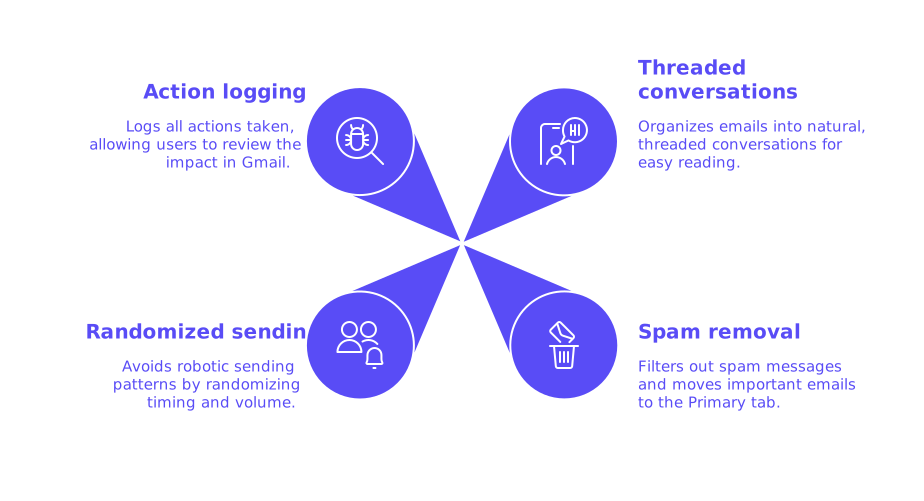
- Opens your emails and replies using naturally threaded conversations.
- Removes messages from Spam and places them in the Primary tab where appropriate.
- Randomizes timing and volume to avoid robotic sending patterns.
- Logs all actions so you can review the impact directly in Gmail.
Mailwarm creates technical engagement to generate steady positive sending signals, so your future campaigns face fewer Gmail filters' flags. It's particularly valuable before launching cold outreach, sales sequences, or notifications from a new domain.
Mailwarm is not just an email warmup tool, it’s a deliverability system.
Every plan includes access to an email deliverability expert to help you fix what actually impacts your inbox placement.
That’s why it’s priced higher, you’re paying for results, not just a tool.
Typical Workflow
- Configure domain authentication (SPF, DKIM, DMARC) and verify DNS.
- Connect your Gmail or Google Workspace inbox to Mailwarm.
- Begin with low daily message volumes, ramping up gradually over weeks.
- Monitor logs and mailbox folders for improved Primary placement.
- Once a stable trend is achieved, begin your real outreach with modest volumes.
Mailwarm is suitable for startups launching a new domain, sales teams transitioning to Google Workspace, and senders who have been recently flagged as spam and require a systematic reset.
Tool #2: lemwarm
Great for lemlist users wanting to manage warm up and outreach from one platform.
lemwarm provides reply threads and rescues emails from the Spam folder, leveraging a network integrated with the lemlist platform. If your outreach is already managed there, this process is seamless and user-friendly.
Highlights
- Unified login for both outreach and warming up.
- Automatically increases daily volume with built-in recommended limits.
- Performs inbox actions that appear organic to Gmail’s algorithm.
Take a conservative approach during initial ramp-up, as Gmail responds better to slow, steady activity rather than sudden spikes, even when using an integrated platform.
Tool #3: Warmbox
Best for users needing precise control over schedules and messaging styles.
Warmbox connects through IMAP or API access, allowing for in-depth customization of warm up cadences, message templates, and reply behavior. It’s popular among teams aiming for a finely tuned, unique schedule.
Highlights
- Fully customizable ramp plans per inbox.
- Threaded reply simulations for authentic email traffic.
- Spam rescue features with auditable log reports.
Use a variety of subjects and neutral, non-repetitive content during the initial ramp. Repetitive messaging can be flagged by Gmail as synthetic activity.
Tool #4: Mailreach
Ideal for teams looking for both warm up automation and actionable deliverability insights.
Mailreach provides warm up features and an in-depth reputation dashboard, including deliverability checks and ongoing engagement monitoring, to help you assess when it’s safe to increase your sending volumes.
Highlights
- Automates opens, replies, and spam rescues for continuous engagement.
- Checks for DNS and configuration issues that could harm deliverability.
- Delivers transparent metrics to guide optimal volume increases.
Use the insight dashboard as a reference, but always validate improvements by testing Gmail inbox placement and monitoring your own results.
Before You Start: Gmail-Focused Checklist
- Ensure SPF and DKIM are published for all sending domains and subdomains.
- Implement DMARC with a policy that fits your current needs.
- Warm up new domains for several weeks before launching campaigns.
- Send neutral messages during ramp; avoid heavy use of links and images.
- Increase daily send counts incrementally; pause if you notice placement drops.
- Leverage Gmail’s built-in labels and archive features while evaluating results.
- Monitor Google's Postmaster Tools for deliverability trends, focusing on broader patterns rather than daily fluctuations.
If you encounter ongoing bounces or frequent spam foldering, review possible causes, such as authentication issues or list quality, and consider returning to a slower, more gradual warm up approach.
Common Warm Up Mistakes That Hurt Gmail Placement
- Skipping DNS setup: Gmail expects sender authentication to be in place from the start.
- Ramping too quickly: Rapid increases in volume are viewed as suspicious by filtering systems.
- Avoid using sales-oriented copy during warm up; opt for straightforward, concise content.
- Ignoring spam folder signals: If the number of rescues continues to rise, slow down your ramp up.
- Stopping your warm up program too soon: Maintain a steady, ongoing baseline even after you start regular sending to protect your reputation.
Remember, successful warm up is not a sprint. Continuously running a modest program in parallel with live campaigns will help sustain your inbox placement over time.
Which Warm Up Tool Should You Choose?
If a curated network that's specifically designed to work well with Gmail is a priority, consider Mailwarm. If you prefer an all-in-one platform for both warming up and outreach, lemwarm is a great option. Warmbox offers precise schedules with granular controls for finely tuned operations. If you are looking for a tool that offers insights on email health along with warming up features, Mailreach is worth considering.
Whichever option you select, patience is crucial. Begin early, keep your daily volumes manageable, and track actual inbox placement in Gmail, not just software dashboards, for the clearest picture of your progress.
Final Take
Gmail deliverability improves when you prioritize reputation building over shortcuts. The warm up tools discussed here provide the foundation for steady, positive activity to enhance your sender standing. Choose the workflow that suits your needs, ramp prudently, and keep your warm up process running in the background as you grow your outreach.
Need a second opinion on your Gmail warm up plan? Experts at mailadept, a leader in the field of email deliverability, are ready to assist. A quick consultation today can save you weeks of troubleshooting down the road.
FAQ
Why is warming up a new email domain necessary?
Warming up a new domain is crucial as it establishes your sender reputation with Gmail and other email clients. Without this process, your emails are more likely to end up in the spam folder, disrupting communication and harming your outreach efforts.
Can I skip DNS setup if I'm in a hurry to start emailing?
Skipping DNS configuration like SPF, DKIM, and DMARC risks gmail flagging your emails as suspicious. Rushing to send without proper setup damages sender reputation, making recovery lengthy and costly.
Why shouldn't I increase my sending volume quickly during warm-up?
A rapid increase in sending volume is a glaring red flag for spam filters. This haste can escalate issues faster than you can solve them, leading to potential blacklisting and further damaging your email marketing ROI.
Is it necessary to continue the warm-up process after starting regular campaigns?
Yes, stopping warm-up too early can lead to deteriorating deliverability. Maintaining a consistent baseline helps preserve your standing with Gmail, ensuring better inbox placement in the long term.
Are there consequences for ignoring spam folder signals during warm-up?
Ignoring spam rescue signals is akin to ignoring fire alarms—they indicate emerging reputation issues. Continuing as is without adjustment makes a bad situation worse, likely leading to a full-scale deliverability crisis.
Can I include sales-oriented content during the warm-up phase?
Including sales-oriented content is risky as it can be perceived as promotional spam during warm-up. Prioritize neutral and concise communication early on to build trust before ramping up sales messaging.
What are the risks of using repetitive content in warm-up emails?
Repetitive content screams automation, making it easy for Gmail algorithms to flag your account as spammy. Diversity in subjects and content is essential to simulate genuine, human-like interaction.
Should I rely solely on software dashboards to measure warm-up success?
Software dashboards can give false assurance; direct Gmail inbox placement offers real metrics. Prioritize real-world testing over digital assumptions to truly gauge your sender reputation.