
Why warm-up matters for a new domain
A brand‑new domain comes with no reputation, which means mailbox providers tend to treat it with caution. Sudden spikes in email volume or immediate cold outreach can raise red flags and trigger spam filters. Proper warm‑up ensures gradual, positive sending activity that builds trust with these providers.
Warm‑up isn’t about blasting out mass campaigns, it’s about carefully controlled sends and genuine interactions with trusted mailboxes. These authentic engagements teach filtering systems that your emails deserve inbox placement.
For a deeper context on the process and timing, you can refer to our comprehensive guide to email warm‑up. It pairs well with the steps detailed below.
Prepare the foundation: DNS and infrastructure
Set up and properly configure all essential technical records before sending your first message. This groundwork is even more critical at the start than your email copy or brand design.
Core records to configure
- SPF: Authorize only legitimate sending hosts. Keep your SPF record concise to limit DNS lookups, and flatten it if necessary.
- DKIM: Use strong cryptographic keys to sign outbound mail. Rotate these keys regularly as a best practice.
- DMARC: Start with a policy of
p=noneto monitor authentication results, then move to quarantine or reject once you’ve confirmed alignment and stability. - MX: Make sure your domain can receive mail, as certain providers penalize domains that ignore incoming replies.
- Reverse DNS and a consistent EHLO/HELO name: Present a clean, consistent identity during the initial SMTP handshake.
Domain and mailbox choices
- Use a subdomain such as outreach.yourbrand.com for email outreach to safeguard your primary domain.
- Warm up every mailbox that will send email, warming one inbox does not protect others.
- Send via a branded, real identity, and keep signatures simple and consistent throughout the process.
Warm‑up starts with building trust: ensure DNS alignment, maintain a clear sender identity, and always be able to receive replies.
A practical warm‑up plan
Numbers can be adjusted based on your sending setup. The goal is sustained, steady growth, not speed. Keep every message plain, human, and conversational in tone.
Week 1: Establish a baseline
- Send 5–15 emails each day from each warming mailbox.
- Spread sends throughout the day, not all at once.
- Respond promptly to any replies, ensuring conversations stay natural and brief.
Week 2: Grow with care
- Increase daily sends to 15–30 emails per mailbox.
- Prioritize responding and keep reply rates high. Start several new threads every day.
- Monitor for soft bounces or any throttling; if you notice these, pause volume increases.
Week 3: Prove stability
- Gradually scale up to 30–60 emails per day, per mailbox.
- Balance new threads with ongoing conversations.
- Validate inbox placement across different major providers.
Week 4: Prepare for production
- If placement remains good, scale up to 60–120 messages per day.
- Introduce a small segment of real outreach, while continuing the warm‑up in parallel.
- If emails land in spam or you spot delivery errors, hold volume steady before continuing any increases.
Never jump from zero to high scale in one day. Spam filters closely monitor not just volume, but also the consistency of sending behaviors.
Automated warm‑up that feels human
While manual warm‑up works, it’s time-consuming and difficult to maintain over weeks. Using an automated warm‑up network can greatly speed the process and remove the uncertainty.
Mailwarm connects your mailbox to a network of over 50,000 active, continually maintained inboxes. It simulates realistic engagement with your messages by replicating interactions such as opening emails, replying, marking emails as important, removing them from spam folders, and more. These activities improve sender reputation in a way that looks natural to mailbox providers.
This isn’t a typical marketing platform, the automated emails only exist for warm‑up and inbox placement improvement. Sales and marketing teams use this process before launching real outreach, with the tool gradually increasing volume based on ongoing performance metrics.
How to use a warm‑up network well
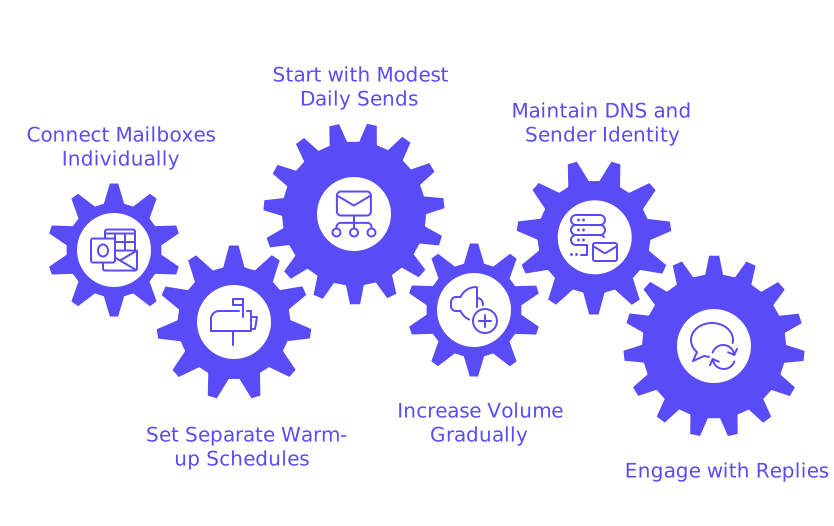
- Connect every sending mailbox individually; set separate warm‑up schedules for each.
- Start with modest daily sends and allow the tool to raise the volume as you accumulate positive signals.
- Keep DNS records and sender identity stable throughout the process, avoid changing providers mid‑stream.
- Allow replies to arrive and engage; don’t automatically archive warm‑up responses.
New domain or subdomain: pick the right lane
Launching from a new root domain carries greater deliverability risks. Using a subdomain allows you to build a strong sender reputation while minimizing any potential impact to your main company domain. This also enables you to set clear authentication for every sending stream.
- Use separate DKIM selectors for each individual sender or sending source.
- Ensure the From domain matches your DKIM signature domain.
- Keep display names consistent across mailboxes to avoid confusing recipients.
No matter your approach, consistency is key, spam filters reward predictable behavior and penalize erratic changes.
Signals to monitor during warm‑up
You don’t need advanced analytics to monitor your progress, keep an eye out for these straightforward indicators from mailbox providers:
- Inbox vs spam: Track delivery rates across several major providers using test (seed) addresses.
- Soft bounces: Bounce codes like 421 or 451 signal you’ve hit temporary sending limits, slow down immediately.
- Hard bounces: Codes in the 550 range mean absolute rejections. Stop increasing volume and thoroughly check your setup.
- Authentication: Make sure SPF, DKIM, and DMARC all pass on every single send.
- Spam complaints: Keep complaints near zero during the warm‑up period. Make opt‑out links simple and clear.
If inbox placement drops, pause any increases for a few days. Let performance metrics recover before raising your sending counts again.
Content that supports warm‑up
Each message you send should closely resemble organic, one-to-one correspondence. Keep emails short, plain, and free of excess images or tracking pixels, especially during the first weeks.
- Write in a natural, personal tone, steer clear of templates that are obviously email “campaigns”.
- Ask simple, genuine questions that naturally prompt replies.
- Maintain active threads by acknowledging responses with short messages.
- Use a simple, consistent signature and footer. Hold off on marketing banners in early days.
Replies are more valuable than opens in demonstrating engagement. That’s why automated reply generation during your warm‑up process is so beneficial to reputation.
Common mistakes that stall new domains
- Increasing sending volume too quickly during the first week.
- Mixing unverified, cold prospect lists into the warm‑up sends.
- Using multiple sending IP addresses before a solid reputation is established.
- Disrupting authentication by making DNS changes mid‑process.
- Ignoring soft bounce warnings and continuing to push volume.
- Stopping all activity for extended periods, then resuming suddenly at a high scale.
Treat the warm‑up as you would training for a marathon, consistency wins. Spikes or long gaps will only delay your success.
Troubleshooting when filters push back
Spam folder drift
- Pause increasing volume for 3–5 days.
- Focus on boosting reply rates while reducing the number of new threads.
- Reconfirm that all authentication settings and alignment are correct.
Rising soft bounces
- Lower daily volume by 30–50% for several days.
- Send in smaller, less concurrent batches.
- Ensure that your sending IP is not new or cold; that is, it should have a recent history of outgoing activity to establish trust and reduce suspicion.
Hard bounces or blocklist hits
- Stop increasing volume right away.
- Remove invalid or problematic email addresses and carefully verify your lists.
- Review DNS, reverse DNS, and HELO identity to ensure there are no mismatches or misconfigurations.
Only resume increasing your volume after several days of stable, healthy performance. Exercising patience will ensure a shorter recovery time if you hit issues.
Transition from warm‑up to real outreach
Once you’re steadily reaching the inbox at all major providers, begin to introduce real client or prospect emails gradually. Continue to run your warm‑up automation behind the scenes as you ramp up outreach.
- Initially, blend 10–20% genuine outreach with your daily warm‑up sends.
- Maintain this mix for a week while you monitor inbox placement and performance.
- Increase real outreach in small, gradual steps, never spike the number of live threads at once.
Maintain a minimal ongoing warm‑up activity long term to preserve domain reputation, especially through holidays, busy periods, or team absences.
Key takeaways for new domain warm‑up
- Ensure you have properly configured your DNS records, verified your sending identity, and established an email infrastructure before initiating any email sends.
- Always increase volume gradually in measured steps over several weeks.
- Engagement, especially replies, is critical; human-like activity is the goal.
- Use a reputable warm‑up network for efficient, accurate progress.
- Keep monitoring straightforward and act quickly at the first sign of trouble.
Follow these steps and your new domain will earn the trust of mailbox providers, making all future outreach more effective from day one.
Need a sanity check?
If you’d like expert feedback on your setup, consult with deliverability specialists who focus on email best practices daily. Share your DNS settings, logs, and warm‑up plans to receive actionable advice. Start a conversation at mailadept.
FAQ
What is the primary purpose of warming up a new domain?
Warming up a domain builds trust with mailbox providers, avoiding the pitfalls of being flagged as spam. It's about establishing a credible sending history through gradual and consistent email activity.
Why not just start sending with high email volumes immediately?
Jumping to high volumes too quickly can trigger spam filters, leading to deliverability issues. It's akin to shouting before you've learned to speak effectively; the approach is bound to backfire.
What are the consequences of ignoring soft bounce signals?
Disregarding soft bounces risks damaging your sender reputation, potentially leading to hard bounces or being blocklisted. This negligence can severely disrupt email campaigns and outreach efforts.
Why is using a subdomain recommended over a root domain for email outreach?
A subdomain minimizes risks to your primary domain's reputation. It allows for focused authentication and can be managed independently, safeguarding the main brand identity while developing a trusted sender profile.
How does warm-up prevent emails from landing in the spam folder?
Gradual send increases during warm-up teach spam filters to recognize emails as legitimate. It fosters positive engagement, reducing the likelihood of emails being filtered into spam folders.
What risks are associated with changing DNS settings during warm-up?
Mid-process DNS alterations can disrupt authentication, sending mixed signals to filters, and compromising deliverability. Consistency in DNS records is vital to maintain stable results.
Is it necessary to continue warm-up activities after starting real outreach?
Yes, maintaining minimal warm-up activity even post-launch helps sustain domain reputation. Abrupt halts or spikes can reverse the progress made, risking your emails being flagged or ignored.
How can poor email content affect the warm-up process?
Content that feels automated or too promotional can hurt engagement rates, sabotaging domain reputation. Authentic, conversational messages that prompt user interaction are essential for successful warm-up.