
The real ceiling behind “how many per day?”
There isn’t a fixed answer to the daily cold email cap, it’s a moving ceiling that reflects your risk tolerance. The number you can safely send depends on sender reputation, how far along you are in your warm-up, and the quality of your technical setup. Only increase daily sends when all key metrics stay positive. A gradual, measured increase always outperforms abrupt spikes.
Think of limits in two layers: per mailbox caps (protecting each sender’s distinct reputation) and per domain caps (protecting your main brand). Treat these both as thresholds you shouldn’t cross unless consistent, positive performance supports it.
Variables that set your daily limit
- Domain age and history: Newer domains require much smaller limits. Even established domains that have been dormant should start safely low.
- Authentication: SPF, DKIM, and DMARC records must be properly configured and aligned. Any misalignment rapidly reduces deliverability tolerance.
- Warm up status: Whether your mailbox has active, real engagement is crucial. Dormant or “cold” mailboxes need to ramp up slowly.
- Mailbox provider: Google Workspace, Microsoft 365, and others each enforce volume limits differently. Check the rules for your provider.
- List quality: Unknown users and special purpose accounts (referred to as role accounts) can trigger blocks. Always verify every recipient address before sending.
- Sending architecture: Keep cold outreach fully separate from transactional emails and support communications.
- Reply patterns: Mailboxes that receive consistent, natural replies can generally handle higher daily volumes.
Safe ranges by stage (per mailbox)
Use these benchmarks as starting points. Always adjust based on your own real delivery data and system status.
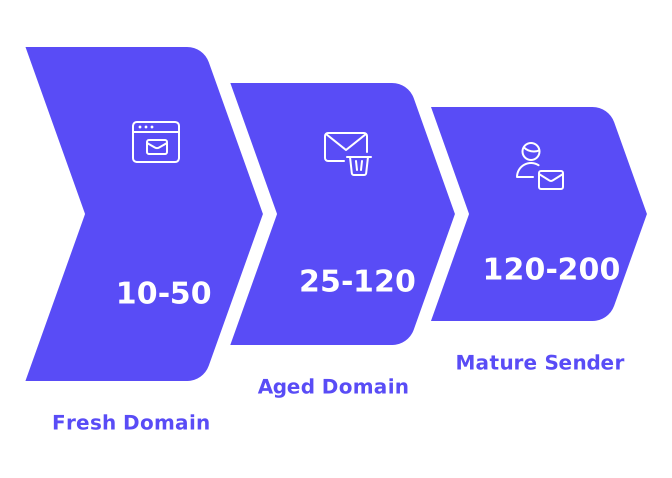
- Fresh domain, days 1–14: 10–50 emails per day. Increase very gradually. Pause growth if you see bounce rates climb.
- Aged domain reviving, days 1–21: 25–120 emails per day. Monitor closely for unknown users or delivery issues.
- Mature, healthy sender: 120–200 emails per day. Distribute volume across multiple mailboxes for best results.
These numbers assume you have verified DNS settings, authenticated sending, and ongoing warm-up interactions. If something slips, reduce your volume right away until issues are addressed.
Example ramp schedules you can copy
New domain, 21‑day ramp (per mailbox)
- Days 1–3: 10, 12, 15 sends. Monitor bounces daily.
- Days 4–6: 18, 20, 22 sends. Maintain genuine human replies.
- Days 7–9: 25, 28, 30 sends. Pause increases if you see delivery blocks.
- Days 10–12: 35, 38, 40 sends. Check spam report frequency.
- Days 13–15: 45, 45, 50 sends. Confirm DNS and authentication alignment.
- Days 16–18: 55, 60, 65 sends. Consider a rest day if needed.
- Days 19–21: 70, 80, 90 sends. Evaluate whether to add a second mailbox.
Aged domain, 14‑day ramp (per mailbox)
- Days 1–2: 25, 30 sends. Ensure no unknown users are on your list.
- Days 3–4: 35, 40 sends. Review sender reputation metrics.
- Days 5–6: 50, 60 sends. Vary send times for natural patterns.
- Days 7–8: 70, 80 sends. Check feedback or complaint inboxes.
- Days 9–10: 90, 100 sends. Keep message templates consistent.
- Days 11–12: 110, 120 sends. Re-validate DNS records.
- Days 13–14: 130, 150 sends. Begin using an additional mailbox.
Stay flexible. If your email delivery metrics (referred to as signals) degrade, pause sending for 48–72 hours and resume at the last successful sending volume.
Signal‑based stop rules
Set strict pause and stop rules. These play a huge role in protecting your domain reputation.
- Hard bounces above 2% in a day: Stop. Re-verify your sending list.
- Spam complaints of any kind: Stop. Assess your content, targeting, and technical setup.
- Unknown users above 1%: Stop. Improve your data sourcing process.
- Sustained soft bounces: Throttle sends. You might be hitting provider-imposed rate limits.
- Blocklist appearance: Stop all sending immediately. Resolve issues before resuming.
These thresholds are intentionally cautious. Prioritize your sender reputation above all else.
Avoid technical bottlenecks that cut volume
- SPF: Ensure your SPF record stays within DNS lookup limits. Use smart record flattening to prevent overflows.
- DKIM: Configure at least 2048-bit keys for domain signing.
- DMARC: Your “From” address should align with the domain signature. Routinely check and review DMARC XML reports.
- Return‑Path: Keep your return-path aligned with your domain, or clearly branded. Misaligned return paths raise deliverability flags.
- Subdomain strategy: Send cold outreach from a dedicated subdomain to isolate risk from your main brand.
Looking for a warm-up framework that’s aligned with these limits? Our 2025 guide to email warm-up walks you through structured, risk-aware warm-up workflows.
How warm up interactions raise your ceiling
Email providers reward accounts that demonstrate natural, consistent engagement. Warm-up interactions create these engagement patterns before large-scale outreach, making the process technical rather than promotional. This “primes the line” so your real messages go to recipient inboxes, not spam folders.
A tool like Mailwarm, for example, helps automate email warm-up processes by running interactions through a network of over 50,000 active mailboxes. These mailboxes open, reply to, and rescue messages from spam, marking them as primary inbox material. Warm-up ramps these activities gradually for sustained, realistic patterns, which in turn raises your safe sending ceiling.
Mailwarm’s system also rotates activity across different providers, so you’ll see blended feedback, mirroring the inbox diversity your real campaign will encounter.
Mailwarm goes beyond email warm up, it helps you reach the inbox. With expert guidance included, you don’t just see data, you fix issues.
We’re not the cheapest, because real email deliverability isn’t.
A practical formula for your max emails to be sent per day
Turn this shifting ceiling into a number that’s practical for you to manage:
Step 1: Start with a stage cap from the ranges given above.
Step 2: Assign a weekly reputation score between 0.4 and 1.0.
Step 3: Apply a safety buffer of 0.7.
Max per mailbox today = StageCap × ReputationScore × 0.7
For example, if your StageCap is 120 and your ReputationScore is 0.8, you get 67 emails per day. Always round down, hold that sending level for at least three days with no issues, then consider increasing the StageCap by 10–15% and recalculate.
For domains, add up the max sending volumes of each mailbox in good standing, then multiply by 0.8. This provides a safety net to protect your brand reputation if one of your senders encounters issues.
Distribution beats one heavy mailbox
It’s much safer to spread your sending volume across several mailboxes. This approach reduces individual risk, supports steadier reputation growth, and also gives you more flexibility for testing and scheduling. For example, five mailboxes each sending 80 emails per day is far less risky than one mailbox sending 400.
When to keep volume flat
- After making DNS changes. Hold steady for at least 72 hours.
- After any blocklist issue. Correct the root cause, then restart at low volume.
- After changing your email copy. Monitor reply rates for any shifts.
- Before launching a major campaign. Maintain stable volume for three “clean” days first.
Periods of stable sending volume can safeguard your email reputation, which can be visually represented as a curve due to fluctuations over time. Flat periods also make it easier to diagnose and address issues if they arise.
Common mistakes that crash caps
- Skipping warm-up steps even for old domains. Every domain needs recent engagement history.
- Mixing cold outreach with invoice or support emails. Always separate streams, ideally by subdomain.
- Sending through unverified tracking URLs or links. Make sure all hostnames involved are aligned and authenticated.
- Letting multiple teams share one mailbox. This hurts sender reputation and leads to inconsistency.
- Allowing SPF records to exceed DNS lookup limits. Consolidate or flatten as needed.
- Changing message templates too frequently during ramp-up. Keep content variables steady.
Your number today vs. next month
There is no one-size-fits-all global maximum. You only have your current maximum, which will grow as your reputation strengthens and technical setup proves stable. Think of these caps like speed limits that adapt to conditions.
The warm-up process prepares your email system for sending. Maintaining clean and accurate data ensures your emails reach their destination. And consistent, meaningful replies from recipients indicate that your messages are well received. Together, these drivers enable steady growth in your daily sending ceiling, minimizing surprises or setbacks.
If you need a robust, consistently maintained warm-up flow, Mailwarm provides replies, spam rescue, and primary tagging from a large network of mailboxes, enabling you to scale more safely.
Bottom line
Start slow. Only increase your sending volume when all delivery signals are healthy. Distribute campaigns across multiple mailboxes and prioritize domain reputation. Use a structured warm-up process for sustainable, real engagement patterns. Your daily sending maximum is a dynamic, living number, manage it carefully and intentionally.
Want feedback on your caps and warm-up strategy? Connect with deliverability experts for practical, personalized advice on risk-aware growth.
FAQ
How many cold emails can I safely send per day?
Your daily limit depends on domain age, sender reputation, and warm-up status. There's no universal number—it's more about managing risk by observing trends and adapting as needed.
Why is a gradual increase in email volume recommended?
Abrupt spikes jeopardize sender reputation, often leading to spam flags. Incremental growth allows for monitoring and adjustment, securing better long-term deliverability and engagement.
What should I do if I encounter a high bounce rate?
Immediately halt all email sending until you re-verify your contact lists. A bounce rate over 2% signals data issues that could harm your domain reputation if ignored.
Is it crucial to separate cold outreach from other emails?
Absolutely. Mixing cold emails with transactional communications can damage crucial delivery paths. Use dedicated subdomains to protect the integrity of different email streams.
How do warm-up interactions affect email delivery?
Engagement during the warm-up phase trains email providers to view your account as trustworthy. Consistent interaction patterns can mean the difference between inbox delivery and landing in spam.
Why is sender reputation more important than high volume?
Sender reputation governs your access to recipient inboxes, outweighing the need for large volumes. A tarnished reputation curtails future email efforts, regardless of volume potential.
What are the risks of changing email message templates frequently?
Constant template changes can disrupt engagement metrics, confusing filters and recipients. Maintaining steady content variables during ramp-up fosters trust and ensures consistent delivery.
Why monitor for spam complaints post-send?
Spam complaints are critical red flags indicating poor targeting or message content. Ignoring them can lead to domain blacklisting, crippling your future email efforts.