
Cold email bounce rate defined and how to calculate it
Your bounce rate indicates the percentage of emails that are rejected by recipients’ servers and serves as a key signal of your sender reputation. A high bounce rate signals to inbox providers that your emails may be risky or unwanted.
Calculate your bounce rate using this formula:
Bounce rate = (Bounced emails ÷ Emails sent) × 100
Monitor this rate at both the campaign and individual mailbox level. Differentiate bounces from replies or out-of-office responses. Comparing trends over days and weeks, rather than focusing only on momentary spikes, will give you a clearer insight into your email deliverability health.
Acceptable cold email bounce rate in 2026: practical targets
Compared to previous years, cold email programs are under stricter scrutiny with regard to deliverability standards in 2026. To avoid issues like blocking or throttling, keep your overall bounce rate as low as possible.
- Aim for <2% hard bounces, these represent permanent failures.
- Ensure your total bounces stay under 3–5% across all sends.
- Pause and investigate immediately if any campaign or send reaches 5% or higher.
These thresholds align with industry best practices for prospecting and outreach. Stay conservative, especially when warming up new domains or mailboxes.
Hard bounces versus soft bounces in cold email programs
Hard bounces: permanent failures
- The recipient’s mailbox does not exist.
- The domain has no valid MX records.
- Your sender address or IP is blocked at the recipient server.
As an email marketer, treat hard bounces as final. Remove these addresses from your mailing list at once.
Soft bounces: temporary failures
- The recipient’s server is busy or rate limiting.
- The message is deferred due to low sender reputation.
- The recipient’s mailbox is full or temporary policies block your message.
Soft bounces are usually related to volume surges or a weak sender reputation. Attempt to resend later, but do so in a controlled and measured way.
Root causes of cold email bounces you can fix now
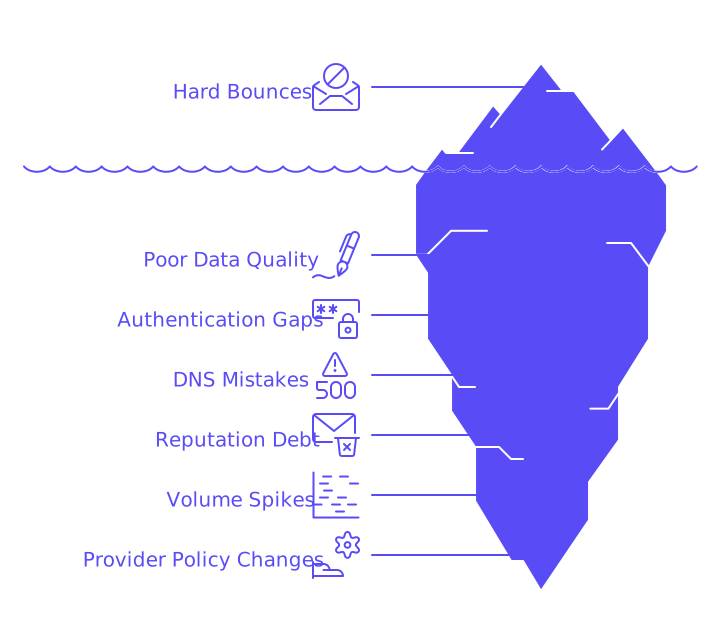
- Poor data quality: Typos, role accounts, catch-all domains, and disposable addresses cause many hard bounces.
- Authentication gaps: SPF, DKIM, and DMARC must be valid and properly aligned with your envelope sender.
- DNS mistakes: Missing MX records, broken CNAMEs, or PTR records that don’t match your HELO name create issues.
- Reputation debt: Newly created domains or mailboxes with no positive sending history are frequently deferred.
- Volume spikes: Sudden increases in your sending volume often trigger throttling and soft bounces.
- Provider policy changes: Major inbox providers update their filtering rules and thresholds regularly.
If you want to dive deeper into bounce reasons and recent policy adjustments, check our comprehensive guide to why emails get bounced and the latest delivery rules applicable in 2026. It covers common SMTP codes and what they mean for your campaigns.
Technical setup that reduces cold email bounce risk
Authenticate correctly from day one
- Publish SPF records, limit DNS lookups, and avoid broad “+all” usage.
- Sign all outgoing email with 2048-bit DKIM keys on your domain.
- Enable DMARC, at minimum with
p=noneand properly aligned identifiers.
Match your identity across the handshake
- Ensure your PTR (rDNS) record matches the hostname you present in HELO/EHLO.
- Offer TLS and an accurate server banner to secure your sending process.
- Maintain valid and reachable MX records for your domain.
Stabilize your envelope sender
- Use a consistent Return-Path domain tied to your DMARC setup and reporting.
- Continuously monitor aggregate DMARC reports for any alignment issues.
Applying these steps helps prevent policy-based rejections and reduces both hard and soft bounces in your cold email outreach.
Email warm up that lowers bounce rate for cold outreach
Email warm-up is all about building a positive sending reputation before you scale up cold outreach. By fostering real mailbox activity, you help train spam and delivery filters to trust your traffic.
With Mailwarm, your mailbox exchanges interactions, such as opens, replies, spam removals, and category tagging, with a network of more than 50,000 active, well-maintained mailboxes. These actions are technical, not marketing, and are strictly to give your sender reputation a safe foundation.
In February 2026, Mailwarm evolved into an advanced email warmup tool, introducing powerful features designed for teams that care about inbox placement and reputation. It now offers centralized multi-account management, content warmup, multi-provider warm-up across major email platforms, real-time deliverability and domain reputation monitoring, provider-specific spam score tracking, automated spam rescue, intelligent volume ramp-up, blacklist alerts, and full SPF, DKIM, and DMARC checks. Built to perform at scale, Mailwarm doesn’t just warm up inboxes, it actively protects and strengthens your sender reputation to maximize deliverability.
For more on this process, read our complete 2026 guide to email warm up and sender reputation, which covers domain age, daily ramping limits, and ongoing safeguards.
Volume planning is crucial. Always follow a gradual schedule to avoid rate limits and unexpected bounces. The article on email warmup schedules for scaling up to 1,000 emails per day explains safe pacing and best practices.
Data hygiene tactics that immediately cut cold email bounces
- Verify all email addresses before sending. For high-risk sources, use two validation vendors.
- Avoid sending first emails to role accounts like info@, sales@, or support@ addresses.
- Flag catch-all domains. Only send to these after successful warm up, and throttle volume accordingly.
- Remove hard bounces from your lists within hours, not days.
- Quarantine soft bounces and retry with reduced daily limits.
Remember, prospecting lists can become outdated quickly. Always revalidate contacts who have been inactive before launching a new sequence.
Sending behavior that keeps bounce rate within acceptable limits
- Scale up slowly. Increase daily sending limits in gradual, controlled steps.
- Distribute your sending load. Use several warmed-up mailboxes instead of overloading one sender.
- Maintain predictable sending patterns. Steer clear of sudden weekday spikes or large campaign bursts.
- Use separate domains for outreach. Set up a dedicated, branded domain for cold emailing.
- Continuously monitor SMTP responses. Track feedback by provider, and adjust sending volumes per domain as needed.
Maintaining consistency in your sending behaviors helps prevent throttling and preserves your email deliverability within acceptable bounce rate margins.
When to pause cold sending and investigate bounce patterns
- Hard bounce rate exceeds 2% on any send.
- Total bounce rate hits 5% or higher in a single day.
- A new mailbox experiences ongoing 421/451 deferrals at high volume.
- Bounces cluster from a specific destination or mailbox provider.
As a sender, pause the email campaign, then test with a small control batch. Subsequently, validate your DNS records, review your warm-up procedures, and thoroughly check all contact list sources. Only resume your campaign once the identified errors have been fully addressed and resolved.
A concise checklist to reduce cold email bounce rate this week
- Authenticate email with SPF, DKIM, and DMARC, all aligned and passing.
- Verify all DNS records: ensure MX and PTR are in place, with HELO hostnames consistent.
- Warm up each mailbox using steady, controlled daily actions.
- Check every address and promptly delete hard bounces.
- Throttle sends by domain and limit daily emails per mailbox.
- Log all SMTP codes and create segmented retry queues for bounces.
- Review domain age, and stage new domains when planning for larger scale campaigns.
Successful email marketers treat bounce rates as diagnostic tools for improving their email campaigns, rather than viewing them just as numbers or vanity metrics that have no practical use.
Key takeaways for an acceptable cold email bounce rate
- Maintain a strict target: under 2% hard bounces and 3–5% total bounces.
- Ensure your technical authentication and DNS are in order before scaling.
- Consistently warm up new mailboxes to build trust with inbox providers.
- Keep your data validated and promptly remove risky addresses.
- Respond quickly to bounce trends with controlled testing and timely adjustments.
By following these core principles, you can keep your cold email campaigns deliverable and consistent.
For a tailored deliverability plan made just for your domain and mailbox mix, feel free to initiate a conversation with our email experts at Mailadept today! A short review can save you weeks of costly trial and error.
FAQ
What is considered an acceptable bounce rate for cold emails?
An acceptable bounce rate for cold emails is under 2% for hard bounces and between 3% to 5% for total bounces. Exceeding these limits can lead to increased scrutiny from email providers.
How do hard bounces differ from soft bounces?
Hard bounces are permanent failures, such as non-existent email addresses, and require immediate removal. Soft bounces are temporary and can result from server issues or full inboxes, necessitating cautious retries.
How can Mailwarm help improve email deliverability?
Mailwarm enhances email deliverability by fostering real mailbox interactions, which build trust and improve sender reputation, crucial for successful cold email outreach.
Why is it crucial to authenticate emails with SPF, DKIM, and DMARC?
Proper authentication through SPF, DKIM, and DMARC is pivotal as it prevents policy-based rejections and helps maintain credibility with email providers, reducing bounce rates.
What role does email warm-up play in reducing bounce rates?
Email warm-up establishes a positive sending reputation by gradually increasing sending volume and interacting with recipients, minimizing the chances of being flagged as spam.
Why should email addresses be verified before sending cold emails?
Verifying email addresses mitigates the risk of sending to invalid or non-existent addresses, reducing hard bounces and maintaining sender reputation.
What are the consequences of high bounce rates?
High bounce rates can damage sender reputation, trigger throttle mechanisms, and lead to blacklisting by email service providers, crippling future outreach efforts.
When should cold sending be paused?
Pause cold sending if the hard bounce rate exceeds 2% or total bounce rate hits 5% or higher, and follow up with a thorough investigation to identify underlying issues.