
Why you should warm up a new Google Workspace inbox
Gmail builds its filtering reputation based on observed sender behavior. New domains and mailboxes lack sending history, so Gmail’s filters are initially cautious. Implementing a structured warmup schedule introduces safe message volumes paired with positive interactions, guiding Gmail to gradually trust your sender identity.
Email warmup is a technical process, not a marketing activity. During this period, the goal of your messages is to generate credible technical signals, such as replies, ongoing threads, and inbox movement, all of which build a sender reputation. Once you establish a strong reputation, you can safely begin real outreach efforts.
Pre-warm checklist for Gmail deliverability
- Set up SPF, DKIM, and DMARC authentication. Begin with a relaxed DMARC policy, tightening it later as reputation forms.
- Add your domain to Gmail Postmaster Tools. Monitor reputation trends and track any specific error types that appear.
- Use a dedicated subdomain for outreach, such as outreach.yourdomain.com.
- Configure reverse DNS and ensure a consistent HELO/EHLO hostname matches your sending identity.
- Keep email signatures clean and simple. Avoid heavy imagery, link shorteners, and attachments during the warmup phase.
- Disable tracking links in all warmup communications. Focus on authenticity, not tracking analytics.
If you want a detailed strategic overview before beginning, review our complete guide to email warm up for deeper context and troubleshooting insights.
The best eight-week warmup schedule for a new Gmail
This schedule is designed for a brand new Google Workspace inbox tied to a new or minimally used domain. Adjust sending volumes if your domain already shows signs of healthy sender history. Consistency is crucial, avoid sudden surges in sending volume.
- Week 1: Send 5–10 emails per day. Use only trusted warmup interactions and friendly contacts. Aim for replies and ongoing conversations.
- Week 2: Increase to 10–20 emails each day. Focus on maintaining active threads through replies. Keep messages plain text and personal.
- Week 3: 20–35 daily emails. Add a few genuine exchanges with known partners, but still avoid any direct sales language.
- Week 4: 35–60 per day. If your reputation appears stable in Postmaster Tools, introduce a small slice of real outreach while sustaining strong warmup activity.
- Week 5: 60–90 each day. Only expand volume if errors remain low and threads continue receiving replies.
- Week 6: 90–120 per day. Hold this rate for several days before increasing further, looking for stable delivery signals throughout.
- Week 7: 120–160 per day. Pay close attention to deferrals, soft bounces, or other Gmail warnings.
- Week 8: 160–200 per day. Keep engagement high and do not exceed established account limits.
These recommendations are intentionally conservative. Your ultimate sending limits may be higher or lower based on past domain activity, list quality, and engagement rates. If you’re uncertain, it’s always safer to proceed cautiously, rushing can severely harm deliverability.
Daily routine that supports the schedule
- Send plain text emails that are short and maintain a personal tone.
- Encourage replies and continue with existing discussions instead of initiating new ones.
- Avoid attachments, images, and complex templates during the entire warmup phase.
- Rotate through simple subject lines and ensure your language sounds natural and unpromotional.
- Dedicate a portion of your daily sends specifically for ongoing warmup interactions.
How to read Gmail’s signals and adjust safely
Gmail does not block senders suddenly; it first throttles mail flow. You may observe soft bounces, delivery delays, or temporary errors. Treat these as cautionary signals and slow down your sending schedule accordingly.
If Gmail begins to defer messages, reduce your email volume, lengthen your warmup process, and prioritize maintaining sender reputation.
- If you encounter soft bounces or delays, cut your sending volume in half for at least three days.
- During this period, only email engaged contacts and proven responders.
- Remove risky or uncertain segments from your routine and only resume growth once errors completely subside.
Hard bounces typically indicate underlying list quality issues. Suspend new outreach immediately if they appear, and validate your recipient lists before restarting campaigns.
Special schedules by scenario
Brand new domain + new mailbox
Follow the full eight-week warmup plan. For domains less than 30 days old, consider extending by two weeks. Taking it slow gives Gmail more opportunity to authenticate your sender identity.
Aged domain + new mailbox
If the domain has consistently proven its reliability over a substantial period of time, start at Week 2 volumes. Keep warmup interactions elevated throughout your first month.
Migration from another provider
Divide your email traffic between your former provider and the new Gmail mailbox for several weeks. Gradually shift volume over as Gmail reputation stabilizes.
Multiple new mailboxes
Avoid increasing volume for all users simultaneously. Instead, spread out the process of increasing mailbox activity over a period of one to two weeks for better manageability and control.
What to monitor during warmup
- Gmail Postmaster Tools reputation. Look for consistent improvement over time, rather than instant spikes.
- Delivery errors. Keep a record of deferrals, temporary failures, and policy-related blocks.
- Inbox placement on seed tests. Watch for signs that emails are drifting to the spam folder and act quickly if needed.
- Reply patterns. Healthy threads should continue evolving. If conversations drop off, it could mean weak engagement.
Avoid chasing open rates during warmup. Gmail’s filters pay greater attention to replies, ongoing threads, and complaint-free interactions. Keep your sending patterns steady and conversational.
Automating warmup with Mailwarm
Manual warmup could require significant time each week. Mailwarm automates the routine with a network of over 50,000 active mailboxes, sending and replying to safe messages, removing emails from spam, and marking messages as primary when necessary. These actions mimic the engagement Gmail expects from a credible sender.
Mailwarm operates on autopilot, letting you focus on developing systems and strategies. Its core function is to produce consistent, positive mailbox activity, not marketing. The warmup phase is solely about building trust.
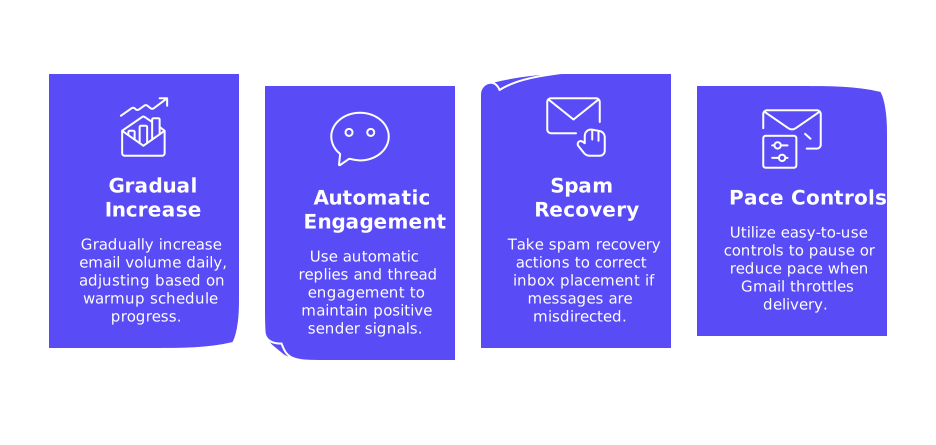
- Gradual daily increase in email volume, adjusted as per the progress in your warmup schedule.
- Automatic replies and ongoing thread engagement to maintain positive signals.
- Spam recovery actions to correct inbox placement if messages stray.
- Easy-to-use controls to pause or reduce pace when Gmail throttles delivery.
Pair the schedule above with Mailwarm’s automation to advance your reputation steadily, minimizing the risk of deliverability setbacks.
Putting it all together
Begin with proper authentication and a clean technical setup. Gradually scale up sending volume over eight weeks, focusing on steady reply rates and discussion threads. Monitor Gmail’s activity signals closely, make necessary adjustments, and prioritize reputation protection above all. Once your mailbox has a stable record, carefully introduce real outreach in controlled phases.
For additional strategy and in-depth background, see our in-depth guide to email warm up. Use it as a reference throughout your warmup journey.
Need a custom warmup plan?
If your domain’s sending history is complex or you have tight schedules, consider getting tailored support. Speak with deliverability specialists who can develop custom schedules suited to your tech stack and risk profile. Start a quick conversation with mailadept and eliminate uncertainty from your process.
FAQ
Why is a warmup schedule essential for new Gmail accounts?
Without a structured warmup, Gmail may view your domain as potentially risky, leading to poor deliverability. Gradual reputation-building through controlled sending is crucial to avoid being deemed spammy.
How does a warmup plan differ from regular email marketing?
Email warmup focuses solely on technical credibility rather than marketing. The priority is generating trustworthy signals instead of customer engagement or sales.
What risks arise from skipping proper authentication setups like SPF, DKIM, and DMARC?
Skipping authentication steps can lead to your emails being flagged as spam, regardless of content. This oversight can severely damage your sender reputation before it even starts.
Can I accelerate the warmup process if my domain already has a good reputation?
While a good reputation helps, accelerating too quickly can still trigger Gmail's defenses. Consistency and monitoring should trump eagerness to maintain healthy delivery rates.
Why avoid using attachments, images, or tracking during the warmup phase?
Attachments and tracking links can signal spam-like behavior, reducing trust. Keeping it simple ensures your emails aren't prematurely labeled as promotional threats.
What should I do if Gmail begins deferring my emails?
Deferrals are a clear warning from Gmail, advising immediate reduction in sending volume. Ignoring these signals can escalate to blocks, making recovery much tougher.
Is there a role for automation tools like Mailwarm in the warmup process?
Automation tools can streamline time-consuming tasks, ensuring stable, positive interactions without human error. Yet, blindly relying on them without monitoring can lead to unforeseen issues if Gmail flags abnormalities.
How does Gmail determine your sending reputation?
Gmail analyzes multiple factors, including recipient interactions, complaint rates, and email authenticity. Building a good reputation requires maintaining positive engagement levels consistently over time.