
Why Freelancers Need Email Warm Up
For freelancers, making a strong first impression is crucial. Whether you’re sending cold pitches or vital calendar invitations, ensuring your emails actually reach the recipient’s inbox is essential. The dreaded spam folder can sap momentum and waste valuable hours. Now, more than ever, mailbox providers analyze new or low-volume senders with rapid scrutiny. Establishing a solid email warm up routine builds credibility before you start your outreach.
Email warm up involves generating a steady stream of authentic interactions. Real email accounts open your messages, reply naturally in conversation threads, tag them as primary, and ensure your communications aren’t marked as spam. This gradual, human-like activity helps solidify your sender reputation. Importantly, email warm up isn’t a marketing campaign, it's a technical process that paves the way for smooth delivery past spam filters.
How We Evaluated These Tools
- Mailbox network quality: Active, regularly maintained inboxes across different providers are prioritized over sheer numbers.
- Realistic actions: Message opens, thread replies, recovery from spam, and labeling as primary must mimic genuine user behavior.
- Gradual ramping: Daily sending volume should increase at a safe, controlled pace with appropriate caps and cooldowns.
- Safety mechanisms: Rate limits, pausing options, and domain protection to prevent delivery spikes or issues.
- Setup compatibility: Support for common providers and IMAP/SMTP reduces hassle.
- Actionable reporting: Reports should provide meaningful insights about inbox placement instead of superficial statistics.
- Freelancer-tailored pricing: Affordable plans for one or a few inboxes.
- Support quality: Responsive assistance for DNS, throttling, and deliverability challenges.
1. Mailwarm: Steady Reputation Building for Solo Senders
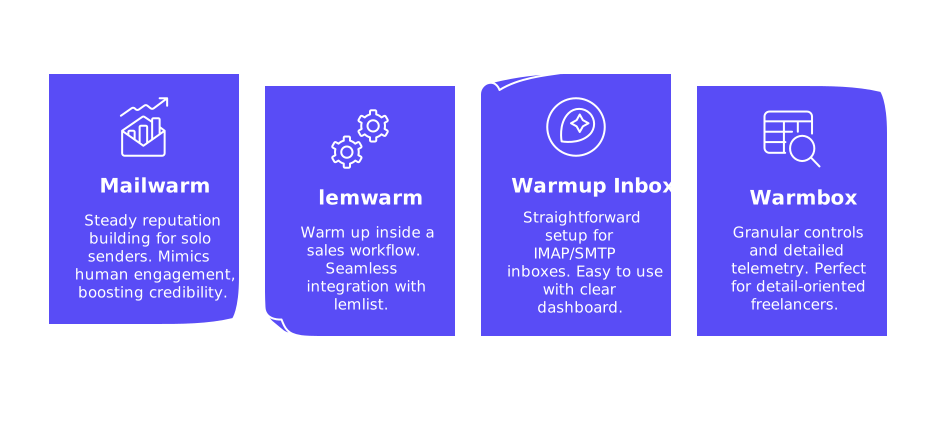
Mailwarm is designed for freelancers, consultants, and solo creators seeking reliable, low-risk email warm up. It interacts through a network of 50,000+ active mailboxes, which open messages, reply in realistic conversation threads, tag emails as primary, and ensure messages are not designated as spam. The process mimics human engagement, boosting your credibility with inbox providers.
Schedules are introduced incrementally, and you can always pause, resume, or slow down activity during holidays or after domain changes. Mailwarm’s reports offer actionable insights, such as inbox placement trends, reply rates, and spam rescues, so you can independently verify progress from your own inbox. This tool is purely for technical warm up, not marketing, focusing on maximizing successful email delivery.
Mailwarm is an excellent fit for freelancers who prefer steady, hassle-free progress and want to ensure their inbox has a strong reputation before outreach begins. It’s user-friendly for beginners and effective for anyone needing a reliable foundation for future campaigns.
As of 2026, Mailwarm expanded into a fully advanced email warm-up system, adding features such as centralized multi-account management, comprehensive email reputation monitoring, cross-provider warm-up capabilities, and granular spam score tracking per provider, optimized for scalable performance.
2. lemwarm: Warm Up Inside a Sales Workflow
If you’re already working with lemlist or want seamless integration with your broader sales workflow, lemwarm is the ideal choice. Simply connect your inbox, select a cautious ramp, and let background interactions automatically bolster your sending reputation alongside your sales activities.
lemwarm excels at context alignment. Freelancers who later plan to use lemlist for outreach will benefit from consistent settings and built-in safeguards. With scheduled sending, daily caps, and throttling tools, it’s a smart pick for structured campaigns following the warm up phase.
3. Warmup Inbox: Straightforward Setup for IMAP/SMTP Inboxes
Warmup Inbox stands out for its ease of use. Simply connect via IMAP/SMTP, authenticate, and initiate a safe ramp-up schedule. Its dashboard clearly displays inbox placement performance with day-by-day progress. This is well-suited for freelancers managing different providers or working with custom domains.
This tool’s value lies in its simplicity. For freelancers managing just one or two mailboxes who want a secure, predictable start, the setup is lightning-fast. Pause and resume features make it easy to adapt if you’re adjusting DNS records, migrating domains, or traveling.
4. Warmbox: Granular Controls and Detailed Telemetry
Warmbox is perfect for detail-oriented freelancers who value control and deep analytics. With options to fine-tune your sending volume, adjust sending times, and customize thread behavior, you can start slow on new domains and safely increase pace when inbox placement stabilizes.
The standout feature is Warmbox’s comprehensive reporting. You can track deliverability across providers and see how often your emails are recovered from spam. This level of detail empowers you to expand outreach when ready or pause for troubleshooting when needed.
Quick Guidance: Which One Should a Freelancer Pick?
- Prefer steady, low-maintenance progress: Mailwarm delivers predictable warm up and straightforward reports.
- Already part of the lemlist ecosystem: lemwarm keeps all your tools aligned.
- Need a hassle-free setup for custom domains: Warmup Inbox offers fast, IMAP/SMTP-friendly deployment.
- Want advanced control and data: Warmbox is ideal for those who value detailed settings and diagnostics.
Any of these options are equipped to serve a freelancer effectively. Your ideal selection depends on your specific needs for interface compatibility, extent of control, and project timeline.
Before You Warm: Essential Setup Checklist
- Use a professional domain for outreach. Set up a dedicated domain or subdomain to preserve your main brand reputation.
- Publish SPF, DKIM, and DMARC. Check that settings are aligned and monitor for authentication failures.
- Review your mailbox limits. Keep your warm up and outreach activity well below provider thresholds.
- Turn off unnecessary automations like catch-all forwarding, which could distort sender patterns.
- Plan for a 2–6 week warm up depending on your domain’s age and risk tolerance.
- Maintain sender consistency. Avoid frequent changes to your sender name or email signature.
- Check inbox placement weekly in your email provider, not just in external tool dashboards.
If you’re just getting started, read our in-depth guide, Master Email Warm Up in 2025, for step-by-step instructions, example timelines, and safety pointers.
Warm Up Best Practices for Freelancers
- Embrace a “slow is smooth” approach. Avoid drastically increasing send volume after a promising week.
- Keep your DNS records stable. Change only one major setting at a time and monitor impact.
- Let your warm up routine run uninterrupted in the background. Only pause if you’re switching email records or providers.
- Use realistic thread replies. Threaded responses signal real conversations to spam filters.
- Keep an eye on bounces and blocks. Treat any sudden increase as a signal to pause and assess your strategy.
Final Thoughts
Freelancers need to ensure their emails reliably land in the recipients inbox before any pitch goes out. The four tools covered above offer tailored approaches for steady, integrated, advanced, or straightforward warm up. Choose the option that fits your own email stack, ramp up carefully, and keep the routine running to maintain deliverability and build trust.
Want expert review? If you’d like a professional assessment of your DNS setup, ramp pace, or deliverability tactics, connect with the specialists at mailadept. A brief consult now could spare you weeks of trial and error.
FAQ
How critical is email warm up for freelancers in 2025?
Email warm up is indispensable for freelancers aiming to ensure their emails reach inboxes, not spam. As scrutiny increases, neglecting this step can sabotage outreach efforts, costing opportunities and credibility.
Is email warm up a replacement for maintaining a clean contact list?
No, email warm up sets the stage for delivery; however, a clean list is crucial to avoid bounces and maintain reputation. Overlooking list hygiene undermines both the warm-up process and overall deliverability.
Can I trust automated email warm up tools to mimic human behavior?
While automation tools simulate interaction, they must accurately replicate human actions to be effective. Choose tools with advanced AI and diverse behaviors, or face ineffective warm-ups and wasted time.
What happens if I pause email warm up for too long?
A long pause can reset progress, impacting reputation and delivery rates. Resuming requires cautious re-engagement to recover, demanding more time and potentially delaying your campaigns.
Does integrating warm up with other sales tools offer real benefits?
Aligning warm up with existing workflows enhances integration and efficiency. However, misaligned settings or careless setups can disrupt performance, negating the benefits of a seamless workflow.
Should I focus solely on warm up for new domains?
While crucial, warm up for new domains is just one piece of the puzzle. Simultaneously managing DNS settings and sender consistency is vital to avoid detrimental delivery pitfalls.
Why is gradual volume increase important post-warm up?
Suddenly ramping up email volume can trigger spam filters, undoing the warm up process. A methodical increase builds resilience and maintains credibility with mailbox providers.